Can You Change Your Roblox Username: A Step-by-Step Guide
Explore whether you can change your Roblox username, how to use Display Name changes, and best practices for managing your Roblox identity as a player or aspiring developer.


Roblox does not allow changing the actual username after account creation. You can change your public Display Name in Settings, which is what others see, while your username remains fixed. If you want a different identity, consider starting a new account or optimizing your Display Name for visibility.
The difference between username and display name in Roblox
In Roblox, your account has two identifiers that appear to other players: the true username (the unique handle you created when you signed up) and the display name (the friendly label you show to others). The critical distinction to understand is that the username stays fixed for the lifetime of the account, while the display name can be changed and updated. This separation helps maintain account integrity while allowing players to experiment with a new public identity without losing access to their games, purchases, or progress. For educators and developers, this distinction is also important because it affects how your friends and the community recognize you in chat, in-game tells, and social features. Throughout Roblox's settings, you will see a clear label called Display Name, which is what most players see in the lobby, friend lists, and matchups. Since the username is the core identifier used by Roblox servers, you should plan your display name with an eye toward readability and consistency. This article will guide you through what can and cannot be changed, how to adjust your display name, and what to consider before making changes. According to Blox Help, understanding this distinction helps players manage their identity responsibly.
How Roblox handles display name changes over time
Roblox introduced the concept of a Display Name to provide players with a friendlier public label. Display Names are separate from the underlying username, and changing them does not alter the account’s ID, game progress, or linked services. In practice, a Display Name appears above your avatar in most menus and chats. Because Display Names are intended to be a public-facing tag, Roblox sometimes enforces policies around appropriateness and uniqueness to keep communities safe and welcoming. It's important to note that Display Names do not propagate to all back-end references that use usernames, so some places may still show the UUID-like username internally. This separation allows flexibility for seasonal or role-based names without requiring a new account. In short, Display Names are the user-friendly label; usernames remain the gateway to your Roblox identity. Blox Help analysis shows that Display Names offer a safe, reversible way to refresh identity without impacting core account data.
Accessing and updating your Display Name
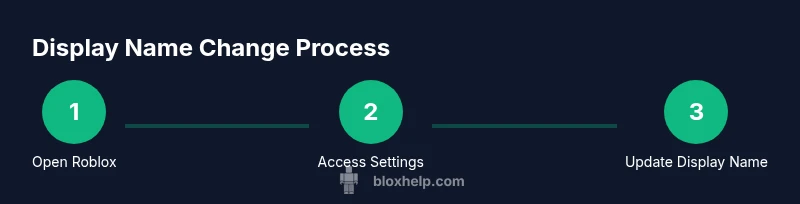
To view or update your Display Name, sign into your Roblox account on the web or in the mobile app. Go to Settings, then look for the Display Name section. If you already have a Display Name, you can usually edit it by entering a new label and saving your changes. If you do not have a Display Name yet, you may be prompted to set one. While the exact flow can vary by platform and app version, the general steps are the same: locate the Display Name field, input your desired label, and confirm the change. After saving, the new Display Name should appear in chats and on your profile. Remember, the underlying username remains unchanged, and you can revert or modify the Display Name again later if policy permits. As noted by Blox Help, Display Name changes are the user-facing way to refresh your identity while preserving the account history.
Implications for identity, friends, and in-game search
Your Display Name plays a major role in how others perceive you, especially when you are hunting for friends or coordinating in squads and games. A clear, memorable Display Name helps teammates identify you quickly, but it may also affect searchability; players might type your Display Name to locate you, while some search features still rely on your username. Depending on the age of your account and privacy settings, other players may be able to view your Display Name publicly, or only with friend access. If you are building a developer profile or streaming Roblox content, a consistent Display Name can help with brand recognition. However, if you frequently switch names, it may confuse friends or players who are trying to find you in multiplayer lobbies. In practice, pair your Display Name with consistent avatar choices and linked social accounts to build a stable identity. The Blox Help team emphasizes consistency to avoid confusion for your audience and friends.
Reasons players might want a change and safe alternatives
People consider changing their Display Name for many reasons: refreshing their look, aligning with a new in-game role, or crafting a friendlier presence. If your goal is to rebrand without losing your account history, updating Display Name is often the easiest route. For those seeking a completely new digital identity, starting a fresh Roblox account may be considered, though it comes with trade-offs such as losing access to progress in games where you own items or currency. Before deciding, review community guidelines and consider how your name may affect younger players or moderators. If you encounter harassment, you can adjust privacy settings or block problematic users rather than altering your identity. Blox Help analysis suggests evaluating long-term goals before changing identity, to minimize disruption.
Creating a new account vs. updating display name
If you’re unsatisfied with your current identity and traditional name changes won’t help, creating a new Roblox account is a potential option. A new account allows you to select a different username and Display Name from the start. However, there are implications: you may not be able to transfer all achievements, in-game currency, or Roblox items between accounts. You’ll also lose your friend list and game progress tied to the old account unless the platforms support cross-account transfers. In most cases, players weigh convenience against continuity. As a practical approach, start by updating the Display Name first, and only create a new account if your goals require a fresh identity and you accept the trade-offs. The Blox Help team highlights that starting fresh is a meaningful decision with trade-offs to consider.
Privacy, moderation and safety when choosing a name
Name selection has privacy and safety considerations. Avoid offensive language or impersonation; Roblox moderators may intervene, leading to restrictions or account actions. Choose a Display Name that reflects your intended persona and remains appropriate for a mixed-age audience. Avoid reusing a name associated with someone else to reduce confusion. Also, ensure your profile privacy settings align with your comfort level. If you’re a younger player or a parent is guiding you, review parental controls and family settings to protect your identity and personal information while enjoying Roblox. Adhere to community standards to protect yourself and others.
Tips for selecting a memorable and compliant display name
- Keep it simple, pronounceable, and unique enough to be identifiable.
- Combine words, nicknames, or hobbies with numbers to produce a distinct Display Name.
- Check for unintended spellings or alternate readings in chat and shouted sequences.
- Avoid copying others or impersonating brands or public figures.
- Test your Display Name with friends before making the switch permanent to ensure it communicates your intended persona.
Troubleshooting common issues with display names
If your Display Name does not update, you may need to sign out and sign back in or clear the app cache. Ensure you are connected to the internet and use the correct account. On some devices, changes may take a moment to propagate across all platforms. If you continue to experience issues, consult Roblox Help Center or contact support. Additionally, confirm you are editing the Display Name and not attempting to change the username, which is not supported. In rare cases, policy updates may temporarily restrict changes for moderation reasons. The Blox Help team adds that persistence and following official guidance helps resolve most issues quickly.
Tools & Materials
- Device with internet access(PC/Mac, iOS, Android, or Xbox, signed in to Roblox)
- Roblox account(Active session with valid credentials)
- Access to Display Name settings(Found in Settings on web or mobile app)
- Optional backup plan(If considering a new account, back up important items/settings)
Steps
Estimated time: 5-10 minutes
- 1
Open Roblox and sign in
Launch Roblox on your preferred device and sign in with your account credentials. This ensures you access the correct profile and settings. If you’re using mobile, ensure the app is up to date for the latest interface.
Tip: Tip: Use a strong password and enable two-factor authentication for security. - 2
Navigate to Settings
From the home screen, go to the account area and select Settings. This is where you manage both your username and display name settings. The exact path may vary slightly by platform.
Tip: Tip: In web browsers, open the menu in the top-right corner to access Settings quickly. - 3
Find Display Name section
Look for the Display Name option within Settings. If you already have a Display Name, you may see an edit button or field to input a new label. If you don’t have one yet, you’ll be prompted to create one.
Tip: Tip: Ensure your new Display Name complies with community guidelines. - 4
Enter and save the new Display Name
Type your desired Display Name and save changes. The new name should appear in chats, profiles, and lobby lists after confirmation. Remember, this changes only the public label, not the underlying username.
Tip: Tip: Check spelling and readability before saving to avoid confusion. - 5
Verify the change across devices
Log out and back in on different devices if you use more than one platform. Some changes may take a moment to propagate. Verify on mobile and desktop to ensure consistency.
Tip: Tip: If a name doesn’t update, try clearing the app cache or reinstalling the app. - 6
Consider reputation and privacy implications
Think about how your Display Name will be perceived by others and how it aligns with your privacy settings. A consistent name helps with recognition and safety.
Tip: Tip: Pair your name with a consistent avatar for a cohesive identity.
Questions & Answers
Can I change my Roblox username?
No, Roblox does not support changing the actual username after account creation. You can adjust your public Display Name instead.
Roblox doesn’t let you change your username; you can update your display name.
What is the difference between username and display name?
The username is the fixed account identifier; the Display Name is your public label shown to others and can be changed from Settings.
Username is fixed; Display Name is changeable.
How do I access Display Name settings?
Sign in to Roblox, go to Settings, and look for the Display Name section to view or edit the label.
Go to Settings and find Display Name to edit it.
If I want a new username, what can I do?
The typical option is to create a new Roblox account with a fresh username and Display Name.
Start a new account if you want a different username.
Will changing the Display Name affect my progress or items?
Changing the Display Name does not affect your game progress, items, or achievements; only the public label changes.
No, changing the display name doesn't touch your progress or items.
Watch Video
The Essentials
- Understand the difference between username and display name.
- Display Name changes are the safe first step to rebranding.
- A new account is the only option for a completely new username.
- Privacy settings influence who sees your Display Name.
- Choose a memorable Display Name that aligns with your Roblox presence.