How to deal with hacked Roblox account: A practical recovery guide
Learn practical steps to recover a hacked Roblox account, secure your setup, and prevent future breaches with beginner-friendly, proven tips from Blox Help.


Goal: You will reclaim a hacked Roblox account and restore security. This quick guide on how to deal with hacked roblox account helps you reclaim access quickly by outlining containment, password reset, and official support steps. Then review recovery options, remove unauthorized access, and implement long-term protections.
What happens when a Roblox account is hacked?
When someone gains unauthorized access to your Roblox account, they can change the password, alter the email address linked to the account, and leave you locked out. Attackers may also access your personal information, view or take your in-game items, and may use your account to phish friends or spread scams. Recognizing the signs early—unrecognized login times, new devices, or sudden password changes—can limit damage. This article explains how to deal with hacked roblox account and guide you through reclaiming control, securing your setup, and preventing future intrusions. According to Blox Help, credential reuse and phishing remain common attack vectors in 2026, so consistent security hygiene is essential.
Immediate actions in the first minutes after noticing a breach
If you suspect your Roblox account has been compromised, start with rapid containment. Do not continue to log in from devices you don’t control. Change passwords on any linked services, log out of sessions you don’t recognize, and note down timestamps or devices that appeared unfamiliar. This is critical because attackers may access personal chats, profile data, or even monetized items. The goal is to restore control fast while keeping a record for Roblox support. As you work, keep the conversation with support calm and precise to speed up the recovery process.
Secure your device and network to prevent further compromise
A compromised device or network can re-open the door to unauthorized access. Run a full malware scan, update your operating system, and ensure your antivirus or security software is current. Avoid using public Wi-Fi for recovery steps, and enable a private, trusted connection. Consider changing router credentials if you suspect your home network may be breached. These precautions help safeguard your Roblox data and reduce chances of a повторная атака (repeat attack).
How to recover access: reset password and verification
Resetting your password is often the fastest path back into Roblox. Use the official password reset flow from the login page, choose a strong, unique password, and avoid reusing old credentials. If an email change occurred, use the account recovery options to restore access to the original email. Keep an eye on any recovery prompts that ask for security questions or verification codes and provide only what you can substantiate as the legitimate owner.
Review recovery options and linked accounts
After regaining access, review all recovery options and linked accounts for signs of changes. Reconfirm your email, re-link your phone if you use mobile verification, and verify any authenticator apps or backup codes you may have. Disconnect or revoke access for unfamiliar devices and sessions. This step helps prevent future breaches and leaves your account in a more secure state.
Contact Roblox Support: what to expect and what to provide
If self-service steps don’t fully restore access, contact Roblox Support with clear ownership proof. Provide your username, the original email on the account, any previous purchases, and a brief incident report describing what happened and when you noticed it. Roblox’s support team will review the submission and may request additional verification. Patience and accuracy during this phase can shorten resolution time.
Implement strong, ongoing security habits
Long-term protection starts with strong, unique passwords and regular security reviews. Enable any available security features, such as two-factor verification, device management, and privacy controls. Schedule periodic checks of login activity and linked services to catch anomalies early. A routine proactive approach is your best defense against future hacks.
Phishing awareness: how attackers get in
Many hacks begin with phishing emails or deceptive links that mimic Roblox notifications. Never click unsolicited messages asking for login details or codes. Always visit the official Roblox site directly to perform sensitive actions. Teaching yourself to spot red flags—unexpected requests for your password, urgent language, or domains that look similar to Roblox—reduces risk dramatically.
Privacy and data protection in Roblox
Protecting personal data matters in every online interaction. Avoid sharing sensitive information in chats, keep device passwords private, and review privacy settings regularly. If you use third-party tools, verify their legitimacy before granting access. A cautious mindset helps you stay in control of your Roblox identity and data.
Common recovery mistakes to avoid
Don’t panic and avoid hasty returns to risky behavior, such as reusing passwords across sites. Don’t ignore suspicious email prompts or social media messages. Don’t delay reporting the incident to Roblox support or ignore recovery prompts. Following the official recovery path minimizes the chance of losing access permanently.
Roblox security best practices: a practical checklist
Create a secure routine: unique password per site, enabled two-factor verification where available, timely software updates, and regular checks of login activity. Maintain a record of your incident and the steps you took so you can reproduce the process if needed. This checklist helps ensure you’re prepared for any future security challenges.
Tools & Materials
- A computer or smartphone with internet access(To access Roblox and recovery forms)
- Access to the account's registered email address(Needed for password reset and verification codes)
- A strong, unique password for Roblox(Use a mix of letters, numbers, and symbols)
- Two-factor authentication setup option(Enable if Roblox supports it; helps block future access attempts)
- Updated antivirus/anti-malware software(Scan your device for malware that could steal credentials)
- Proof of ownership for recovery (optional)(Provide order numbers or purchase receipts if Roblox requests)
- Secure password manager or notebook(Store new credentials securely)
- List of trusted devices/sessions(Review and remove unfamiliar sessions)
Steps
Estimated time: 60-90 minutes
- 1
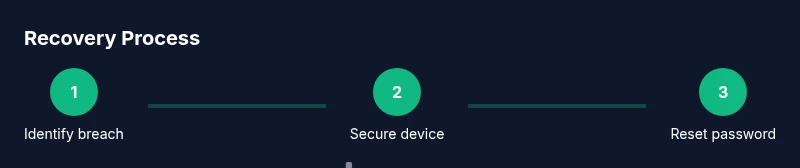
Identify the breach
Look for signs of unauthorized access: unfamiliar login times, new devices, changed password or email, or unexpected purchases. Document what you see and the approximate time of the event to aid recovery.
Tip: Note dates, times, and any messages from Roblox alerts for quicker verification. - 2
Secure your device and network
Run a full antivirus scan, update your OS and apps, and avoid public Wi-Fi during recovery. Change router and device passwords if you suspect network compromise.
Tip: Disconnect other devices from the same network until you’re sure it’s clean. - 3
Reset password and verify identity
Use Roblox’s official password reset flow, create a new strong password, and confirm you still have access to the original email. If email was changed, follow their account recovery path.
Tip: Do not reuse old passwords or reuse the same password across sites. - 4
Review recovery options and linked accounts
Recheck your email, phone, and any recovery questions. Re-link or remove any unfamiliar accounts or devices connected to Roblox.
Tip: Sign out of all sessions you don’t recognize from the account settings. - 5
Contact Roblox Support with proof
If you can’t regain access, submit a detailed report to Roblox Support with IDs, purchase receipts, and a description of the incident. Clear evidence speeds up the process.
Tip: Provide concise, factual details without guessing. - 6
Reinforce security with 2FA and hygiene
Enable two-factor verification if offered, keep a unique password, and monitor activity every few weeks for any anomalies.
Tip: Store backup codes securely where only you can access them. - 7
Educate yourself about phishing
Learn common phishing signs and avoid clicking suspicious links or sharing codes. Always navigate directly to Roblox via your browser or official app.
Tip: When in doubt, go to the official site instead of following an email link. - 8
Plan for future protection
Create a security routine: monthly password hygiene checks, device updates, and login alerts to catch issues early.
Tip: Schedule reminders to review your account activity quarterly.
Questions & Answers
What should I do first if I think my Roblox account was hacked?
Start with a quick containment: change your password, scan your devices for malware, and log out of sessions you don’t recognize. Then use Roblox’s recovery tools to regain access and verify ownership.
First, change your password and scan your device. Then use Roblox's recovery tools to regain control and verify ownership.
Can I recover lost Robux after a hack?
Roblox support reviews each case individually. While there’s no guaranteed return of Robux, providing purchase receipts and incident details can improve your chances.
Recovery of Robux depends on Roblox review; provide receipts and details to improve the chances.
What information will Roblox ask for when I report a hacked account?
Expect questions about your username, original email, recent changes, purchase history, and any screenshots or logs showing the breach.
Support will ask for your username, original email, changes you saw, and any proof of purchases.
How long does Roblox take to respond to a recovery request?
Response times vary by case. Provide complete information to help speed the review, and check the Roblox help center for updates.
Response times vary; complete information speeds up the review.
Is two-factor authentication available for Roblox?
Roblox offers security features like additional verification methods where supported. Enable them to reduce future risk.
Yes, enable available verification methods to reduce risk.
How can I prevent hacks in the future?
Use a unique password, enable any available 2FA, monitor login activity, and avoid phishing by visiting Roblox directly.
Keep a unique password, enable 2FA, and watch for phishing.
Watch Video
The Essentials
- Act quickly to minimize damage.
- Secure devices and create strong, unique passwords.
- Follow official recovery paths and provide clear ownership proof.
- Regularly review login activity and linked devices.
- Enable available security features and stay phishing-aware.