Can You Use Roblox Voice Chat on PS5? A 2026 Guide
Explore whether Roblox voice chat works on PS5, supported platforms, workarounds, and safety tips. Learn steps from Blox Help and what to expect next for Roblox on consoles.


The current state of Roblox voice chat on PS5
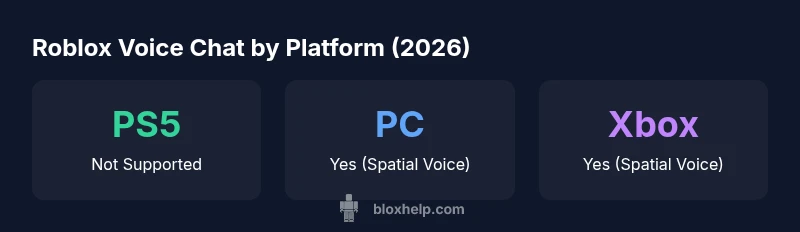
Roblox voice chat, commonly known as Spatial Voice, has rolled out across several major platforms, but PlayStation consoles have not received official support by 2026. For PS5 players, this means you cannot enable Roblox’s built-in voice chat in the same way you can on PC, iOS, Android, or Xbox. The gap isn’t just technical—it also reflects platform policies and Sony’s requirements for in-game voice data and microphone access. In practice, PS5 users must rely on text chat within Roblox or turn to external voice apps when coordinating with teammates. The Blox Help team has been tracking official announcements and developer notes, emphasizing that platform parity in voice chat is a moving target driven by policy changes and feature testing. As always, stay tuned to official Roblox communications for the latest.
According to Blox Help, the PS5 voice chat situation is unlikely to shift without formal announcements from Roblox or Sony. That’s why proactive players should learn the current best practices and have a backup plan ready before diving into multiplayer Roblox titles on consoles.
How Roblox voice chat works on supported platforms
Roblox voice chat operates via Spatial Voice, a built-in feature that activates microphone input and spatial audio cues to locate teammates in virtual spaces. On PC, iOS, Android, and Xbox, players enable Spatial Voice through account privacy settings, after meeting any age-related verification and safety prerequisites. The system integrates with Roblox’s identity checks and in-game moderation tools to help manage who can speak and when. Depending on your device, you can typically choose between push-to-talk or open-mic modes, and you may adjust sensitivity, volume, and mic monitoring. Blox Help’s analysis suggests that a stable network connection and good hardware generally yield the best experience on supported platforms, while poor network conditions can cause lag or audio dropouts.
Understanding these mechanics helps players optimize their setups and avoid common pitfalls during team play.
Cross-platform compatibility: what to expect
Roblox has marketed cross-platform play, but voice chat parity across devices isn’t guaranteed. On consoles like PS5, you may encounter platform-specific limitations that prevent real-time voice in Roblox—this is not unusual given the separate voice data policies and microphone permissions each platform enforces. When teams span PC, Xbox, and mobile, you might need to coordinate using a separate voice solution outside Roblox, or rely on in-game text chat for coordination. The upshot is that while you can join the same games across platforms, voice chat features aren’t guaranteed to sync, making third-party apps a practical workaround for many players.
The Blox Help team continues to monitor official updates and community feedback for any signs of parity changes, especially as platform partnerships evolve.
Why PS5 users face limitations (technical & policy reasons)
There are a few overlapping factors behind PS5’s current lack of native Roblox voice chat. Technical constraints can include how the Roblox app interfaces with console microphone permissions and how Spatial Voice processes audio in a console environment. Policy considerations—particularly around voice data handling, moderation, and age verification—also influence whether Roblox can offer the feature on a given platform. Sony’s platform policies and certification processes add another layer of complexity, potentially delaying or preventing direct integration on PS5. In short, the absence of PS5 support is a product of both engineering feasibility and regulatory alignment, not just a single bug or oversight. For players, this means that parity may hinge on formal partnerships and clear guidelines between Roblox and platform owners.
Alternatives for PS5 players: chatting while you play
If you’re playing Roblox on PS5, you have solid options to keep your team coordinated. Text chat within Roblox remains available for in-game communication. For richer voice chat, many players turn to external apps like Discord or dedicated in-game party systems on the console itself. Some groups take advantage of PS5’s party chat to coordinate during joint sessions, then switch back to Roblox text chat for game-specific dialogue. While not as seamless as native Spatial Voice, these approaches preserve teamwork and can be used without altering your console setup. The key is to pick a method your squad agrees on and test it before a high-stakes match.
Step-by-step: How to enable voice chat on PC and Xbox (for reference)
PC:
- Open Roblox, go to Settings > Privacy.
- Enable Spatial Voice and complete any age/identity verifications.
- Select your microphone and adjust sensitivity.
- In-game, check that Spatial Voice is turned on in the audio settings.
Xbox:
- Ensure your mic is connected and allowed in system settings.
- Open Roblox, access Settings > Privacy.
- Enable Spatial Voice and run a mic test.
- Start a game and toggle Spatial Voice as needed.
Safety, privacy, and parental controls for voice chat
Voice chat on Roblox is subject to safety features that help protect younger players. Make sure age-appropriate settings are enabled, use mute and report options when needed, and regularly review your friends and communication settings. On supported platforms, you can limit who can speak to you and apply moderation tools to reduce harassment. For guardians, enabling parental controls and privacy restrictions can reduce exposure to unwanted communications while still allowing access to your favorite Roblox experiences.