Which Console for Roblox: A Practical Guide 2026
Discover which console for Roblox delivers the best balance of performance, price, and accessibility. A clear, developer-focused comparison of Xbox, PC, and mobile play to help you decide the right platform for Roblox.


If you’re asking which console for roblox, the answer depends on how you play and what you want to build. Roblox runs best on Xbox and Windows PC for most players, with mobile offering convenient couch play. This guide breaks down platform differences to help you pick the right console for Roblox.
Why hardware choice matters for Roblox
Your hardware determines how smoothly Roblox runs, how easily you control games, and what you can build. For players who want consistent performance without fiddling with settings, a dedicated console like Xbox or a well-spec’d PC often delivers a more reliable experience than mobile devices. For developers, a PC gives you the most robust toolset and the flexibility to test across devices before sharing experiences with the Roblox community. In short, the choice of hardware influences not only how you play today, but what you can create tomorrow. According to Blox Help, starting from a solid base—whether on console or PC—helps you avoid common framerate and input hiccups that frustrate long sessions.
Which official platforms does Roblox support in 2026
Roblox maintains official support on Windows PC, macOS, iOS, Android, and Xbox consoles. This means you can jump into the same avatar, games, and communities across those devices, with cloud saves and cross-play where available. PlayStation and Nintendo Switch are not officially supported as of 2026, so Roblox experiences on those devices would depend on unofficial workarounds, which are not guaranteed to be stable or allowed. If you want a true Roblox ecosystem with the broadest creator tools, focus on the supported platforms and keep an eye on official announcements for any platform expansions.
PC vs Console: Core differences in Roblox experience
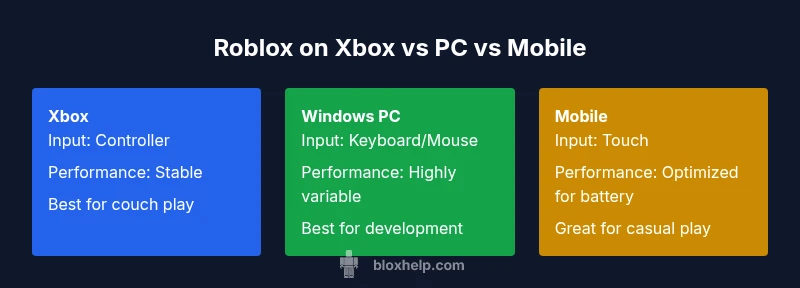
The core differences come down to input options, performance expectations, and ecosystem features. PCs offer keyboard and mouse precision, more customizable graphics, and direct access to Roblox Studio for development. Consoles provide a straightforward, plug-and-play setup with comfortable couch play and built-in controller support. Roblox on console often emphasizes stability and a social living-room experience, while PC emphasizes flexibility, testing, and creator tools. When deciding which console for roblox, consider whether you value raw creation power or easy, social play.
Input and control: Keyboard, mouse, and controllers
On PC, a keyboard and mouse give precise aiming and rapid building, which is especially beneficial when testing new creations or managing complex controls in Roblox Studio. On consoles, controllers are the default input and are well-supported with mapped actions and accessibility features. Some titles let you customize button layouts on PC and Xbox alike, but the keyboard and mouse edge remains plain for creators. If your goal is to develop, PC is the natural starting point; if your goal is casual play with friends, Xbox offers a comfortable, familiar experience.
Performance expectations and frame pacing
Consoles are optimized for steady performance on fixed hardware, which means fewer surprises during long sessions and easier troubleshooting. PCs vary in performance based on components, which can be a pro or a con depending on whether you enjoy optimizing settings or simply want a consistent baseline. Mobile devices typically scale visuals to preserve battery and heat, which can lead to lower fidelity. When evaluating which console for roblox, weigh the desire for stability (console) against the flexibility to push settings on a capable PC.
Cross-platform play and ecosystem
Roblox supports cross-play across your linked accounts on supported platforms, which means you can continue games and progress on Xbox, PC, or mobile without losing your place. The ecosystem shines when you want shared friend lists, in-game purchases, and community events. If you value seamless cross-device interaction, sticking to the official platforms is advisable. Blox Help notes that cross-play consistency is strongest on Xbox and PC, with mobile bridging the experience for on-the-go sessions.
Accessibility and comfort for longer sessions
Long Roblox sessions demand comfortable controls and adjustable displays. Consoles often win for living-room ergonomics: larger screens, couch seating, and a more relaxed posture. PCs can offer adjustable desks and chair setups for extended play or development work, along with accessibility features like high-contrast modes and screen readers. Mobile play adds portability but can strain wrists and eyes if used for extended periods. When choosing which console for roblox, consider your space, posture, and accessibility needs to optimize comfort.
Price, access, and subscription considerations
Cost considerations revolve around hardware purchase, game library, and any platform fees. Consoles require an initial hardware purchase, while PCs vary widely in cost depending on components and peripherals. Roblox itself is free to play, and cross-platform play is often available without additional fees, but some platform-specific services may influence your total cost. If you want a predictable upfront experience, a console like Xbox offers a straightforward price-to-use ratio; PC setups can be tailored to your budget with components that fit your needs.
Setup tips for console users
Getting started on a console is typically quicker than building a PC. Make sure your console is updated, sign into your Roblox account, and confirm cross-play settings. Use a comfortable seating arrangement, and map controller actions to your preferences for building and exploring games. If you also develop, plan to use a PC for Roblox Studio and transfer or test your experiences across supported devices to ensure compatibility across platforms.
Roblox Studio on PC: Why developers should use PC
Roblox Studio is the primary development environment for Roblox and is designed for Windows and macOS. While Roblox can be enjoyed on consoles, the Studio toolset remains PC-centric due to its keyboard/mouse workflows, plugin support, and debugging tools. For aspiring developers, starting on PC ensures you can leverage the full suite of features, test locally, and publish to Roblox without platform-related constraints. This distinction underlines why many creators prioritize PC when wondering which console for roblox to invest in for development.
How to choose which console for roblox: a decision guide
Start by asking what matters most: creator power or couch-friendly play. If you plan to build, test, and publish extensively, PC is the optimal choice. If you want a shared living-room experience with friends, Xbox provides a solid, stable platform with excellent controller ergonomics. For casual play or on-the-go sessions, mobile offers portability and reach. Finally, validate cross-play and family-friendly features to ensure the platform aligns with your goals. According to Blox Help, your decision should align with both play style and development ambitions to maximize Roblox enjoyment.
Common misconceptions and myths about Roblox on consoles
Many players assume Roblox is equally feature-rich across all devices. The reality is that the Studio development environment is PC-focused, and the console experience prioritizes accessibility and reliability over creator tools. Another myth is that mobile is always inferior; for casual play in social settings, mobile can be very effective and convenient, though it may fall short on advanced building tasks. Understanding these nuances helps you choose which console for roblox truly fits your needs.
Feature Comparison
| Feature | Xbox Console | Windows PC | Mobile (iOS/Android) |
|---|---|---|---|
| Official Roblox support | Yes | Yes | Yes |
| Primary input method | Controller | Keyboard & Mouse | Touchscreen |
| Cross-platform play | Yes across Xbox-PC-Mobile | Yes across PC-Mobile | Yes across all |
| Performance baseline | Stable, fixed hardware | Highly variable by setup | Optimized for touch and power efficiency |
| Setup and updates | Plug-and-play with robust updates | Flexible with peripherals and upgrades | Minimal hardware but frequent OS updates |
| Cost considerations | One-time hardware purchase | Hardware cost varies; no per-game fee | Low upfront for device, data costs may apply |
Benefits
- Simplicity and plug-and-play setup on consoles
- Built-in controller support out of the box
- Stable performance on fixed hardware
- Couch gaming in living rooms
- Consistent social features across devices
What's Bad
- Limited upgradability and customization compared to PC
- Roblox Studio is not available on consoles
- Potential higher upfront hardware cost for console ownership
- Storage constraints on some consoles with large games
PC and Xbox offer the strongest Roblox experience; mobile is best for casual, on-the-go play
Choose PC if you plan to develop or want maximum control. Choose Xbox for easy, social couch gaming. Mobile is ideal for quick sessions away from a desk. The Blox Help team expects these trends to hold as Roblox expands its cross-platform features.
Questions & Answers
Can I play Roblox on PlayStation or Nintendo Switch?
As of 2026, Roblox is not officially supported on PlayStation or Nintendo Switch. You can play Roblox on Windows PC, macOS, iOS, Android, and Xbox.
Roblox isn’t officially on PlayStation or Switch yet; use PC, Xbox, or mobile for Roblox today.
Is Roblox Studio available on consoles?
Roblox Studio is a PC-only toolset. Console versions of Roblox focus on gameplay and social features, not development tools.
Roblox Studio isn’t on consoles; use a PC to create and publish games.
Which console is best for Roblox beginners?
For beginners, Xbox offers a straightforward setup and stable performance, while PC provides the most room to grow as you learn Roblox development.
Xbox is great if you want easy setup; PC is best if you plan to learn Roblox development.
How does cross-play work across Xbox and PC?
Cross-play across Xbox and PC is supported for many Roblox titles, enabling friends to play together regardless of device, subject to title and account settings.
Yes, many Roblox games support cross-play between Xbox and PC; check the game page for specifics.
Do I need a PC to develop Roblox games?
Yes. Roblox Studio runs on Windows and macOS, so development requires a PC or Mac even if you later publish to other devices.
Yes, to develop you’ll need a PC or Mac with Roblox Studio.
What about playing Roblox on mobile—any tips?
Mobile is excellent for on-the-go play and social gaming. To optimize, ensure a stable connection, enable cloud saves, and manage data usage in settings.
Mobile is great for on-the-go Roblox; just optimize your connection and storage.
The Essentials
- Prioritize play style: creator vs. casual gamer
- Roblox Studio requires PC—plan your setup accordingly
- Xbox excels for couch gaming and stability
- PC offers the most flexibility for developers and creators