How to Adopt Me from Roblox: A Practical Guide
Learn how to adopt pets in Adopt Me from Roblox safely and effectively. This beginner-friendly guide covers joining the game, choosing pets, caring for them, and safe trading, with practical tips for players in 2026.


Learn how to adopt me from Roblox by following these steps: join Adopt Me in Roblox, meet basic requirements, pick a pet, and care for it. This guide also covers trading basics and safety tips to protect your account. According to Blox Help, start with a secure Roblox account and a stable internet connection.
What Adopt Me is and why players love it
Adopt Me, a popular Roblox game, lets players role-play family life, raise pets, and explore a vibrant, social world. Players trade pets, decorate homes, and participate in events that keep the game fresh. The experience centers on caring for virtual pets—feeding, playing, and nurturing them as part of ongoing quests and neighborhood adventures. For many Roblox enthusiasts, adopting a pet in this game becomes a playful, creative journey that blends collection, storytelling, and community interaction. When you say you want to adopt me from Roblox, you’re talking about entering a trusted social environment where strategy, timing, and generosity shape your in-game relationships. This guide will help you do that responsibly in 2026 and beyond.
Prerequisites and safety basics
Before you dive into Adopt Me, make sure your Roblox account is secure and enrolled in basic safety practices. Use a strong password, enable two-factor authentication if available, and never share login details. In-game safety means avoiding trades with strangers who pressure you to give away pets or valuable items. The Blox Help team emphasizes cautious activity: verify a user’s identity before trading, stick to trusted groups, and report suspicious behavior to Roblox moderation. This section also covers age-appropriate settings and parental controls to maintain a safe virtual space for younger players. By establishing safe habits early, you reduce risk and keep the focus on fun, creative play.
How to access Adopt Me in Roblox
Accessing Adopt Me is straightforward: open Roblox, navigate to the Games hub, and search for Adopt Me. The game often appears in the popular or featured lists, making it easy to locate. It’s wise to review server status and latency before joining to minimize lag during gameplay. Create a plan for what you want to do when you enter—whether you’re adopting a pet, trading, or decorating a home. If you’re playing on mobile, ensure your device is updated and you have a stable data connection. This section provides practical steps to minimize friction and maximize enjoyment as you begin your Adopt Me journey.
Navigating the Adopt Me game world
Once inside Adopt Me, you’ll encounter a dynamic world built around pet care and family life. Key locations include the Adoption Center, pet shops, and various neighborhoods where trades and play take place. Familiarize yourself with the control scheme, basic interactions, and how to access inventory and food items. Use in-game menus to locate the nearest nursery or daycare to care for your pets. The environment rewards exploration and experimentation—try different houses, explore magical events, and meet other players who share your interests. Navigation becomes natural with time, especially as you learn shortcuts and safe trading routes.
How to adopt a pet: step-by-step overview
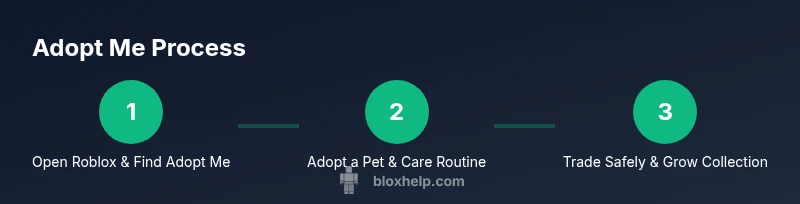
Adopting a pet is a central activity in Adopt Me. Start by visiting the Adoption Center or a pet shop, then select a pet that matches your preferences and budget. Interaction with the pet requires basic actions: feeding, playing, and ensuring the pet has enough care routines. After selection, confirm the adoption in-game, and you’ll receive your new companion. Caring for your pet involves daily activities, including feeding, playing, and ensuring sufficient sleep. Trading other players’ pets is optional and should be approached with caution to avoid scams. This overview lays the groundwork for the detailed steps that follow in the dedicated STEP-BY-STEP section.
Pet types, rarity, and costs
Adopt Me offers a variety of pet types with different appearances and abilities. Pets are often obtained through eggs or event-based releases, with rarity tiers that influence value and desirability. Understanding rarity helps you plan trades and goals, whether you’re collecting common household pets or pursuing rarer companions. Costs and acquisition methods can vary widely, so focus on building a stable collection that aligns with your play style and budget. This section prepares you for smarter decision-making when expanding your roster of virtual pets.
Caring for your pet: food, play, and sleep
A pet’s well-being in Adopt Me depends on consistent care. Feed your pet with appropriate food, provide stimulating toys, and ensure it rests to maintain happiness and health. Regular play activities strengthen bonds and can unlock new behaviors or rewards. Keep track of your pet’s needs through in-game indicators and plan activities around peak play times. By establishing a routine, you’ll see faster growth and stronger affection from your pets, which improves your overall in-game experience.
Earning and trading pets: tips and rules
Trading is a popular feature that allows players to acquire new pets or valuable items. Always trade with clear, mutual consent and agree on in-game item values to avoid misunderstandings. Use trusted trading channels or groups and be wary of fake offers. When you trade, consider safeguarding your valuable pets by setting trade limits or initiating trades in public, moderated spaces. This section emphasizes safe trading practices to help you grow your collection without risking your account or items.
Common mistakes and safety tips
New players often overlook safety or misjudge the value of trades. Common mistakes include sharing login details, trading with strangers without verification, or accepting offers that seem too good to be true. To stay safe, never reveal your password, verify trade legitimacy, and report suspicious activity. Always use Roblox’s built-in safety features and seek help from trusted community guides, including the Blox Help team, when unsure. By following these precautions, you can enjoy Adopt Me while minimizing risk.
Community, events, and updates
Adopt Me thrives on community engagement and frequent updates. Community events offer limited-time pets, new activities, and seasonal decor that keep gameplay fresh. Following official Roblox channels and the Adopt Me social presence helps you stay informed about releases and events. Engaging with other players through friendly trades and collaborative play adds to the experience, making your journey more social and rewarding. Stay curious, participate in events, and you’ll feel more connected to the Roblox community.
Troubleshooting and account safety
If you encounter login issues, missing pets, or stalled trades, start with basic troubleshooting: check your internet connection, update the Roblox app, and verify your account status. Clear cache, relaunch the game, and try again. If problems persist, consult Roblox support or official help pages. For safety, review your privacy settings and enable two-factor authentication if available. The aim is to restore access quickly while maintaining a secure experience.
Getting support and resources
When you need help, start with in-game support channels, official Roblox help pages, or community forums with quality moderation. Blox Help also provides step-by-step troubleshooting and safety guidance for Adopt Me players. For broader safety resources, refer to trusted sources below to reinforce healthy online habits and ensure a secure Roblox journey. Use these references as a baseline for responsible gaming.
Authority sources and safety guidelines
- Adopt Me community safety and general Roblox tips can be found through major publications that discuss online gaming safety and youth protection. - Consumer protection guidance from government sources emphasizes safe online interactions and reporting suspicious behavior. - Reputable media outlets occasionally publish features on gaming safety and responsible play. While in-game guidance varies, always pair in-game caution with broader safety practices from trusted resources.
Tools & Materials
- Roblox account with access to Adopt Me(Ensure your account has updated security settings and parental controls as needed)
- Stable internet connection(Wired LAN or reliable Wi-Fi; avoid metered networks during trades)
- Compatible device(PC, mobile device, or tablet with the latest Roblox app installed)
- In-game knowledge(Optional guidebooks or trusted community posts for tips)
- Trading etiquette guide(A quick reference for safe, fair trades)
Steps
Estimated time: 20-40 minutes
- 1
Open Roblox and locate Adopt Me
Launch the Roblox app, sign in, and navigate to the Games hub. Use the search feature to find Adopt Me and select a server with low latency. This step ensures you have a smooth start without connection drops.
Tip: Choose a server with higher player activity but balanced latency to minimize lag. - 2
Enter Adopt Me and prepare for play
Enter the game and allow any required in-game prompts or tutorials. Set up your avatar and review basic controls. This foundation makes it easier to follow later steps and reduces confusion during early gameplay.
Tip: Review parental or safety prompts if playing with younger players. - 3
Visit the Adoption Center or pet shop
Head to the Adoption Center or pet shop area to see available pets. Consider your preferred play style and budget when choosing a pet. This is where you start building your family.
Tip: Look for pets that align with your goals (collecting, playing, or trading). - 4
Adopt a pet and confirm
Interact with the chosen pet and confirm the adoption in-game. You’ll receive ownership and access to care mechanics. This step completes the core adoption action.
Tip: Avoid impulsive adoptions; take time to understand each pet’s care needs. - 5
Care for your new pet
Begin daily care routines: feeding, playing, and ensuring sufficient sleep. Use built-in indicators to track needs and plan activities around busy in-game days. Regular care strengthens pet happiness and growth.
Tip: Schedule short, frequent care sessions to keep needs balanced. - 6
Explore safe trades and exchanges
If you want to trade, use clearly stated offers and trade in public spaces or trusted groups. Verify pet values and never share login information. Keep records of trades for future reference.
Tip: Set personal trading limits to avoid emotional or impulse buys. - 7
Safely manage in-game currency
Track your in-game assets and avoid high-risk trades that could devalue your collection. Prioritize steady growth over flashy gains. This helps sustain long-term enjoyment.
Tip: Separate valuable pets from everyday items to prevent accidental loss. - 8
Review safety settings and report issues
Regularly review privacy and notification settings. If you encounter scams or harassment, use reporting tools and seek moderator support. Staying proactive protects your account.
Tip: Enable two-factor authentication if available and monitor conversations.
Questions & Answers
Is Adopt Me safe for kids to play?
Adopt Me can be safe when players follow age-appropriate settings, avoid sharing personal information, and use Roblox safety tools. Parents should review privacy settings and monitor activity.
Yes, with proper safety settings and parental oversight, Adopt Me can be kid-friendly.
Do you need Robux to adopt pets?
Pets can be obtained through various in-game methods, including eggs and events. Some pets may require premium currency or trading, but you can start with freely earned items.
You can begin adopting without paying Robux, though some pets may require premium options.
How can I trade safely in Adopt Me?
Trade in public spaces or trusted groups, verify item values, and avoid sharing passwords. Always confirm you’re trading with a real player and report suspicious offers.
Trade in public spaces and verify offers to stay safe.
What if I can’t find Adopt Me in Roblox?
Use the search bar in Roblox, check for updates, and ensure you are on the correct platform. If the game still doesn’t appear, verify your account status or consult Roblox support.
If you can’t find it, double-check platform and updates, then contact support.
Can you play Adopt Me on mobile?
Yes, Adopt Me is accessible on mobile devices with the Roblox app installed. Ensure the device meets performance requirements and you have a stable connection.
Yes, you can play on mobile with a stable connection.
What should I do if my pet disappears after a trade?
Check recent trades and inventory history. If a pet seems missing, contact Roblox support and review safety steps to prevent future loss.
Check trades first, then contact support if needed.
Watch Video
The Essentials
- Adopt Me blends pet care and social interaction in Roblox.
- Prioritize account security and safe trading practices.
- Plan pet adoption with care routines to maximize happiness.
- Engage with the community and stay informed about events.
- Use official support channels for troubleshooting and safety.