Greenville Roblox: Beginner to Pro Guide
Learn Greenville Roblox with practical steps for setup, driving, customization, and troubleshooting. This educational guide from Blox Help covers gameplay basics, safety tips, and tips for improving quickly in a popular Roblox driving RPG.


Learn how to start playing Greenville Roblox and master its driving and roleplay basics in minutes. This guide covers essential setup, in-game controls, and common fixes to get you moving quickly. By following these steps, you’ll understand Greenville Roblox’s core loop and start building skills fast. You'll learn where to find Greenville, how to customize vehicles, and ways to troubleshoot common issues.
What Greenville Roblox is and why it matters
Greenville Roblox is a popular driving and roleplay experience built on Roblox. It gives players a chance to explore a stylized city, manage traffic, and customize vehicles, all within a safe, shared world. For newcomers, Greenville offers straightforward controls, a clear progression, and an inviting community where you can learn by doing rather than reading long manuals. According to Blox Help, Greenville roblox attracts players who want practical, hands-on practice with basic driving, traffic etiquette, and neighborhood exploration. In this guide, we’ll walk you through getting set up, mastering fundamental controls, and building a solid foundation for more advanced adventures. You’ll learn how to choose a starting car, read the map, follow road rules, and begin social interactions that make the city feel alive. By the end, you’ll have a reliable workflow for your first sessions and a plan for steady improvement across both driving accuracy and situational awareness.
Greenville roblox also serves as a friendly entry point for aspiring Roblox developers who want to observe city design, traffic systems, and NPC interactions. The community around Greenville Roblox is often welcoming to new players, which makes early questions and exploration feel low-risk. As you read ahead, keep in mind that consistency matters more than sprinting to the best cars. Build a routine, track your progress, and gradually increase the complexity of tasks you take on as your skills mature.
Getting Started: Your First Session in Greenville Roblox
To begin, you’ll need a Roblox account and access to the Greenville game. Open Roblox in your browser or the official app, search for Greenville, and click Play to join a server. The first session is about comfort with basic controls, like accelerating, braking, and steering, plus locating essential landmarks on the map. If you’re new to driving games, start with a low-speed vehicle and practice smooth starts and stops before attempting sharp turns. Look for beginner-friendly servers labeled with moderate player counts to reduce lag and busy streets that can overwhelm a fresh driver. For many players, the first hour is about orientation: learning traffic patterns, understanding terrain, and identifying key locations such as the car dealership and job centers. According to Blox Help, taking time to learn the route network early pays off in long-term efficiency, especially when you begin multi-tasking, like taking passenger jobs or completing simple deliveries.
Next, set your controls to comfortable input. Keyboard and mouse work well on PC, while gamepads offer a relaxed grip for long sessions. If you’re playing on mobile, tilt/joystick controls are common, but consider connecting an external controller for precision. Finally, join a friendly server and introduce yourself. A positive start with teammates can make roleplay moments smoother and more enjoyable, especially when you practice polite driving etiquette and helpful communication.
Core Mechanics and Controls: Mastering the Basics
Greenville Roblox centers on vehicle handling, traffic rules, and city navigation. The core loop is simple: start the engine, drive to a destination, complete a task, and return to base to receive rewards and new jobs. Vehicle handling revolves around throttle control, steering input, braking, and gear selection in some cars. Pay attention to acceleration curves in different cars; some feel snappier than others, which changes your braking distance and cornering. The camera system typically follows from behind the car, with options to switch views for better situational awareness. Learn to read road signs and obey simple signals to avoid penalties from NPCs and other players. Regularly check your fuel or upkeep requirements if the game offers a maintenance mechanic. Early practice should focus on smooth throttle, accurate turns, and predictable braking to prevent skidding or overshooting turns.
To stay efficient, create a mental map of major roads and shortcuts. Use landmarks like city blocks, train tracks, or bridges to guide your path without relying solely on the mini-map. Practice commuting between common locations until you can do so confidently without checking the map every few seconds. Gradually add tasks such as passenger pick-ups or deliveries as your control improves; this builds a reliable routine that translates into faster, more accurate navigation during crowded times.
Vehicles, Customization, and Progression: Building Your Fleet
Greenville Roblox offers a variety of vehicles with different handling profiles and aesthetics. Start with a basic car and gradually unlock more capable models as you complete jobs and earn currency. Vehicle customization options typically include paint colors, rims, decals, and sometimes performance tweaks. When choosing a car, consider not just speed but handling, braking, and visibility—some models are easier for new players to manage in tight city streets. As you progress, you’ll gain access to dealerships or stores where you can view available inventory and pricing. Budget for maintenance costs and plan upgrades to improve reliability for longer routes. Always test-drive a new vehicle in a safe, open area before taking on complex routes. Documentation from Blox Help notes that deliberate, incremental upgrades help beginners maintain confidence while expanding their in-game capabilities.
Beyond performance, customization can affect how others perceive you in RP scenarios. A neat paint job or unique decals can help you stand out in social spaces and job missions. Maintain a steady upgrade path: prioritize durability and handling before chasing top speeds. This approach minimizes risk during early sessions and supports steady skill growth over time.
City Navigation and Roleplay Tips: Do’s and Don’ts
Greenville’s city layout rewards familiarity. Start by identifying central hubs such as the car dealership, fuel stations, clinics, and the police station. A strong mental map reduces time spent circling blocks and helps you arrive on time for jobs. When roleplaying, keep your actions consistent with the setting: obey road rules, communicate clearly via chat, and respect other players’ space on the road. Use the map and in-game cues to plan detours around traffic jams or road closures. Social interactions often shape opportunities; friendly greetings and helpful responses can unlock cooperative missions or passenger gigs. If you encounter a difficult route, slow down and retrace your steps to find a safer path. Remember to save progress after completing tasks and to pause in safe zones if you need to reorient.
For those who want extra structure, create a mini-route plan for a few popular routes—this reduces decision fatigue during busy hours. Practicing consistent signaling (mirror checks, indicators) also makes you a smoother driver and a more reliable RP partner. As you gain confidence, you’ll notice faster responses to changing traffic patterns and more fluid cooperation with other players during joint tasks.
Safety, Moderation, and Roblox Policies: Playing Smart and Respectfully
Safety and moderation are important in Roblox games, including Greenville. Always protect personal information and avoid sharing real names, addresses, or contact details in chat or in-game messages. If you see harassment or inappropriate behavior, use in-game reporting tools and follow the server’s guidelines. Greenville supports a mix of new players and seasoned roleplayers, so communicate politely and avoid aggressive driving that could disrupt others’ fun. Roblox’s community standards apply, including rules about cheating, exploiting glitches, or using third-party tools to gain an unfair advantage. If you’re unsure about a tactic, opt for fair play and seek advice from more experienced players in a courteous manner. Keeping your game updated and verifying server rules can prevent many common issues. According to the Blox Help analysis, modeling good etiquette and safe play habits accelerates learning in both driving and roleplay contexts.
If you ever experience persistent lag, disconnections, or broken scripts, document the issue with screenshots or a brief video clip and report it to the server moderators or Roblox support. A well-documented report helps developers fix issues more quickly and improves the experience for everyone.
Scripting and Beginner Customization: For Aspiring Roblox Developers
Even beginners can explore light customization and scripting concepts in Greenville Roblox. Start by inspecting the user interface, identifying which parts of the engine respond to inputs, and learning how to modify simple scripts or settings without breaking gameplay. Focus on learning Roblox Lua basics, such as event-driven actions, basic variables, and simple conditionals, to understand how vehicles respond to player input and how NPCs trigger tasks. The goal is not to become a full-scale developer overnight but to gain a practical feel for how game logic drives the driving and RP experiences you enjoy. As you gain confidence, try small tweaks—like adjusting a car’s acceleration or changing a waypoint in a test server. The most successful learners practice with a clear goal, such as improving a single route or reducing travel time by a few seconds.
Always test changes in a controlled environment and document outcomes. This iterative approach builds confidence and gives you a tangible sense of progress that you can share with friends or in community forums. If you’re unsure where to start, follow beginner-friendly tutorials from recognized Roblox education resources and gradually apply what you learn to Greenville’s layout.
Troubleshooting Common Greenville Issues: Quick Fixes and Fix-It Routines
When Greenville Roblox isn’t performing as expected, a structured troubleshooting approach helps. Start with the basics: ensure a stable internet connection, verify your Roblox app is up to date, and restart your device to clear temporary issues. If you experience lag, lower the game’s graphics settings and close background applications that consume bandwidth. For online matchmaking problems, try switching to a less crowded server or wait a few minutes before rejoining. If controls feel unresponsive, rebind key mappings to comfortable inputs and test in a practice area. For graphical glitches, update GPU drivers or switch to a different rendering mode if available. When problems persist, consult official Roblox support resources or Greenville community forums for known issues and recommended workarounds. By methodically ruling out potential causes, you’ll usually identify the root source of the problem and regain a smooth experience quickly. The Blox Help team recommends documenting errors and sharing reproducible steps to help others reproduce and resolve the issue more efficiently.
Practice Routines: Short, Focused Sessions to Accelerate Skill
Create a simple, repeatable practice routine to build muscle memory and route familiarity. Start with a 15-minute warm-up that includes basic driving, braking, and lane discipline in a quiet area. Then spend 20 minutes on a chosen route, aiming to hit time targets and minimize route changes. Finish with a 10-minute RP scenario, such as a passenger pickup or city delivery, to reinforce communication and timing. Use a timer to track progress and adjust difficulty gradually—swap in trickier routes or higher traffic density as you improve. Document your results after each session to observe steady gains. Regular, consistent practice compounds driving accuracy, map literacy, and social coordination, which are the core skills that translate into more rewarding Greenville Roblox experiences.
Alternatives and Related Roblox Experiences: Broaden Your Horizons
If you enjoy the Greenville Roblox experience, there are several other driving and city life games on Roblox worth exploring. Games with similar traffic systems, road etiquette challenges, or city-building elements can broaden your skill set and prevent burnout. Try a few titles that emphasize realistic driving physics, urban planning, or cooperative tasks. While each game has its own quirks, the underlying skills—map reading, route planning, and patient practice—translate well across titles. Use Greenville as a baseline for your learning, then expand to other experiences to compare handling, car customization, and multiplayer dynamics. Always read community reviews and check age-appropriate settings to ensure a welcoming, safe gaming environment.
Tools & Materials
- Roblox account(An active Roblox account with access to Greenville via the Roblox game catalog)
- Stable internet connection(Reliable bandwidth to avoid server hiccups during sessions)
- PC, Mac, or mobile device(Device capable of running Roblox and Greenville smoothly)
- Input device(Keyboard and mouse or a compatible gamepad/controller)
- Headphones(Optional for clearer voice chat during RP moments)
- Notepad or notes app(Use to record routes, tips, or findings from practice sessions)
Steps
Estimated time: 60-90 minutes
- 1
Open Roblox and locate Greenville
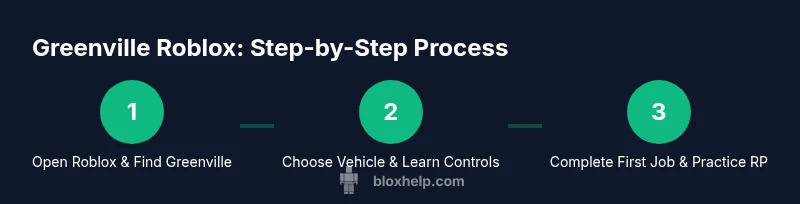
Launch Roblox, use the search bar to find Greenville, and click Play to join a server. Choose a server with a balanced player count to practice without getting overwhelmed. This first step sets up your session and ensures you’re entering the right game mode for driving and RP.
Tip: If you don’t see Greenville immediately, try refreshing the catalog or filtering by most popular. - 2
Choose a starting vehicle
In Greenville, select a beginner-friendly car that prioritizes stable handling over speed. Familiarize yourself with basic controls in an open area before venturing into city streets. Your goal is predictable, confident starts rather than flashy accelerations.
Tip: Test acceleration and braking in a safe stretch of road before attempting turns. - 3
Master basic driving controls
Practice acceleration, braking, and steering with smooth inputs. Get comfortable with steering sensitivity and throttle response, then practice gentle curves and straight-line stability. Early sessions should emphasize consistency over speed.
Tip: Use both hands on the wheel or the best input setup for stable control. - 4
Read the map and landmarks
Familiarize yourself with key city landmarks, routes, and the map legend. Identify main roads, intersections, and the locations of job centers or dealerships. A strong mental map reduces hesitation during missions.
Tip: Create a mental breadcrumb trail using landmarks like bridges or train tracks. - 5
Try a simple RP task
Engage in a basic job first, such as a pickup or delivery, to practice route timing and communication with other players. Focus on polite chat and clear instructions to succeed in cooperative tasks.
Tip: Keep chat concise and only share essential information during tasks. - 6
Upgrade gradually
As you earn in-game currency, try a modest upgrade or a more stable vehicle. Prioritize handling and durability to reduce repeated repairs and trips back to the dealership.
Tip: Avoid chasing top speed until you consistently handle lower-speed driving. - 7
Experiment with customization
Visit the vehicle customization area to personalize your car’s look. Small aesthetic changes can boost immersion and RP presence without affecting handling.
Tip: Note how different paint jobs and decals affect your in-game identity. - 8
Practice safe RP etiquette
Maintain friendly interactions, respect other players’ space on the road, and follow server rules. Etiquette helps create a positive community experience and smoother collaborations.
Tip: Promote constructive feedback and avoid confrontations in chat. - 9
Troubleshoot common issues quickly
If you encounter lag or control delays, adjust graphics settings, ensure drivers are up to date, and switch servers if needed. Document any reproducible issues for quick help from the community.
Tip: Restart the game or device to clear temporary glitches. - 10
Review and reflect
After each session, note what worked and what didn’t. Set a small, measurable goal for the next session (e.g., complete three routes without errors). This habit accelerates improvement.
Tip: Keep a quick log of routes, times, and improvements.
Questions & Answers
What is Greenville Roblox and why should I try it?
Greenville Roblox is a driving and roleplaying game on the Roblox platform. It teaches basic vehicle control, city navigation, and social interaction in a cooperative setting. Players often enjoy the steady progression and community feel, making it a solid entry point for new Roblox fans.
Greenville Roblox is a driving and roleplaying game that helps new players learn vehicle control and city navigation in a friendly community.
Is Greenville Roblox free to play?
Yes, Greenville Roblox is free to play. Optional in-game purchases exist, but you can enjoy core gameplay and many missions without spending money. Some vehicles or cosmetics may require in-game currency earned by completing jobs.
Yes, you can play Greenville Roblox for free, with optional purchases available later.
Do I need Roblox Premium to play Greenville?
Premium is not required to play Greenville Roblox. You can access the game with a standard Roblox account and participate in most activities. Premium may offer perks in other Roblox games, but Greenville’s core experiences are accessible without it.
No, Premium isn’t required to play Greenville Roblox.
Can I customize vehicles in Greenville Roblox?
Yes, Greenville offers vehicle customization options such as paint, decals, and rims. Start with basic customization to personalize your look, then upgrade to keep up with performance improvements. Changes are cosmetic and functional parts can be tied to progression.
You can customize cars with paint, decals, and rims, enhancing style and progression.
Where can I find active Greenville servers to join?
Find active Greenville servers by using Roblox’s search, looking for recently updated or populated instances, and checking community forums for recommendations. Joining public servers with moderate activity often yields better RP opportunities and smoother gameplay.
Look for recently updated Greenville servers with healthy player activity for the best experience.
Watch Video
The Essentials
- Master basic driving before complex tasks
- Build a mental map of Greenville landmarks
- Upgrade vehicles with a focus on handling and reliability
- Practice RP etiquette for better cooperation