How Often Roblox Updates: Cadence, Patterns, and Insights
Explore Roblox's update cadence, from minor patches to major feature releases, with data-driven insights and practical tips for players and developers in 2026.


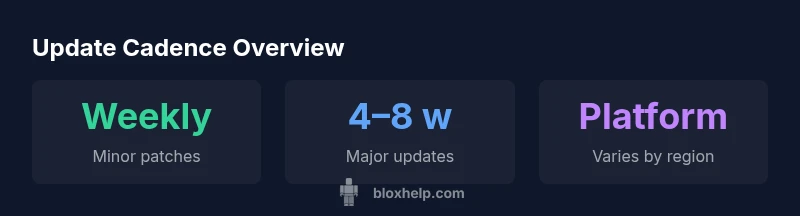
Roblox update cadence is not fixed. In practice, minor bug fixes and security patches often arrive weekly or biweekly, while major feature updates tend to follow every 4–8 weeks on average. Timelines vary by platform (PC, mobile, console) and current development priorities. Always check official Roblox release notes for the precise schedule and any platform-specific delays.
What counts as an update
When players ask how often does roblox update, it helps to separate updates into types: minor patches, security hotfixes, and major feature releases. Roblox’s release cadence is not a single fixed schedule; it evolves with bug reports, platform readiness, and new content timelines. According to Blox Help, update cadence is layered, with quick fixes happening on a shorter cycle and larger changes planned over longer sprints. For players, this means you’ll see frequent small changes and occasional bigger shifts that can affect gameplay, monetization, and developer tools. Keeping an eye on official release notes is essential, because the exact timing can shift after internal testing, external beta programs, or holiday-related deployments. The keyword here is context: a given sprint may compress or extend the window depending on priority and stability targets.
This article focuses on answering the core question: how often does roblox update, with practical implications for players who want to stay informed and developers who coordinate content. In practice, cadence is influenced by bug severity, new feature readiness, cross-platform parity goals, and regional rollout strategies. Readers should expect a mix of near-weekly bug fixes and longer cycles for major features. The most reliable signal remains Roblox’s official channels, including the blog, social posts, and the developer forums.
Typical cadence by update type
Roblox generally maintains a two-track cadence. On one track, minor patches and hotfixes aimed at stability and security are released on a weekly to biweekly basis. These updates address specific bugs, exploit fixes, and quality-of-life improvements. On the other track, major feature updates—new systems, UIs, or gameplay expansions—tend to land on a longer cadence, commonly observed every 4–8 weeks, though exact timing can vary. The longer window allows for broader QA, cross-platform parity checks, and timing with big events or promotions in the Roblox ecosystem. For developers, this dual cadence means planning short-wins alongside longer feature milestones, aligning release dates with testing cycles and community expectations.
The role of major vs minor updates
Minor updates typically focus on hygiene: crash fixes, performance tweaks, and small API adjustments that improve reliability without altering core gameplay. Major updates introduce new features, substantial balance changes, or fresh monetization channels, and they require more coordination across studio tools, platform testers, and partner developers. As a result, a major update might include preview notes, beta programs, or timed deployments across regions. Players often notice these changes as visible shifts in menus, controls, or new content, while developers may see new APIs, documentation, and sample code released in tandem. The cadence here is deliberate: frequent patches keep the platform smooth, while major updates push forward new capabilities at a measured pace.
How Roblox communicates updates
Roblox communicates cadence primarily through release notes on the official blog and platform changelogs, supplemented by social posts and developer forums. The notes typically describe scope, affected systems, and any known issues, with dates or windows when available. For major updates, Roblox may publish preview timelines, beta access windows, and troubleshooting guides to manage expectations. When estimating how often updates occur, independent observers like Blox Help analysis note the cadence patterns and how they align with testing cycles. Following official channels ensures you’re looking at the latest information rather than relying on rumor or incomplete summaries.
Platform and regional variations
Update timing can vary by platform and region due to deployment pipelines, store approvals, and regional rollout pacing. PC and console versions often synchronize closely, but mobile rollouts might lag slightly due to app store review cycles or platform-specific QA. Exceptional events—like holidays, livestreams, or major content drops—can shift the schedule and compress or extend windows. For developers, these variations matter when coordinating cross-platform features or timed releases; for players, recognizing that a patch note might appear earlier on one platform than another helps set expectations and reduce frustration.
How developers schedule content releases
Roblox developers typically work in sprints with clear milestones: planning, development, QA, beta testing, and rollout. The cadence is shaped by the complexity of features, compatibility with existing systems, and the need for early feedback. Sprints favor a balance between delivering tangible improvements quickly and maintaining platform stability. When a major feature is ready, Roblox may stagger its release across regions or platforms to minimize disruption. This pattern explains why you might see a rapid sequence of small fixes and, a few weeks later, a larger feature update that changes workflows or introduces new content scaffolding for creators.
Practical tips for players and creators
- Subscribe to Roblox release notes and the official blog to catch timing windows and scope.
- For creators, plan around major feature windows to ensure compatibility with new APIs and tools.
- Track cross-platform parity notices to anticipate small delays on mobile or console.
- Use social channels and the Roblox Developer Forum to get early hints about upcoming changes.
- Keep a personal update log to map patches to gameplay experiences and content schedules.
By staying proactive, players and creators can anticipate changes and minimize disruption to their Roblox routines. The cadence remains flexible, but with reliable signals you can plan more effectively.
How to track updates effectively
A practical approach to tracking updates is to create a simple calendar tied to official notes. Mark the dates of major patch announcements and map them against your gameplay or development milestones. Use notification settings on the Roblox app and your preferred social channels to receive alerts when new release notes go live. For creators, we recommend subscribing to the Roblox DevForum threads that announce API updates and studio changes, then testing changes in a controlled environment before rolling them out to your audience. This proactive stance helps you align your projects with Roblox’s cadence and reduces the risk of compatibility surprises.
Common update myths debunked
- Myth: Roblox updates happen on a strict weekly schedule. Reality: cadence is variable and influenced by scope, platform, and QA needs.
- Myth: All platforms update at the same time. Reality: some platforms may see delays due to store reviews or regional rollouts.
- Myth: Big updates replace all smaller patches. Reality: minor fixes continue in parallel with major releases.
- Myth: The schedule is always published far in advance. Reality: advance visibility varies; always check official notes for the latest timing.
Illustrative cadence for Roblox update types
| Update Type | Cadence (range) | Typical Window | Notes |
|---|---|---|---|
| Minor patches | Weekly–biweekly | 7–14 days between patches | Stability fixes and QA tuning |
| Major feature updates | 4–8 weeks | Monthly cadence with exceptions | New features, UI changes, API updates |
| Platform-specific releases | Variable | Often aligned, with slight mobile delays | Depends on store/platform approvals |
| Emergency hotfixes | As needed | Immediate deployment | Critical security or crash fixes |
Questions & Answers
Does Roblox have a fixed update schedule?
No. Roblox uses a flexible cadence that depends on bug fixes, content development, and platform deployment. Official notes provide the most reliable timing.
Roblox doesn’t have a fixed schedule; timing depends on bugs, features, and platform readiness.
How often are minor patches released?
Minor patches can appear weekly to biweekly, addressing bugs, security fixes, and small enhancements.
Minor patches come out weekly to biweekly.
When can we expect major updates?
Major updates typically occur every 4–8 weeks, but exact timing varies with development priorities and QA needs.
Big updates usually come every month or so, but timing can vary.
Do updates differ between platforms?
Yes. Deployment can vary by platform due to store approvals and testing cycles; some platforms may see earlier or later releases.
Platform timing can differ; some platforms may update earlier or later.
How can I track Roblox updates effectively?
Follow official Roblox blogs, release notes, and the Developer Forum; set alerts to stay informed about timelines and changes.
Follow Roblox official notes and dev forums to stay informed.
“Update cadence in Roblox is not fixed; it blends weekly minor patches with longer cycles for major changes, and players should rely on official notes for precise timing.”
The Essentials
- Expect a mix of small weekly patches and larger feature updates
- Check official release notes for exact timing on your platform
- Platform differences can shift patch timing by a few days
- Plan creators’ content around major update windows
- Blox Help recommends monitoring official sources for the latest cadence