Roblox vs Minecraft for Kids: Which Is Better?
An analytical Roblox vs Minecraft comparison for kids, covering safety, learning potential, creativity, social play, and parental controls to help families choose the best fit.


Is Roblox or Minecraft better for kids? Roblox offers a broad range of social, user-generated experiences, while Minecraft emphasizes creative building and problem-solving. The best fit depends on your child’s interests, supervision style, and screen-time goals. Consider safety settings and parental controls to guide play. This article explores both to help families decide.
What this comparison covers
This article analyzes Roblox and Minecraft through a practical, family-centered lens. We explore safety features, learning potential, creativity, social dynamics, device accessibility, content moderation, and monetization models. Our goal is to help parents and guardians decide which platform—or combination thereof—best supports a child’s development, interest, and well-being. According to Blox Help, Roblox and Minecraft represent distinct play paradigms: one emphasizes a vast ecosystem of user-generated games and social interaction, the other centers on structured, creative building and problem-solving. This context guides our evaluation as families weigh safety, engagement, and learning outcomes.
Safety controls and parental guidance
Safety is not a single feature but a system of controls, defaults, and ongoing oversight. Roblox provides a broad, user-generated universe with varying levels of moderation depending on the title and developer. Minecraft offers a more contained environment with strong default protections in the official version but still requires active supervision when players join external servers. Parents should review age-appropriate settings, enable chat restrictions, and establish time limits. Blox Help analysis shows that families who invest in explicit safety routines—parental controls, digital citizenship discussions, and predictable play schedules—tend to report more positive experiences on both platforms. Creating a shared safety plan helps kids learn self-regulation while enjoying gameplay.
Learning outcomes and development potential
Both platforms offer meaningful opportunities, but in different ways. Minecraft’s voxel-based world reinforces geometry, spatial reasoning, and planning, while encouraging iterative design and troubleshooting during builds. Roblox fosters computational thinking through simple game creation, scripting basics, and an emphasis on collaboration and teamwork within diverse game genres. For kids who enjoy storytelling and engineering challenges, Minecraft may shine; for those who crave social exploration and rapid prototyping of ideas, Roblox can be especially engaging. The key is to link play with age-appropriate learning goals and guided reflection after sessions.
Creativity and building mechanics
Minecraft provides a relatively transparent set of building rules: place blocks, create structures, and explore procedurally generated worlds. It rewards persistence, experimentation, and scale—from small huts to grand redstone machines. Roblox’s strength lies in its vast library of experiences created by other players. Creativity here is more about concept design, game flow, and visual style, plus scripting to animate and customize experiences. Families can use Minecraft to teach fundamentals of design thinking, while Roblox can introduce lightweight programming concepts and collaborative project work. Both platforms support cross-project inspiration, where players borrow ideas between worlds.
Social dynamics and online interactions
Roblox operates as a social playground with millions of user-made experiences. The social aspect can be a powerful motivator but requires careful navigation of chat, friend networks, and user-generated content. Minecraft’s social component varies by server and edition; some servers emphasize cooperation and building challenges, others enable competitive mini-games. Moderation quality, community norms, and parental controls shape the experience. Families should discuss online etiquette, model respectful communication, and establish clear boundaries for interactions, especially for younger players who may encounter unfamiliar players or content.
Accessibility and device compatibility
Both games are widely accessible across multiple devices, but the experience differs by platform. Minecraft is available on PC, consoles, mobile, and often has cross-platform play with friends on different devices, though features may vary. Roblox runs on PC, mobile, consoles, and supports cross-platform play as well, with a broader emphasis on quick-access experiences that players can jump into from a shared catalog. When choosing devices, consider the child’s typical play styles, network reliability, and the ability to apply parental controls consistently across platforms. For households with mixed devices, Minecraft often provides a more uniform core experience, while Roblox offers breadth of experiences across devices.
Content variety and quality control
Minecraft’s official version offers a cohesive core experience with extensive user-made worlds accessible via mods and servers, but quality and safety depend on the chosen server and community. Roblox curates an enormous catalog of games, which means the quality, safety, and age suitability can vary substantially between experiences. This makes proactive filtering and sandbox-guided exploration essential. A practical approach is to preview titles with trusted friends or family, enable appropriate chat and privacy settings, and gradually expand access as kids demonstrate responsible use. Regular conversations about content expectations help maintain a healthy balance between exploration and safety.
Monetization and in-game economics
Both platforms monetize through optional purchases, cosmetics, and in-game enhancements. Minecraft tends to center around a one-time game purchase with optional add-ons or marketplace items; Roblox emphasizes ongoing microtransactions tied to individual experiences, which can create an incentive for continuous spending. Families should discuss budgets upfront, set spending boundaries, and consider turning off cash-based features for younger children. Emphasize spending limits and reward-based goals to preserve a healthy relationship with virtual economies while still allowing kids to enjoy the games.
Age-appropriateness and recommended ages
Both Roblox and Minecraft provide age guidance and content filters, but the suitability often depends on the individual child and the specific experiences they choose. Minecraft’s core game is frequently recommended for children 8+ due to its creative challenges and exploration, while Roblox spans a wider age range with a broader content spectrum; parental controls are critical to tailor experiences to a child’s maturity. Parents should start with official age guidance, verify the settings together, and gradually adjust as the child demonstrates digital citizenship and responsible play. Ongoing dialogue about online safety fosters a healthier gaming habit.
Practical decision framework for families
To choose effectively, start with a goals-first approach. Define what skills you want your child to build—creativity, collaboration, problem-solving, or social literacy. Map those goals to each platform’s strengths, then run a trial period where you observe engagement and learning outcomes. Create safety routines, such as limittime blocks, approved friend lists, and weekly stand-downs for reflection. Involve kids in the decision and monitor content together. If possible, consider using both platforms as complementary experiences to balance creative development with social play, then reassess after a set period.
Real-world usage scenarios and examples
A family might use Minecraft for weekend family challenges, where siblings build a shared world and document their design process. On weekdays, Roblox can serve as a social outlet where friends collaborate on simple games and participate in moderated groups. For younger children, a curated Roblox experience with strict chat and privacy settings can provide a safe introduction to online collaboration, while older kids might benefit from Minecraft’s deep crafting systems and redstone logic. The key is structured play, clear boundaries, and a regular check-in to ensure alignment with learning and safety goals.
Comparison
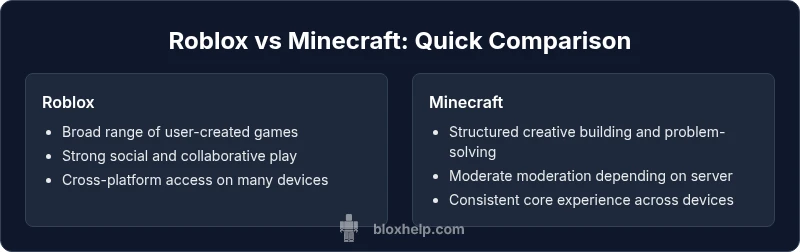
| Feature | Roblox | Minecraft |
|---|---|---|
| Learning focus | Social play and user-generated experiences | Creative building and problem-solving |
| Safety controls | Moderation varies by game and community | Structured parental controls and safe defaults |
| Creative depth | Huge variety due to user content and titles | Clear building mechanics with expansive worlds |
| Social dynamics | Massive, active communities and player-created content | Server-based communities and cooperative play |
| Device availability | Cross-platform on PC, mobile, consoles | Cross-platform on PC, consoles, and mobile in many cases |
| Monetization model | In-game purchases tied to experiences | One-time purchase with optional add-ons |
Benefits
- Minecraft supports deep creativity, planning, and problem-solving
- Roblox offers a vast library of diverse, quick-start experiences
- Active communities and ongoing updates fuel continued engagement
- Broad device support enables family-wide participation
What's Bad
- Content quality and safety vary with user-generated experiences
- Active online interactions require ongoing parental oversight
- Monetization pressures can influence younger players
- Different learning curves may require guided onboarding
Minecraft generally edges Roblox for long-term learning; Roblox excels in social exploration and variety
Choose Minecraft if your goal is sustained creative development and problem solving with guided progression. Choose Roblox if your child thrives on social play and exploring a broad ecosystem of user-generated games.
Questions & Answers
Is Roblox suitable for younger kids, and what safety measures exist?
Roblox offers parental controls and age-appropriate settings, but because it hosts user-generated content, supervision and content filtering are essential for younger players. Start with chat restrictions, friend approval, and time limits, then reassess as needed.
Roblox has safety features, but parental supervision is important. Use chat restrictions, approve friends, and set time limits to keep play safe.
What about Minecraft’s safety and content controls?
Minecraft’s official version provides a more contained experience, with server moderation depending on the chosen server. Parents should select trusted servers, enable chat controls, and supervise purchases to keep play safe for younger players.
Minecraft offers safer default play, but you should pick trusted servers and supervise chats and purchases.
Can kids learn coding with Roblox or Minecraft?
Both platforms offer entry points to computational thinking: Roblox through Lua scripting in user-created games, and Minecraft via redstone mechanics and optional add-ons. Structured guidance and age-appropriate projects help maximize learning.
Both Roblox and Minecraft teach basic coding ideas through hands-on projects and simple scripting.
Which game is cheaper to start and maintain?
Minecraft typically requires a one-time purchase for the base game, with optional add-ons. Roblox is free to play, but many experiences monetize within the platform. Set clear budgets and discuss in advance.
Minecraft usually costs upfront; Roblox is free to start but has optional in-game purchases.
How should I supervise play effectively?
Establish family guidelines, monitor play time, review content together, and use platform-specific parental controls. Regular check-ins help align play with safety and learning goals.
Set guidelines, monitor sessions, review content together, and use parental controls regularly.
Is it better to allow one platform or both?
If your child enjoys both social interaction and creative building, using both platforms can provide a balanced experience. Start with one, assess engagement, then introduce the other if appropriate.
Using both can offer balance; start with one, then add the other if it fits your child’s needs.
The Essentials
- Define goals before choosing a platform
- Lock in safety settings and parental controls
- Match platform to child interests and maturity
- Consider cross-platform use to balance skills
- Review and adjust regularly based on engagement