Playing Roblox for Free: A Complete Beginner Guide
Discover how to play Roblox for free with a practical, beginner-friendly guide. Learn account setup, free games, safety tips, and how to avoid scams while enjoying Roblox.


You can play Roblox for free by creating a Roblox account, downloading the client on your device, and choosing free-to-play games. The platform itself is free to join, with optional purchases like Robux. This guide shows legitimate ways to start without spending money, plus safety tips and how to control spending.
Roblox basics: what is free to play
Roblox is a platform that hosts user-generated games and experiences that can be accessed by players around the world. When we say playing Roblox for free, we mean you can join the platform, explore thousands of experiences, and play many titles without spending money. The core of Roblox is its free-to-start model: creating an account, downloading the Roblox client, and entering a vast library of user-created games. Some games offer optional paid enhancements or in-game currency, but a huge portion of Experiences are accessible at no cost. For younger players and those testing the waters, this means you can safely enjoy a wide range of adventures without upfront purchases. The Blox Help team emphasizes that free access is a legitimate and supported way to enjoy Roblox, as long as you follow safety guidelines and avoid external offers that promise free Robux. As you begin, remember that 'free' in Roblox often refers to access, not necessarily completed items or premium features.
How you access Roblox for free across devices
Roblox is designed to work across devices, so you can start playing without paying for access. On a PC or Mac, you can use a web browser or download the Roblox launcher to run experiences. On iOS and Android devices, the Roblox app is available in official app stores, and many games run smoothly on mobile networks. Some consoles offer Roblox compatibility, but device availability may vary by region and model. The key benefit for free players is that you only pay if you want to expand your collection with Robux or unlock premium experiences. Before you begin, ensure your device meets the minimum requirements for Roblox, and keep your Roblox client updated to access the latest free games and updates. This cross-platform accessibility is a major reason why Roblox remains popular among beginners and seasoned players alike.
Legitimate ways to start without spending
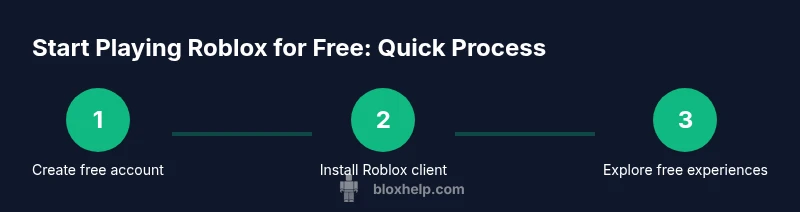
Getting started without spending money is straightforward. First, create a free Roblox account and install the Roblox client. Second, explore the Discover or Games sections to find free-to-play experiences and user-generated content with no mandatory purchases. Third, join friends or popular servers to discover appropriate content and learn how the community works. Fourth, participate in events or challenges that reward cosmetic items or in-game currency without charging real money. Fifth, take advantage of parental controls and account restrictions if you're guiding younger players. Remember, many games offer cosmetic items or boosts as part of free events, while others may require currency purchases for advanced features. The important thing is to enjoy gameplay, not chase paid perks, and to verify that you are on official Roblox channels when signing in.
Safety considerations and scams to avoid
This section covers why staying safe matters. Roblox offers built-in safety features, but there are third-party sites and social engineering tricks that promise 'free Robux' in exchange for personal data or passwords. Such offers are scams and can compromise your account. Never share your password, email credentials, or verification codes, and avoid third-party apps claiming to increase your Robux balance. Use two-factor authentication where available, and enable privacy settings that limit who can contact you or join your games. If a deal sounds too good to be true, it probably is. Stay within the official Roblox ecosystem and report suspicious activity to help keep the community safe.
Family safety and parental controls for younger players
Parents and guardians can help younger players enjoy Roblox safely by enabling account restrictions, setting age-appropriate permissions, and monitoring in-game purchases. Use Roblox's parental controls to limit chat features, disable in-game purchases, and require PINs for new device logins. Discuss safe play habits with kids, including cyberbullying awareness and sharing personal information. Encourage a balance between free experiences and screen time, and model healthy gaming boundaries. The goal is to preserve fun and learning while protecting privacy and well-being in an online environment.
How to discover high-quality free experiences
Quality is subjective, but you can gauge a game's safety and value by looking at length, player reviews, and developer details. Start with popular listicles or curated collections that emphasize safety and age-appropriateness. Check the number of visits and the number of likes to estimate popularity, and review the update history to see if a title is actively supported. Favor games with clear descriptions, offline alternatives for low bandwidth, and friendly communities. Remember, you can filter by genre to find adventures, simulators, or creative tools that suit your interests—without paying a cent.
Balancing free play with in-game purchases
Even as a free player, you may encounter optional purchases. It's essential to differentiate between what is essential for enjoyment and what is cosmetic or convenience-based. If you want to keep costs predictable, turn off or require approval for purchases in your account settings and set reminders to review any proposed transactions. Use free cosmetics or earned items first, and reserve Robux for features that truly enhance your experience. By approaching purchases mindfully, you can enjoy Roblox for free while still appreciating premium options if you choose.
What to expect from the Roblox economy as a free player
Roblox's economy includes both free content and paid enhancements. Free players can access a vast library of games, earn cosmetics and accessories through events, and participate in social spaces. Robux, the platform's currency, is primarily used for premium assets and some game features, but many developers offer free access to assets and limited-time freebies. The economy encourages creativity and collaboration, so even without paying, you can enjoy a wide range of experiences and join communities that share free resources. The economy supports a thriving ecosystem where free players can participate meaningfully without mandatory purchases, though optional paid content can enrich the experience.
Quick-start checklist for playing Roblox for free
Use this practical checklist to begin playing without spending: create an account, install the client, explore free games, join a community that matches your interests, enable safety settings, and monitor your time and spending. Revisit the platform regularly to discover new free experiences and seasonal events. This approach helps you maximize free play and learn the mechanics before deciding whether you want to invest in extras later.
Tools & Materials
- Stable internet connection(Broadband or strong Wi-Fi recommended)
- Compatible device(PC, Mac, iOS, Android, or Xbox (where supported))
- Free Roblox account(Sign up with a valid email or phone number)
- Official Roblox app/launcher(Download from roblox.com or official stores)
- Parental controls/settings (optional)(Set spending limits and chat controls if needed)
- Headphones or speakers (optional)(For better in-game communication and sound)
Steps
Estimated time: 15-25 minutes
- 1
Create your Roblox account
Visit the official Roblox signup page and enter your email or phone number to create a free account. Choose a username and set a strong password. Complete any verification prompts so your account is secure from the start.
Tip: Use a unique, strong password and enable two-factor authentication when available. - 2
Install Roblox on your device
Download the Roblox client or app from official sources and sign in with your new account. The installation process is straightforward on most devices and takes only a few minutes.
Tip: Always download from the official Roblox site or trusted app stores to avoid scams. - 3
Explore free games and experiences
Navigate to the Discover or Games sections and look for experiences labeled as free-to-play or with no mandatory purchases. Read the descriptions and reviews to gauge suitability for your age and interests.
Tip: Filter by genre and check recent updates to ensure active development and safety. - 4
Join a game and adjust settings
Join a suitable game, adjust your avatar, and configure privacy settings. Enable chat filtering and set who can contact you. If you’re playing with kids, keep sessions short and supervised.
Tip: Start with a friend you trust to help you navigate labeling and safety features. - 5
Monitor spending and safety
If you encounter prompts for purchases, decline or set approvals in your account settings. Use parental controls to limit purchases if younger players are involved.
Tip: Set a spending limit reminder to avoid accidental purchases. - 6
Stay secure and protect your account
Keep your login information private, enable two-factor authentication, and regularly review connected devices. Report any suspicious activity to Roblox support.
Tip: Never share your password or verification codes with anyone.
Questions & Answers
Is Roblox free to play?
Yes, Roblox is free to join and play. You can explore many experiences without spending money, though some games offer paid options for extras. Robux purchases are optional and not required to play most experiences.
Yes, Roblox is free to join and play. You can start with free games and experiences right away.
Do I need Robux to start playing?
No. You can begin with free games and experiences. Robux is optional and mainly used for premium assets and certain features in some games.
No, you can start playing for free and decide later if you want to buy Robux.
What safety settings should I enable for kids?
Enable account restrictions, limit who can contact the player, and consider enabling chat filtering. Use parental controls to manage purchases and screen time. Regularly review account activity with guardians.
Turn on safety features and parental controls to help protect younger players.
Where can I find free games?
Look in the Discover and Games sections for titles labeled as free-to-play or without mandatory purchases. Review ratings, visits, and update history to pick solid options.
Check the Discover area for free games and read reviews.
How can I avoid scams offering free Robux?
Don’t trust offers promising free Robux from third parties. Roblox never asks for passwords or verification codes outside the official site or app.
Don’t fall for fake Robux offers; use official channels only.
Can I play Roblox without downloading anything?
Most Roblox experiences require the client, but some browsers or lightweight options may offer limited play. The standard path is to install the Roblox app on your device.
Most games need the Roblox client, but some lightweight options exist.
Watch Video
The Essentials
- Create a free account to start playing.
- Prioritize free-to-play experiences and safe settings.
- Avoid scams by not sharing passwords or personal data.
- Manage spending with parental controls if needed.