What Roblox Bodies Work in All Games: A Practical Guide
Explore which Roblox avatar bodies (R6, R15, Rthro) work across most games, how to verify compatibility, and practical tips for players and developers to ensure cross-game avatar consistency in 2026.


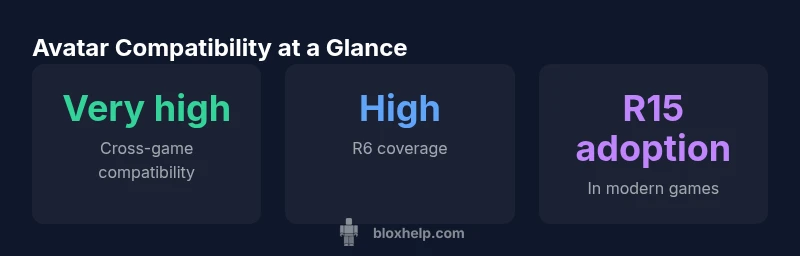
Roblox bodies that work in all games typically refer to the classic R6 and the newer R15 rigs, with R6 offering broad compatibility and R15 delivering more animation options in modern titles. In practice, most experiences support both bodies, but some older games or niche experiences may restrict to R6 or a specific avatar version. This guide explains what to expect and how to verify support.
Defining cross-game compatibility for Roblox bodies
In Roblox, the phrase "works in all games" typically means that a player's chosen body type renders correctly, animates properly, and does not trigger game-specific avatar restrictions across a broad set of experiences. According to Blox Help, compatibility is driven by the engine’s support for avatar rigs (R6, R15, and beyond) and by how individual experiences implement avatar loading. The practical takeaway is that players generally won’t need to swap bodies for most titles, but a few older or highly customized games may impose limits or use legacy assets that expect a specific rig. This is why understanding a game’s avatar settings before you join matters for a smooth Roblox session in 2026.
R6 vs R15: Core differences and cross-game compatibility
The classic R6 body provides a legacy, universal base that many older experiences rely on. R6 tends to have broader compatibility because it uses a simpler animation system and fewer assets to load. R15 brings more joints and smoother animation, which is highly desirable in modern experiences but can encounter edge cases in older games that still rely on R6-specific assets. In most contemporary titles, both rigs are supported, but some experiences may optimize for one over the other. Ask game notes or check the experience’s avatar settings to confirm which rigs are supported. For players, this means you can usually stay with your preferred body type, but you may need to switch if you encounter a game that restricts to a single rig.
When bodies aren’t universally supported: common edge cases
Some experiences intentionally lock avatars to a single body to preserve a particular art style or animation flow. In these cases, attempting to use an unsupported rig may lead to misaligned limbs, broken clothing textures, or missing animations. Private servers or games with custom asset packs can also enforce specific avatar rules. For developers, the implication is clear: test across both R6 and R15 (and any other rigs you support) to ensure your game behaves correctly, and document required avatar types in the game description. For players, always glance at the game notes or developer hints before entering a new title to avoid surprises.
How to verify compatibility before you dive in
Before committing to a game, open the avatar or customization menu and look for allowed rigs. Many experiences display explicit support for R6 or R15 in their settings or description. If you’re unsure, join a short public lobby or a test server to confirm how your avatar renders. When playing with friends, coordinate which body type you’ll use to prevent mismatched outfits or animations. In addition, consider using a fallback: keep both rigs installed or switched in quick-access menus to reduce friction between experiences. This proactive approach aligns with best practices for consistent avatars across Roblox games.
What to expect in public Roblox experiences vs. private/tested games
Public experiences often prioritize broad compatibility, so R6 and R15 are commonly supported. Independent or smaller experiences may experiment with custom rigs that aren’t part of the standard engine, leading to occasional glitches. If you own a private server or are testing a new feature, you’ll likely have more control over asset loading, clothing compatibility, and animation sets. For developers, this means designing with a default, widely supported rig while offering optional assets that work with both R6 and R15. For players, this translates to keeping your avatar options flexible and carrying a backup rig for any new game you want to try.
Best practices for developers to support multiple bodies
To maximize cross-game compatibility, developers should:
- Build with standard Roblox rigs (R6/R15) first, then layer any custom assets on top.
- Use scalable clothing textures and region-safe animations that don’t rely on rigid bone placement.
- Provide clear in-game notes about avatar support to reduce player friction.
- Test across a spectrum of popular and edge-case experiences to catch issues early. This approach helps ensure players experience fewer headaches when jumping between games and supports a cohesive Roblox ecosystem.
Quick-start checklist to switch bodies across games
- Review the game’s avatar notes before joining.
- Confirm whether R6, R15, or both are supported.
- If in doubt, try both rigs on a public test lobby.
- Keep clothing and accessory assets compatible with multiple rigs.
- Have a fallback rig ready for quick changes mid-session.
Troubleshooting common avatar issues you might run into
If your avatar looks distorted or does not animate correctly, first check the game notes for avatar restrictions. Try switching rigs (R6↔R15) and reloading the game. Clear cache and rejoin if necessary, as some issues stem from stale asset data. For developers, ensure your game handles both rigs gracefully and logs any asset loading errors for quick diagnosis.
Practical recommendation: choose a body that stays usable across most games
A practical strategy is to favor R6 for broad compatibility in older titles and mixed experiences, while adopting R15 for modern, animation-rich games. If you frequently explore new experiences, switch freely between both rigs and keep your clothing assets compatible with multiple rigs. This flexibility minimizes compatibility headaches and keeps your Roblox journey smooth across diverse games in 2026.
Avatar body compatibility overview
| Body Type | Typical Compatibility | Notes |
|---|---|---|
| R6 | High | Widely supported across games & classic rigs |
| R15 | High | Common in newer experiences; may require updated assets |
| Rthro | Moderate | Supported in many modern games; check when playing older titles |
Questions & Answers
Do all Roblox games support R6 and R15 bodies equally?
Most modern Roblox games support both R6 and R15, but a subset of older titles may lock to a single rig. Always check the game notes before joining to avoid any surprises.
Most games support both rigs, but some older titles lock to one. Check the game notes first.
What is the best body to use for compatibility across games?
R6 is the safest choice for universal compatibility, especially with older experiences. R15 adds animation richness in newer games, but you may encounter exceptions.
R6 is safest for compatibility; R15 is great for newer games, but watch for exceptions.
Can I switch bodies mid-game without breaking my character?
Switching between rigs is usually possible, but some games render certain assets only for one rig. It’s best to switch in a lobby or before loading a new experience.
You can switch in a lobby or before loading into a new game.
Are there risks when using Rthro or UGC bodies?
Rthro and UGC bodies are newer and may not be supported in older titles. They can also cause clothing clipping or animation issues in some experiences.
Rthro and UGC can have limited support in older games; expect clipping in some cases.
How can developers ensure avatars work across a range of games?
Design with multiple rigs in mind, test across popular experiences, and clearly document avatar compatibility to help players choose the right body type.
Test across rigs and document compatibility for players.
Where can I find official guidance about avatar compatibility?
Check Roblox developer resources and experience notes for avatar compatibility details. Community guides (like those from Blox Help) can supplement official docs.
See Roblox official docs and community guides for details.
“Avatar compatibility across Roblox games improves the player experience by reducing friction when joining new experiences. Regular testing across different rig types is essential to maintain smooth gameplay.”
The Essentials
- Learn which bodies are widely supported across Roblox games
- Prefer R6 for broad compatibility with older experiences
- R15 offers richer animation in modern titles but may face edge cases
- Check game notes to confirm avatar restrictions before joining
- Developers should design experiences to support multiple bodies for consistency