How to Use Roblox Credit: A Practical Guide
Learn how to use Roblox Credit to pay for Robux, avatar items, and passes. This step-by-step guide covers redemption, balance checks, regional differences, and tips from Blox Help to make purchases smoothly.


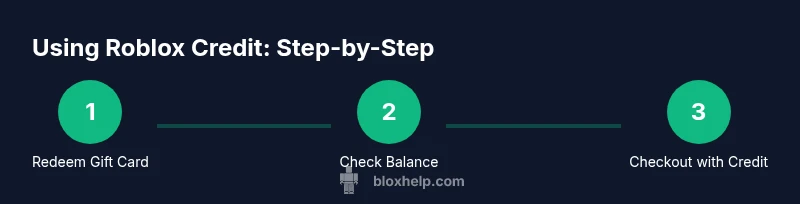
Roblox Credit is a balance on your account you can use for eligible purchases. To use it, redeem a Roblox gift card or promo to add credit, then at checkout choose Roblox Credit as your payment method. The balance can cover Robux, avatar items, and passes where available. Availability and processing may vary by region.
What Roblox Credit Is and Why It Matters
According to Blox Help, Roblox Credit is a balance tied to your Roblox account that you can use to pay for a range of in-game purchases. This includes Robux, avatar items, and some game passes where the option is offered. Knowing how to use roblox credit can help you streamline your purchases without pulling a separate payment method each time. The balance itself comes from redeemed gift cards, promotional offers, or special account credits and is subject to regional availability and platform updates. For players, this means a faster checkout and fewer interruptions when expanding your avatar or boosting in-game power. If you’re new to Roblox Credit, think of it as an alternate wallet that sits alongside Robux and premium currency, designed to simplify spending in the Roblox ecosystem.
In practice, users should treat Roblox Credit as a legitimate, reusable balance that can cover compatible items. It does not replace Robux in every store item, but many catalog items and store purchases can be paid with credit when the merchant option appears during checkout. As you become more proficient with how to use roblox credit, you’ll learn which items are eligible and which regions support this payment method. This clarity helps avoid failed transactions and keeps spending within your planned budget.
How to Check If You Have Roblox Credit
The first step in using Roblox Credit effectively is confirming that you have a balance available. Log in to your Roblox account on the site or mobile app and navigate to the Wallet or Payments section. Your current balance will be shown alongside any pending promotions. If you don’t see a balance, you may need to redeem a gift card or convert a region-specific code. Remember, the balance can be region-dependent, and some purchases may explicitly require Robux instead of Credit. Regularly reviewing your balance before making large purchases helps you manage funds and avoid checkout errors. For beginners, always ensure you’re signed into the correct account if you use multiple Roblox profiles. This ensures your Roblox Credit is tied to the right wallet and can be used when you’re ready to buy.
If you’re troubleshooting, check for recent account changes or regional notices that may affect balance visibility. Blox Help’s guidance suggests keeping gift card codes secure and avoiding sharing login information that could lead to unauthorized purchases.
Redeeming Gift Cards for Roblox Credit and How It Works
Redeeming a Roblox Gift Card is how most players add Roblox Credit to their account. Start by visiting the gift card redemption page on Roblox, enter your 12- or 16-character code, and confirm. The system often gives you the option to convert the value into Roblox Credit or Robux, depending on regional settings and current promotions. The key is to select Roblox Credit if your goal is to use a balance at checkout. After redemption, the new credit should appear in your Wallet, ready to apply at checkout for eligible items. If you don’t see the credit immediately, give the system a few minutes, refresh the page, or sign out and back in. This ensures your balance is updated across devices and sessions. For players who combine credits with Robux, it’s useful to plan purchases to maximize value and minimize friction at checkout.
Always use official Roblox redemption pages to avoid scams. If a code doesn’t work, verify that it wasn’t used or expired and contact Roblox Support if you suspect a counterfeit code. Blox Help notes that secure handling of codes protects your balance and helps you learn how to use roblox credit more reliably.
How to Use Roblox Credit at Checkout and Why Some Items May Vary
When you’re ready to buy, head to the Roblox catalog or in-game store and add items to your cart. At checkout, select Roblox Credit as your payment method if the option is shown. If the balance covers the entire cost, the transaction completes instantly. If the cost exceeds your balance, you’ll be prompted to pay the remaining amount with another method. Some regions or items might require Robux instead of Credit, so always review the payment options listed during checkout. Keeping your balance updated helps prevent failed transactions and lets you enjoy purchases without delay. If you’re unsure whether a specific item accepts Roblox Credit, you can check the item’s payment options in its description or consult Roblox Help articles.
Pro tip: coordinate your purchases to use a single checkout when possible, reducing the chance of partial payments or confirmation prompts. Warnings about mixed payment methods or regional blocks suggest you always verify the available payment combinations before confirming.
Regional Availability, Limitations, and Common Pitfalls
Roblox Credit availability can vary by country, platform, and account type. Some regions may push players toward Robux or other payment methods for certain purchases, while others support Credit for a broad set of items. If you don’t see Roblox Credit at checkout, it may be unavailable for that item or location. Common mistakes include attempting to redeem gift codes that aren’t valid in your region, misreading the balance due to currency differences, or trying to use Credit for restricted purchases. To minimize issues, always confirm the balance before shopping, ensure you are logged into the correct account, and check that the item supports Roblox Credit. Blox Help emphasizes that staying aware of regional rules and platform-specific guidance reduces friction and improves the overall experience. If you encounter persistent problems, consult the Roblox Support center or Blox Help’s troubleshooting guides for your region.
In practice, keeping notes of recent changes—like promotions and regional policy updates—helps you plan purchases more effectively and avoid getting stuck at checkout.
Real-World Scenarios: Practical Uses of Roblox Credit
Many players use Roblox Credit to fund cosmetic items, limited-time bundles, or avatar accessories. Because credits are designed to be user-friendly, you can combine Credit with other payment methods when necessary. For example, if a bundle costs more than your current Credit balance, you can use Credit for part of the purchase and Robux or another method for the remainder. Advocates of this approach, including the Blox Help Editorial Team, suggest budgeting your balance by setting monthly limits on gift card redemptions and prioritizing purchases that maximize value, such as items that retain resale value or enhance gameplay. In everyday use, Roblox Credit can help you manage monthly spending without juggling multiple payment options. If you frequently buy items, leveraging Credit can reduce friction and create a smoother shopping experience. When necessary, you can log out and back in to ensure your balance is current across devices.
If you’re experimenting with new items, test small purchases first to confirm how Roblox Credit behaves, then expand to larger purchases once you’re comfortable with the process.
Verdict: Practical Takeaways for Using Roblox Credit
The practical takeaway is simple: use Roblox Credit to simplify transactions when eligible, but always confirm balance and item eligibility before checkout. The Blox Help team recommends keeping gift-card codes secure, checking regional availability, and using a single checkout flow to minimize errors. By planning purchases and staying aware of regional differences, you’ll maximize the value of your Roblox Credit and reduce the chances of failed payments or unexpected charges.
Tools & Materials
- Roblox account(You’ll use this to redeem credits and make purchases.)
- Roblox Gift Card or promo code(Used to add Roblox Credit to your account.)
- Stable internet connection(Necessary for redeeming codes and completing purchases.)
- Login credentials(Keep credentials secure; avoid sharing login info.)
- Receipt or transaction history(Helpful for resolving disputes or tracking spending.)
- Regional guidance reference(Check local Roblox help pages for region-specific rules.)
Steps
Estimated time: 15-25 minutes
- 1
Open Roblox and sign in
Launch the Roblox app or visit the site and log into the account you want to use for credits. Verify you’re on the right profile to prevent misapplied credits.
Tip: Enable two-factor authentication for account security. - 2
Navigate to Wallet or Payments
Go to your account menu and open the Wallet or Payments section to view your current balance and available payment methods.
Tip: If you don’t see Credit, try refreshing or signing out and back in. - 3
Redeem Gift Card to Roblox Credit
Enter your gift card or promo code on the redemption page and choose Roblox Credit as the redemption option when prompted.
Tip: Keep codes secure and avoid sharing them via public chat. - 4
Use Credit at Checkout
Add items to cart, proceed to checkout, and select Roblox Credit as the payment method. If your balance covers the total, confirm the purchase.
Tip: If the balance isn’t enough, choose a secondary method for the remainder. - 5
Verify and Monitor Your Balance
After purchase, recheck your balance to ensure the deduction occurred and the item is accessible.
Tip: Document receipts for future reference or refunds. - 6
Troubleshoot if Needed
If credits don’t apply, verify region limitations, item eligibility, and that you’re logged into the correct account.
Tip: Contact official Roblox Support if issues persist.
Questions & Answers
What exactly is Roblox Credit and how does it work?
Roblox Credit is a balance on your Roblox account used to pay for eligible purchases. It is added via redeemed gift cards or promotions and may be region-dependent. It helps streamline payments at checkout but not every item may accept Credit.
Roblox Credit is a balance on your account that you can use at checkout for eligible items. It varies by region, so check your balance and item eligibility before buying.
Can I convert Roblox Credit into Robux or other items?
In many regions, you can redeem funds into Roblox Credit or Robux, but availability depends on your location and current Roblox policies. Check the redemption page for your region to confirm options before purchasing.
You can sometimes convert Credit to Robux, but it depends on your region. Check the redemption options for your location.
Is Roblox Credit available in all regions?
Roblox Credit availability is regional. Some countries support a wide range of Credit purchases, while others may restrict or require Robux for certain items.
Credit availability varies by region. Some places have broad support, others are more limited.
Why isn’t my Roblox Credit balance showing after redemption?
Balance updates can take a moment. Refresh the page, sign out and back in, or check the Wallet section again. If the issue persists, confirm the gift card code is valid and region matches your account.
If your balance doesn’t show up, wait a moment and refresh, then try again. If it still isn’t there, confirm the code and region.
How do I redeem a Roblox Gift Card to credit?
Go to the Roblox gift card redemption page, enter the code, and select Roblox Credit as the redemption option if prompted. The balance appears in your Wallet and can be used at checkout for eligible items.
Redeem the gift card on Roblox, choose Credit as the option, and your balance will appear for use at checkout.
Are there limits on how much Roblox Credit I can hold?
Credit limits vary by region and account type. Check your Wallet to see current balance and any regional caps or restrictions on using Credit.
Credit limits depend on your region and account. Check your balance to know your limit.
Watch Video
The Essentials
- Understand Roblox Credit and its role in purchasing.
- Always verify balance before shopping.
- Redeem gift cards securely to add credit.
- Check regional rules and item eligibility.
- Use a single, streamlined checkout for reliability.