How Big Is the Roblox Skybox: Size, Perception, and Tips
Explore how big Roblox skyboxes really are. There is no fixed size—the apparent scale depends on world units, camera distance, and texture mapping. Learn practical evaluation tips and best practices from Blox Help.


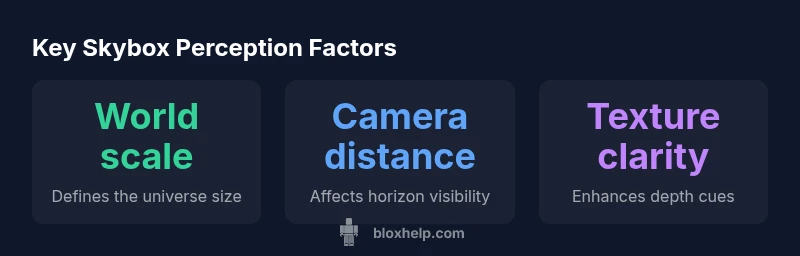
There is no fixed size for a Roblox skybox. It serves as a distant environmental backdrop that surrounds the playable area, and its apparent size is a function of world scale, camera distance, and texture mapping. Developers influence perception more than actual dimensions. In practice, you adjust how big the skybox feels by tuning world units, camera far distance, and the textures themselves.
What the Roblox skybox is and why it matters
In Roblox, the skybox is a distant environmental backdrop that surrounds the playable area. There is no fixed, universal size for a skybox—the goal is to create the impression of a boundless sky, not to physically scale a cube to a defined measurement. According to Blox Help, the skybox's apparent size is determined by world scale, camera distance, and how the textures are mapped to the sky surfaces. This matters because a skybox that feels too small or too large can distort players' sense of space and immersion. For developers, understanding that the skybox is more about perception than a literal dimension helps prioritize texture quality, horizon alignment, and performance considerations. By aligning these factors, you can maintain a believable horizon while keeping gameplay comfortable on a range of devices.
The illusion of size: perspective and parallax in Roblox skyboxes
A key question players often ask is how big is the roblox skybox. The answer hinges on perception rather than a fixed measurement. The skybox creates an ambient reference frame; if the world scale is large, distant features may appear smaller relative to the player, while a smaller world scale can make the horizon feel closer. Parallax cues—the subtle difference in perceived motion between the skybox and foreground—also contribute to depth. Texture orientation and seamless edges reduce visual seams and enhance the impression of a vast sky. In short, you don’t resize the skybox; you craft perceptual depth through careful asset selection and camera setup.
World scale and its effect on perceived skybox size
World scale sets the baseline for how every object in your game relates to the player. When you question how big is the roblox skybox, you must recognize that its size is not an attribute you set directly. Instead, you adjust the scale of your world so that the horizon lines up with your design intent. If your game uses a large world with sprawling terrain, the skybox will naturally feel more distant. Conversely, a compact, vertical-focused scene may make the horizon loom more prominently. The takeaway is to treat skybox size as a perceptual tool aligned with world scale, not a fixed object with fixed dimensions.
Camera settings: far clip, field of view, and horizon handling
Camera parameters significantly affect perceived skybox size. The far clipping plane determines how far the engine renders before culling; increasing it can reveal more sky and create a sense of greater depth, while a shorter distance can compress the horizon. Field of view (FOV) also plays a role: a wide FOV makes the skybox feel larger and more expansive, whereas a narrow FOV can compress space. When evaluating the skybox in your scene, test multiple camera configurations to ensure the horizon remains natural and consistent across gameplay scenarios. The concept of how big the skybox feels is intimately connected to these settings.
Skybox textures: quality, mapping, and seamless edges
Texture strategy matters for the perceived scale. High-resolution, well-mapped textures can boost realism and depth cues, even if the physical size remains constant. Use six faces with clean seams and consistent lighting to avoid distracting gaps where the skybox meets the foreground. For performance, balance texture detail with draw calls and memory usage. In practice, choosing textures that preserve color fidelity and horizon alignment helps the skybox convey vastness without requiring a larger in-scene footprint.
Lighting, atmosphere, and the skybox
Lighting and atmospheric effects influence how big the skybox feels. Subtle gradients, soft bloom around the horizon, and ambient colors can shift perception by suggesting atmospheric depth. While the skybox itself does not change size, these ambient components can make the sky appear more expansive. Pair atmospheric lighting with texture work to craft a believable environment that feels immersive without imposing on performance.
How to evaluate skybox size in-game
Start by aligning skybox textures with your world scale: render a simple scene, capture screenshots at various camera angles, and compare horizon consistency. Use the camera far clip as a proxy for depth variations and observe how the horizon shifts with changes in FOV. Establish a baseline by recording a few reference poses and ensure the skybox remains convincing across devices. Iterative testing is essential, because the perceived size is a composite of world scale, camera settings, and texture mapping.
Common mistakes when dealing with skybox scale
Developers frequently assume the skybox has a fixed size. This mindset leads to mismatches between horizon placement and player expectations. Another pitfall is neglecting texture seams, which can break immersion. Finally, ignoring performance trade-offs when increasing far clip or texture resolution often results in framerate drops on lower-end devices. The best practice is to treat skybox size as a perceptual tool that should be tested across multiple hardware configurations.
Case study: comparing two Roblox projects with different skybox approaches
Project A aims for a tight, cinematic world where the horizon feels immediate. Project B uses a vast, open-world aesthetic with a distant horizon. In Project A, sensible camera settings and moderate texture detail produce a convincing skybox without dominating performance. In Project B, high far-clip values combined with high-resolution textures create an expansive feel, but require careful optimization. The key takeaway is that different design goals require different skybox strategies, all while keeping the perceived size aligned with the game's scale.
Impact of skybox rendering on depth perception
| Aspect | What it controls | Effect on perceived size | Notes |
|---|---|---|---|
| World scale | Overall unit system of the game | Higher scale makes distant objects seem smaller relative to the world; skybox perception follows this | No fixed size; depends on your game's units |
| Camera far distance | Rendering limit for distant scenery | Increases horizon visibility and can increase perceived skybox size if set higher | Requires balancing performance |
| Skybox texture resolution | Texture fidelity on skybox faces | Sharper textures enhance depth cues, impacting perceived distance | Use high-res assets for realism |
Questions & Answers
Is there a way to set a fixed size for a Roblox skybox?
No. Roblox skyboxes are designed as distant backdrops rather than fixed-size objects. You shape their perceived size through world scale, camera settings, and texture mapping.
No fixed size for Roblox skyboxes. Perception is controlled by world scale, camera distance, and textures.
Does skybox size affect performance?
Not directly. The texture resolution and draw distance influence performance more. Higher far clip values can affect rendering, so balance quality and performance.
Skybox size itself doesn't affect performance; textures and how far you render matter more.
Can I simulate a larger skybox without changing size?
Yes. Use parallax textures, layered skies, and careful lighting to create depth cues that feel larger without altering actual skybox dimensions.
You can simulate a bigger skybox with layered textures and lighting cues.
What tools help measure perceived skybox size?
Test in-editor and in-game from multiple angles, adjust camera FOV and far clip, and compare horizon positions across devices.
Test in editor and game, adjust FOV and distance, compare horizons on devices.
Are there beginner-friendly settings for skybox work?
Start with moderate texture quality, keep a consistent horizon alignment, and gradually adjust camera distance while checking performance.
Begin with moderate textures and consistent horizons, then tune camera distance while monitoring performance.
“The skybox is a perceptual tool, not a fixed measurement. Focus on world scale, camera settings, and texture quality to achieve the desired horizon effect.”
The Essentials
- There is no fixed skybox size; perception follows world scale.
- Adjust camera far clip to reveal more horizon and alter perceived size.
- Texture quality influences depth cues without changing actual dimensions.
- Test skybox behavior across devices to ensure consistency.
- Document skybox setup for easier maintenance and future tweaks.