VPNS for Roblox: A Practical Guide for 2026 Gaming
Explore how vpns for roblox work, how to choose a safe provider, and how to set up a Roblox VPN while staying compliant and protecting your privacy. online.


VPNs for Roblox are virtual private networks that route Roblox traffic through encrypted tunnels to protect privacy and potentially improve latency by selecting nearby servers. They can mask your IP and location, but results vary and Roblox ToS may restrict certain uses. Choose a reputable provider, test connections, and monitor performance to stay compliant and secure.
What vpns for roblox are and why players consider them
VPNs for Roblox are virtual private networks that tunnel your traffic through encrypted channels, hiding your real IP and location from Roblox servers. This can enhance privacy and protect against some network threats, especially when on public Wi‑Fi. Some players also look for VPNs to reduce jitter or ping by connecting to servers closer to Roblox data centers. However, latency can increase if the VPN path is longer than your direct route. According to Blox Help, the best outcomes come from selecting a provider with fast, stable servers and transparent privacy policies. Not every VPN is suitable for gaming; many offer shared IPs or aggressive traffic shaping that hurts performance. Always test a candidate VPN with Roblox before committing to a long-term plan.
How to evaluate vpns for roblox: latency, privacy, and policy considerations
Key factors: server proximity to Roblox data centers, consistent speed, a kill switch, and no-logs policies. In-game performance depends on your baseline connection and the VPN route. Look for providers offering gaming-optimized modes, obfuscated servers, and options to customize protocol (WireGuard, OpenVPN). Roblox ToS varies by country; some regions ban VPN use to circumvent bans or cheats; ensure you comply with local laws and Roblox's terms. Based on Blox Help analysis, prefer paid, reputable services with a trial period and clear refund policies. Also check customer support responsiveness; you may need real-time assistance during a gaming session. For privacy, ensure DNS leak protection and robust endpoint encryption.
The ethics and Roblox terms of service you should know
Roblox’s terms of service emphasize fair play and compliance with local laws. Using a VPN to cheat, bypass regional restrictions, or evade enforcement can lead to account actions. If you decide to use a VPN, do so for legitimate privacy or security reasons and stay within Roblox guidelines. The Blox Help Editorial Team recommends reviewing Roblox ToS for your region before enabling any VPN, and always disable it when not actively needed to protect your account. This approach minimizes risk while enabling safer internet practices.
Safety and performance best practices for Roblox VPN use
Start with a reputable, paid provider that offers transparent privacy policies, fast servers, and robust security features. Test multiple servers to find the best balance between latency and stability. Enable features like a kill switch and DNS leak protection to ensure your traffic doesn’t leak if the VPN drops. Avoid free VPNs for gaming because they often throttle speeds, share IPs, or inject ads. Prioritize providers with clear gaming-oriented guidance and good customer support, so you can troubleshoot quickly during a Roblox session.
Authority sources and practical testing guidelines
For readers who want independent verification of VPN security and privacy practices, consult external sources. This article references guidance from government and academic sources such as the CISA, NIST, and FTC on privacy and security best practices. While these sources may not discuss Roblox specifically, they offer foundational principles for evaluating any VPN service, including strong encryption, leak protection, and user rights. See the linked resources in the Authority Sources section for direct access to those organizations.
Tools & Materials
- Device with internet access(PC, Mac, iOS, or Android device; Roblox app or browser access)
- Roblox account(Active account with accessible games)
- Paid VPN subscription(Choose a provider with gaming-friendly servers)
- Stable network connection(Prefer wired Ethernet if possible for lowest latency)
- Secondary test device (optional)(Useful for comparing direct vs. VPN routes)
- Notebook or notes app(Record test results, ping times, and server choices)
Steps
Estimated time: 20-40 minutes
- 1
Prepare your device and Roblox account
Ensure your device is up to date and you have an active Roblox account ready for testing. Check your baseline connection speed to set expectations for VPN performance.
Tip: Document baseline latency (ping) to a Roblox server without the VPN first for comparison. - 2
Install the VPN app from the official store
Download and install the VPN app from the provider’s official source. Avoid third-party installers to reduce risk of malware.
Tip: Enable robust protections (kill switch, DNS leak protection) during setup. - 3
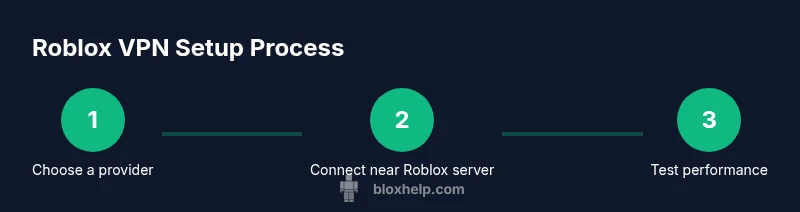
Choose a near-Region server
Open the VPN app and select a server located closest to Roblox game servers you’ll typically play. Proximity often reduces added latency compared to distant locations.
Tip: Start with a nearby region and note the ping difference against your baseline. - 4
Enable safety features and connect
Turn on the kill switch and DNS protection to prevent leaks if the VPN connection drops. Then connect to the chosen server and wait for the app to confirm a stable tunnel.
Tip: Test a few seconds of in-game activity to confirm stability before playing longer sessions. - 5
Launch Roblox and measure performance
Open Roblox, pick a representative game, and compare in-game latency, frame rate, and stability against your baseline. Record any noticeable improvements or regressions.
Tip: If latency spikes, try another nearby server or protocol (e.g., WireGuard vs OpenVPN). - 6
Evaluate legality and revert if needed
Review Roblox ToS for your region before continuing. If you observe instability or policy conflicts, consider returning to a direct connection or using the VPN only for privacy in non-gaming activities.
Tip: Keep tests short and document outcomes to avoid account risk.
Questions & Answers
Is using a VPN for Roblox allowed by Roblox ToS?
Roblox ToS prohibit cheating, ban evasion, and certain types of region-based manipulation. A VPN may be permissible for privacy or security if it’s not used to break rules. Always review the ToS and regional laws before using a VPN with Roblox.
Roblox ToS restricts cheating and evasion; use a VPN only for privacy and security, and always follow the rules for your region.
Can a VPN reduce Roblox lag or improve ping?
A VPN can sometimes reduce jitter by avoiding congested routes, but it can also add latency. The impact depends on server proximity, routing, and the VPN’s performance. Test several servers to determine the real effect.
Sometimes a VPN helps with lag, but often it adds delay. Test multiple servers to see what works for you.
Are free VPNs suitable for Roblox?
Free VPNs often come with limited speeds, data caps, and may inject ads or track activity. For gaming, paid services with gaming-optimized servers are usually more reliable and safer.
Free VPNs tend to be slow and unreliable for gaming; consider a paid option for consistent performance.
What should I check before picking a Roblox VPN?
Check server proximity, speed, security features (kill switch, DNS leak protection), device compatibility, and clear refund policies. Also verify policy on gaming and geolocation usage.
Look for nearby servers, strong security features, and a clear refund policy before you decide.
Is using a VPN legal in my country for gaming?
VPN legality varies by country. In most places, using a VPN is legal for privacy, but using it to circumvent bans or commit fraud is illegal. Always check local laws.
In many places VPNs are legal for privacy, but using them to break rules is not.
How do I test a VPN with Roblox without risking my account?
Test on a secondary or test account if possible, or limit testing to non-critical sessions. Monitor for any account actions and revert to a direct connection if you notice issues.
Test on a secondary setup or non-critical sessions and revert if you see issues.
Watch Video
The Essentials
- Test multiple near servers to optimize latency.
- Always respect Roblox ToS and local laws when using a VPN.
- Enable kill switch and DNS leak protection for privacy.
- Document performance changes to choose the best setup.