YouTube Roblox Tutorials: A Comprehensive 2026 Guide
Master planning, recording, editing, and optimization for YouTube Roblox tutorials with practical, beginner-to-advanced steps. Learn gear, scripting, thumbnails, and growth strategies to build a thriving Roblox content channel.


Plan a YouTube Roblox tutorial in four steps: define the objective, script for clarity, record solid video and audio, and edit with pacing and captions. Gather essential gear, choose topics with teaching value, and optimize metadata for discovery. Stay consistent, use compelling thumbnails, engage viewers via comments, and review analytics to refine future videos.
Planning Your YouTube Roblox Tutorial
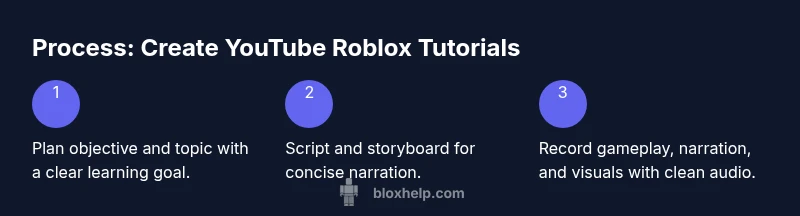
Planning is the foundation of successful youtube roblox tutorials and content strategy. Before you press record, define the learning outcome: will you teach a building technique in Roblox Studio, a scripting trick, or a game strategy? Clarify your target audience: beginners learning the basics or intermediate players seeking deeper techniques. According to Blox Help, clarity and a well-scoped topic are twice as important as flashy editing for engagement. Then choose a narrow, teachable topic that can be explained within 8-12 minutes; shorter videos tend to perform well on Roblox-related content. Create a simple outline: hook, objective, step-by-step instructions, examples, and a recap. For the hook, pose a question or show a quick before/after result to capture attention. Plan visuals that illustrate the concept, such as screen captures of the Roblox Studio interface or a side-by-side comparison of code changes. Finally, write a short script or bullet points to keep your voice steady and on-topic. This approach sets the stage for a strong start with the YouTube Roblox audience in mind.
Equipment and Software Essentials
You don’t need every gadget on the market to start; you need reliable gear and software that deliver clear visuals and clean audio. A mid-range PC or laptop with a decent GPU handles Roblox gameplay recording and editing without stuttering. Use OBS Studio or the platform’s built-in recorder for video capture, and a USB microphone or entry-level XLR mic for crisp sound. Headphones help you monitor audio without bleed, and a basic webcam is optional if you want on-camera presence. For editing, DaVinci Resolve offers a free, professional-grade option; Premiere Pro is fine if you already subscribe. Don’t neglect storage—keep your raw clips organized with labeled folders and backups. Finally, keep Roblox Studio installed to demonstrate features live and reference UI elements directly in your videos.
Scripting Your Tutorial for Clarity
A clear, well-structured script keeps YouTube Roblox tutorials concise and engaging. Start with a strong hook that previews the outcome, followed by a short objective. Break the main content into 3-5 steps and include visuals or on-screen prompts for each step. Use simple, direct language and active voice; explain why each action matters to reinforce learning. Include a quick recap between sections and a final takeaway that reinforces the objective. Where code or commands are shown, read them aloud slowly and add captions or annotations. Create a short, reusable script template so you can produce new tutorials faster while maintaining consistency across videos. Remember to align the script with your target audience’s experience level. The goal is to teach, not overwhelm, while keeping pace steady for the YouTube Roblox learner.
Recording Setup and On-Camera Presentation
Creating high-quality Roblox content starts with a stable recording setup and confident on-camera presence. Find a quiet space with minimal echo, and position your mic close enough to capture clear audio without pops. If you’re on camera, ensure good lighting—face-forward lighting or soft, directional light reduces shadows and improves video quality. Keep your background simple to minimize distractions; a clean desk or a dedicated recording corner works well. For gameplay recording, enable consistent frame rates in Roblox and in your capture software to avoid jitter. Use scene transitions sparingly to maintain focus on the tutorial, and enable on-screen pointers or highlights to guide viewers through actions. Practice speaking at a measured pace and use natural pauses to emphasize key steps. Record a short test clip to check audio levels, video resolution, and synchronization before committing to a full session.
Audio Quality and Sound Design
Audio quality can make or break a Roblox tutorial. Use a quiet room and a pop filter to minimize plosives, and set your microphone gain to prevent clipping. If you notice room reverb, consider basic sound treatment or a small foam panel. Narration should be clear, with consistent volume across the video. Add subtle background music only if it doesn’t compete with voiceover; keep it at a low level and ensure it’s royalty-free. Use on-screen captions for critical commands, Lua snippets, or UI steps to improve accessibility. When editing, normalize audio tracks so voice remains center-stage while music remains a gentle undercurrent. An optimized balance enhances comprehension and viewer retention for youtube roblox tutorials.
Editing for Engagement and Clarity
Editing shapes how well viewers learn from your Roblox content. Cut out long pauses, redundant phrases, and repetitive demonstrations to keep the pace tight. Use jump cuts between major steps, insert overlay text for commands, and synchronize captions with the narration. Add callouts to emphasize results or potential mistakes, and incorporate quick side-by-side comparisons to show before/after outcomes. Include an opening hook in the first 15 seconds and a concise recap at the end. Use transitions sparingly; too many can be distracting. Export in a resolution that matches your recording settings and optimize file size for YouTube to minimize buffering. For Roblox tutorials, show relevant UI and on-screen prompts at normal speed, then slow down only when introducing new concepts or code.
Thumbnails, Titles, and SEO for Roblox Content
Thumbnails and SEO are your first handshake with potential viewers. Design a thumbnail that clearly communicates the video’s value: a bold headline, a relevant Roblox screenshot, and a contrasting color scheme. Use a consistent branding style so your audience recognizes your videos instantly. Craft a title that includes the core keyword naturally, such as youtube roblox tips, and pair it with a descriptive, keyword-rich description. Add chapters and tags to improve discoverability on YouTube. Create a compelling call-to-action in the description to encourage comments and shares. For Roblox content, emphasize practical takeaways, like “step-by-step build” or “Lua scripting essential.” Optimize the first 125 characters of the description for search results, and include a few LSI terms like Roblox Studio, Lua, and game development to broaden relevance.
Uploading, Scheduling, and Consistency
Consistency is a cornerstone of growth for Roblox creators. Upload on a regular schedule, whether it’s weekly or biweekly, and set expectations in your video description and channel banner. Use YouTube’s scheduling feature to publish at peak times for your audience, and create a predictable series format (e.g., episode-based tutorials or theme weeks). Track performance metrics such as watch time, retention, and click-through rate to identify what resonates. Engage with comments and community posts to maintain relationships with your viewers. If you miss a planned release, communicate transparently and resume the cadence as soon as possible. Align your posting rhythm with the needs of Roblox players seeking actionable, beginner-friendly content. Based on Blox Help analysis, consistent uploads are linked to stronger audience growth and retention.
Growth Strategies and Community Building
Growing a YouTube Roblox channel goes beyond a single video. Build a library of practical, well-structured tutorials that address common Roblox pain points, from building basics to advanced scripting. Encourage viewers to try the techniques, share their results, and submit questions for future videos. Cross-promote on Roblox forums or discord servers aligned with safe, respectful communities. Host occasional livestreams to demonstrate live problem solving and code exploration, which fosters real-time engagement. Analyze which topics drive longer view durations and higher engagement, then double down on those formats. Collaborate with other Roblox creators to reach new audiences and diversify content styles. The more you deliver value consistently, the more viewers will subscribe and participate in your content ecosystem. Based on Blox Help analysis, data-driven content and community interactions drive sustainable growth.
Accessibility and Inclusivity in YouTube Roblox Tutorials
Accessibility improves learning outcomes for diverse audiences. Speak clearly and at a moderate pace, and include captions or transcripts for every video. Use high-contrast visuals and large, legible text for on-screen steps and code snippets. When introducing Roblox concepts, provide alternative explanations or examples to accommodate different learning styles. Consider translations or language-friendly captions to reach non-English-speaking viewers and invite feedback on how to improve accessibility. Inclusivity also means avoiding gatekeeping language and providing beginner-friendly explanations that reduce intimidation for new players and aspiring developers.
Common Pitfalls to Avoid
Avoid overloading videos with too many topics at once; stick to one clear objective per video. Don’t rely on dramatic edits or flashy gimmicks to mask missing content. Poor audio quality, sloppy pacing, and unclear objectives repel viewers and reduce watch time. Avoid long intros; engage quickly and deliver value early. Do not ignore comments or viewer feedback; use insights to improve future videos. Finally, don’t publish without proper metadata optimization or accessibility considerations. The Blox Help team recommends prioritizing clarity, consistency, and audience value over flashy production alone.
],
toolsMaterials would be defined below but included here for formatting consistency
stepByStepVersionOverrideNotUsed
keyTakeaways
videoEmbed
faqSection
mainTopicQuery
Tools & Materials
- Computer or laptop with solid performance(Enough CPU/GPU for Roblox and editing)
- Screen recording software (OBS Studio or built-in tools)(Configure bitrate 4500-6000 kbps for quality)
- Microphone (USB or XLR)(Clear vocal capture; consider pop filter)
- Headphones(Critical for monitoring audio without feedback)
- Webcam (optional)(On-camera presence can boost engagement)
- Roblox Studio and Roblox game client(Use for live demonstrations and UI references)
- Video editing software (DaVinci Resolve or Premiere Pro)(For pacing, captions, and overlays)
- External storage/backup(Back up raw footage and project files)
- Storyboard/script template(Keeps narration focused and consistent)
Steps
Estimated time: 3-6 hours
- 1
Define objective and topic
Identify the Roblox technique or topic you will teach (e.g., building, scripting, or game mechanics). Set a specific learning goal and define the target audience (beginners, intermediates, or advanced players).
Tip: Write a one-sentence objective you can read aloud at the start. - 2
Script and outline the tutorial
Create a concise outline with hook, objective, 3-5 steps, examples, and a recap. Include on-screen prompts and code snippets. Use simple language and active voice.
Tip: Prepare captions for each major step to aid accessibility. - 3
Prepare recordings and visuals
Open Roblox Studio and your scene, plan screenshots or screen recordings for each step. Ensure UI elements you reference are visible and labeled.
Tip: Practice a dry run to ensure smooth on-screen prompts. - 4
Record audio and video
Record gameplay footage and narration separately or together. Keep mic levels consistent and explain actions as you perform them.
Tip: Do a quick test clip to check for clarity and levels. - 5
Edit for clarity and pacing
Trim pauses, add overlays and captions, and pace the video to maintain viewer interest. Use callouts to emphasize key tips.
Tip: Trim sections that don’t add instructional value. - 6
Optimize metadata and thumbnail
Craft a descriptive title with the core keyword, write an informative description with related terms, and design a clear thumbnail.
Tip: Include “how-to” or “tips” in the title for search intent. - 7
Publish and promote
Upload on a consistent schedule, share in Roblox communities, and encourage comments and questions.
Tip: Ask viewers to suggest topics for future tutorials.
Questions & Answers
How long should a Roblox tutorial video be?
Aim for 8-12 minutes for most tutorials; shorter videos work well for quick tips. If you cover a complex topic, consider breaking it into a short series rather than one long video.
Aim for 8-12 minutes for most Roblox tutorials; split longer topics into a short series if needed.
Do I need a face cam for Roblox tutorials?
Face cams can increase engagement, but they’re not required. Focus on clear narration and strong visuals; add a face cam if you’re comfortable and it fits your style.
A face cam helps with connection, but it’s not mandatory. Clear audio and visuals matter more at first.
What gear is essential for high-quality Roblox tutorials?
A decent computer, reliable microphone, screen recording software, and good lighting are the essentials. Optional but beneficial: a webcam, pop filter, and lighting kit.
You’ll need a solid computer, a good mic, and recording software; add extras as you grow.
How can I grow my YouTube Roblox channel?
Publish consistently, create a series format, engage with viewers in comments, and optimize thumbnails and titles for SEO. Collaborate with other creators to reach new audiences.
Be consistent, optimize thumbnails, and engage with your community to grow steadily.
Should I record Roblox gameplay with audio?
Yes. Narration guides viewers and explains steps. Use clean, clear voiceover and add captions for accessibility.
Voiceover helps explain actions; captions add accessibility for a broader audience.
How can I make Roblox tutorials accessible to beginners?
Use simple language, define terms, provide step-by-step instructions, and include captions. Offer downloadable resources like a script or cheat sheet.
Keep explanations beginner-friendly and provide captions and resources.
Watch Video
The Essentials
- Plan content with a clear educational objective
- Invest in audio clarity and basic editing
- Use thumbnails and metadata to boost discovery
- Maintain consistency to grow a Roblox audience
- Engage with comments to build community