Best Way to Learn Roblox Scripting: A Practical Guide
Discover the best way to learn Roblox scripting with a practical, hands-on plan using Roblox Studio, Luau basics, and project-based practice for lasting skills.


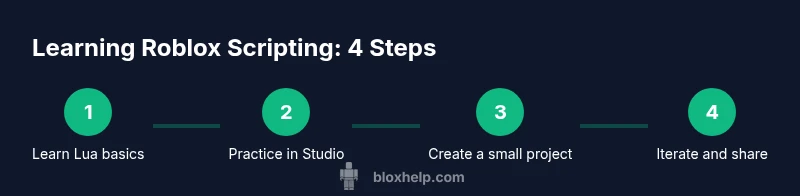
The best way to learn Roblox scripting is a step-by-step, hands-on approach: master Luau basics, set up Roblox Studio, and build small projects to reinforce skills. Start with guided tutorials, then pivot to your own ideas, gradually increasing complexity as you gain confidence. Practice daily, track progress, and seek feedback.
Why Roblox Scripting Unlocks Creative Potential
According to Blox Help, the best way to learn Roblox scripting blends guided tutorials with project-based practice. When you combine structured lessons with real-game experimentation, you build intuition faster than by reading alone. Roblox scripting gives you the power to design interactive experiences, automate tasks, and prototype gameplay quickly. By starting small and iterating, you create a tangible sense of progress that keeps you motivated over the long haul. This approach is especially effective for beginners where the goal is to turn curiosity into capability, not just theory.
Luau — the scripting language used in Roblox — is approachable for beginners who learn by doing. You don’t need to be a seasoned programmer to start; you only need curiosity and a plan. As you learn, you’ll see how changes to scripts affect in-game behavior, which reinforces concepts in a memorable, practical way. The mobile-friendly nature of Roblox Studio means you can experiment across platforms, broadening your learning opportunities.
What you’ll gain by following a structured, practice-first path:
- Faster mastery of core concepts like variables, functions, and events
- Real-world debugging experience that translates into stronger problem-solving
- A portfolio of small projects you can share with friends or the Roblox community
- Confidence to tackle more complex systems, such as UI scripts and multiplayer interactions
The key is consistency. Even 20–30 minutes a day beats long, sporadic sessions. With a steady rhythm, you’ll progress from basic scripts to more ambitious projects much sooner than you’d expect.
Core Concepts and Foundations
A Practical, Step-by-Step Learning Path
Hands-On Projects to Build Confidence
Tools, Resources, and Community Help
Common Pitfalls and How to Avoid Them
How to Measure Progress and Stay Motivated
Tools & Materials
- Roblox Studio(Install the latest version from Roblox official site and ensure it runs on your computer.)
- A computer with internet access(Windows or macOS; at least 4GB RAM recommended for smooth testing.)
- Roblox account(Create a free account to save projects and publish experiences.)
- Code editor (optional)(VS Code with Luau syntax highlighting can speed up scripting.)
- Starter project templates(Begin with small, guided templates to practice core concepts.)
Steps
Estimated time: Estimated total time: 4-6 hours for the initial sprint, plus ongoing practice
- 1
Prepare your workspace
Set up Roblox Studio and create a dedicated project folder. Configure your UI so you can easily access the Script editor and Explorer. This foundation makes subsequent steps smoother and reduces setup friction.
Tip: Keep your projects organized with a consistent folder structure and clear names. - 2
Learn Lua/Luau basics
Study variables, data types, conditionals, loops, functions, and basic APIs. Practice by writing tiny scripts that print messages, modify values, or respond to simple events inside Roblox Studio.
Tip: Comment your code generously so you understand what each line does later. - 3
Explore Roblox Studio interface
Familiarize yourself with Explorer, Properties, Output, and the Script editor. Understand where serverside vs. clientside code runs, and how to place scripts in appropriate services like ServerScriptService or LocalScript.
Tip: Use the Find button to locate APIs quickly and read short docs in-context. - 4
Create your first script
Add a Script in ServerScriptService and write a simple script that prints a message or changes a part's color on startup. Run the game to observe the effect and fix issues you see in Output.
Tip: Start with a tiny, visible change to verify your script runs correctly. - 5
Test, debug, iterate
Use Roblox Studio’s Play mode to test changes in real time. Read error messages in Output, adjust the script, and rerun until you achieve the desired behavior.
Tip: Use print statements temporarily to trace values during debugging. - 6
Delve into Roblox API references
Browse Roblox Developer Hub for API documentation. Learn how built-in services, events, and objects interact, and replicate small examples to deepen understanding.
Tip: Bookmark key APIs you’ll reuse often and review them after each project. - 7
Build a small project
Apply your skills to a practical task like a door that opens with a lever, or a teleport pad. This concretizes concepts and provides a tangible milestone.
Tip: Plan the project before coding: sketch the logic flow and user interactions. - 8
Modularize your code
Begin refactoring by grouping related functions into modules. This makes code reusable, easier to test, and scalable for larger projects.
Tip: Document module interfaces clearly so you can reuse them later. - 9
Set up a learning plan
Create a weekly schedule with goals (e.g., learn 3 APIs, complete 1 project). Track progress and adjust as needed to stay on course.
Tip: Use a simple journal or checklist to hold yourself accountable.
Questions & Answers
What is Luau and why is it used in Roblox scripting?
Luau is Roblox’s Lua-based scripting language, optimized for in-game behavior and performance. It combines Lua syntax with Roblox-specific APIs, making it approachable for beginners while powerful enough for complex experiences.
Luau is Roblox’s scripting language built on Lua, designed for in-game tasks and performance. It’s beginner-friendly and expands with Roblox APIs.
Do I need prior programming experience to start?
No. You can start with basic logic and gradually learn Lua basics. The key is consistent practice and applying concepts to small Roblox projects.
No prior programming experience is required. Start with basics and build projects to learn by doing.
How long does it take to learn Roblox scripting?
Learning pace varies; with regular practice, you’ll see steady progress in weeks, not days. Set realistic milestones and revisit tougher topics as needed.
Progress varies, but steady daily practice yields visible improvement over a few weeks.
What are good starter projects?
Start with simple interactive items like a door script, a button that triggers an action, or a teleport pad. These projects reinforce core concepts and API usage.
Try a door that opens, a button that triggers actions, or a teleport pad to practice events.
Which resources are trustworthy?
Begin with the Roblox Developer Hub for official docs. Pair those with beginner-friendly guides from trusted sources like the Blox Help team for structured learning paths.
Use the Roblox Developer Hub and trusted guides from Blox Help for a solid learning path.
Is Roblox Studio free to use?
Yes, Roblox Studio is free to download and use for creating and testing Roblox experiences.
Roblox Studio is free to download and great for practicing scripting.
Watch Video
The Essentials
- Start with Lua basics and Roblox Studio setup
- Build and test small projects to reinforce learning
- Use API references to expand capabilities
- Refactor frequently to keep code clean and reusable
- Practice consistently to develop long-term proficiency