Can You Use Roblox Gift Card on PS5? A Practical Guide
Explore whether Roblox gift cards can be redeemed on PS5, how Robux works across platforms, and the best cross-device workflow to enjoy Roblox on PS5.


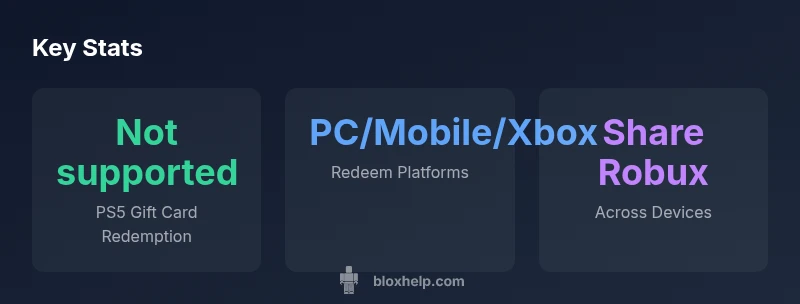
Short answer: No, you cannot redeem Roblox gift cards directly on PS5. Roblox gift cards must be redeemed on a Roblox-supported device (PC, Mac, iOS, Android, or Xbox) to add Robux to your account. Once your Robux balance is on your Roblox account, you can sign in on PS5 to use Robux for Roblox purchases, according to Blox Help.
can you use roblox gift card on ps5
Can you use roblox gift card on ps5? The short answer is that you cannot redeem Roblox gift cards directly within the PS5 ecosystem. Gift cards must be redeemed on Roblox-supported devices to add Robux to your account. Once the Robux credit is tied to your Roblox account, you can sign in from any supported platform—PS5 included—and use Robux for Roblox purchases. This cross-platform flexibility is convenient, but it does require redeeming on a device that actually supports Roblox gift card redemption. According to Blox Help, the key is to separate the redemption step from the platform you use to play, ensuring your Robux balance remains associated with your Roblox account across devices.
where gift cards can be redeemed
Roblox gift cards are designed to be redeemed on the Roblox website or mobile apps, and on Roblox-enabled consoles that officially support purchases. In practice, you typically redeem on a PC, Mac, iOS, Android, or Xbox console/app. After redemption, your Robux balance is linked to your Roblox account. When you later sign into Roblox on PS5, the balance should be accessible for eligible in-game purchases. The important caveat is that PS5 itself does not process Roblox gift card redemptions directly, so plan to redeem on another device first.
how Robux works across devices
Robux is tied to your Roblox account rather than a single device. If you add Robux to your account on PC, mobile, or Xbox, that balance becomes available on any platform that supports Roblox, including PS5. This cross-platform balance is what enables players on PS5 to enjoy Robux purchases after the initial redemption elsewhere. It’s important to keep your Roblox login consistent across devices to ensure the balance stays in sync, and to note any platform-specific restrictions on certain purchases.
step-by-step: redeeming on a non-PS5 device
- Open a Roblox-supported device (PC or mobile). 2) Sign into your Roblox account. 3) Navigate to the Gift Card redemption page on roblox.com or within the Roblox app. 4) Enter the gift card code exactly as shown and confirm. 5) The corresponding Robux credit will be added to your account. 6) On PS5, sign into the same Roblox account to access the Robux balance for purchases. 7) Verify your balance under the account section to ensure the credit appeared correctly.
signing in on PS5 after redemption
After you’ve redeemed on a supported device, launch Roblox on PS5 and sign in with the same Roblox account. You should see the Robux balance reflected in your in-game wallet. From there, you can buy items, cosmetics, or game passes, depending on what’s available in Roblox. If the balance doesn’t show immediately, sign out and back in, or check for a Roblox app update, as syncing may take a moment.
common pitfalls and troubleshooting
Common issues include entering an invalid code, redeeming in a region-locked way, or redeeming on a device that isn’t linked to your Roblox account. If the gift card shows “redeemed” on one device but not another, contact Roblox support with your code and purchase receipt. Always ensure you’re using the same account on all devices and avoid sharing gift card codes publicly to prevent fraud or theft.
alternatives for PS5 players
If you want a PS5-friendly path, plan to redeem the gift card on a compatible device first, then sign into your Roblox account on PS5 to utilize Robux. Some players also use an Xbox or PC to perform the redemption and then bridge to PS5 via the Roblox account. Note that PS5 itself won’t accept direct gift card redemption, so you’ll rely on cross-device balance transfer.
safety tips and best practices
Never share your gift card codes publicly or across messages. Verify you’re on the official Roblox site or app when redeeming. Double-check codes before submitting and be mindful of regional restrictions. If you suspect a scam, pause the redemption and contact Roblox support. Keep your account credentials secure and enable two-factor authentication for added protection.
workflow for PS5 owners: quick checklist
- Ensure you have an active Roblox account and you can access it on multiple devices. - Redeem Roblox gift cards on PC, Mac, iOS, Android, or Xbox. - Confirm Robux balance is credited to your account. - Sign in to PS5 with the same Roblox account to access Robux for in-game purchases. - If issues arise, check connectivity, app updates, and Roblox support resources.
Platform support for Roblox gift card redemption
| Platform | Can Redeem Roblox Gift Card | Notes |
|---|---|---|
| PC/Mac | Yes | Redeem on roblox.com or app; credits Robux |
| iOS/Android | Yes | Redeem on mobile apps; credits Robux |
| Xbox | Yes | Redeem on Xbox app/website; uses same Robux balance |
| PS5 | No | Direct redemption not supported; redeem elsewhere and sign in on PS5 |
Questions & Answers
Can I redeem Roblox gift cards directly on PS5?
No. PS5 does not currently support direct Roblox gift card redemption. Redeem on a supported device, then sign in on PS5 to access Robux.
No direct redemption on PS5; redeem on another device and log in on PS5 to use Robux.
Which platforms support Roblox gift card redemption?
Gift cards can be redeemed on PC, Mac, iOS, Android, and Xbox via the Roblox website or apps. The Robux balance then applies to all platforms sharing the same account.
Redeem on PC, Mac, iPhone/Android, or Xbox, then use the Robux on any platform including PS5.
Will Robux from gift cards be usable on PS5?
Yes, if you redeem the gift card on a supported device first and sign into the same Roblox account on PS5, your Robux balance will be usable on PS5.
Yes—once redeemed elsewhere and you’re logged into the same account on PS5.
What if the gift card shows as redeemed but Robux don’t appear?
Double-check the code, ensure you’re on the correct region, and confirm you’re signed into the same Roblox account. If it still fails, contact Roblox support with your code and receipt.
Check the region and account, then contact Roblox support if the balance isn’t credited.
Are there PS5-specific alternatives to get Robux quickly?
The primary path is to redeem on a supported device and then use Robux on PS5. There is no direct PS5 gift card redemption, so cross-device redemption is the recommended approach.
Redeem on another device and use Robux on PS5.
Do Roblox gift cards expire?
Roblox gift cards typically do not expire, but regional terms may apply. Always check the card's terms and Roblox's official policy.
Most Roblox gift cards don’t expire, but verify regional terms.
“Cross-platform Robux management works best when you redeem on a supported device and then use the same account across devices. This approach minimizes friction for PS5 players.”
The Essentials
- Redeem on a supported device first
- Robux balance is shared across platforms
- PS5 does not process direct gift card redemption
- Sign in with the same Roblox account on PS5
- Use caution to avoid codes scams