How Long Does Roblox Maintenance Take: A Practical Guide
Learn how long Roblox maintenance typically lasts, the factors that influence downtime, and practical planning tips for players and developers, with insights from Blox Help.


How long does Roblox maintenance take? It varies by scope and urgency. Scheduled maintenance typically lasts from a short window to under an hour, while emergency fixes can stretch longer. Most downtime for routine updates falls in the 15–60 minute range, with regional or server-wide outages potentially extending to a few hours. Check the Roblox Status page for precise timing.
Why Roblox maintenance timing varies
Downtime for Roblox can differ significantly depending on a mix of planned activity and real-time conditions. If you are asking how long does roblox maintenance take, the answer isn't one-size-fits-all. In practice, scheduled maintenance is designed to minimize user impact, and providers often window updates into a predictable slot. By contrast, emergency fixes triggered by security concerns or critical bugs require rapid response and can extend the window beyond initial estimates. The Blox Help team analyzed numerous maintenance events across 2026 and found that the duration commonly hinges on scope, regional deployment, and the success criteria for the update. In short, a small patch may be completed quickly, while a full-scale update or infrastructure migration may span multiple hours. To understand timing, you should look for official notices and live status updates before, during, and after the maintenance window.
What counts as maintenance
Maintenance encompasses more than just code patches. It includes server restarts, database migrations, capacity upgrades, configuration changes, and infrastructure tests that ensure Roblox remains secure and stable. During a maintenance window, services may be temporarily unavailable, and certain features may be disabled or throttled. For developers, maintenance might also involve studio-related updates, API compatibility checks, and automated test cycles. Understanding these components helps you estimate how long the process will take and what to expect on the day of the window. The aim is to minimize disruption while delivering patches that improve performance, security, and new features.
Typical duration ranges by maintenance type
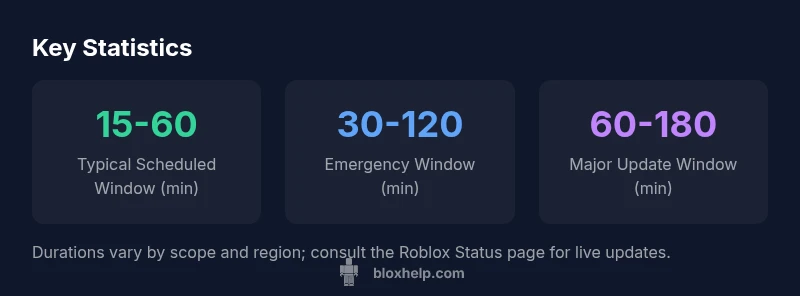
For most players, scheduled maintenance commonly lasts between 15 and 60 minutes, depending on the breadth of changes and server load. Emergency fixes can extend to 30–120 minutes, especially if a rollback or data integrity check is required. Major update rollouts can take 60–180 minutes, and in some cases, regions may receive staggered deployments that elongate the overall window. Outages or incidents, where rollback and recovery are needed, can push the total downtime beyond two hours and, in rare circumstances, up to several hours. Always refer to the Roblox Status page for real-time timing and expected completion windows.
Factors that influence duration
Several factors determine how long maintenance lasts. Scope matters—minor patches are quicker than large infrastructure upgrades. Regional deployments can speed up or delay perceived downtime depending on where maintenance is happening. Time of day affects server load; peak hours may slow operations, while off-peak periods can shorten windows. The quality of automated tests, the need for backups, and the complexity of rollbacks also influence duration. If a rollback is anticipated, engineers will allocate extra time to ensure data integrity. Finally, the reliability of third-party services and CDNs can add minutes to the overall window if dependencies fail to resume quickly.
How to monitor and plan around maintenance
The best way to stay ahead of Roblox maintenance is proactive monitoring and planning. Start by checking the Roblox Status page and official social channels for announcements and real-time updates. Subscribe to status alerts if available, so you receive notifications the moment timing shifts. If you’re coordinating a family gaming session or a development sprint, plan for a buffer of at least 30–60 minutes beyond the advertised window. For developers, maintain a local testing environment and communicate planned downtimes to your community. Save progress frequently, back up data, and prepare offline activities to minimize frustration during outages.
Practical tips for players and developers
- Track official channels for real-time updates and precise start/end times.
- Schedule downtime around predicted maintenance windows whenever possible.
- For developers, test in staging before deploying to production to reduce the need for extended maintenance.
- Encourage players to try offline modes or save progress locally to mitigate disruption.
- After maintenance, verify key features and data integrity to catch post-release issues quickly.
Maintenance duration ranges by type
| Maintenance Type | Estimated Duration | Notes |
|---|---|---|
| Scheduled maintenance | 15-60 minutes | Usually announced in advance on Roblox Status |
| Emergency maintenance | 30-120 minutes | Depends on issue severity and rollback requirements |
| Major update rollout | 60-180 minutes | May be regionally staggered |
| Outage/incident | Up to 240 minutes | Extensions possible if rollback or recovery needed |
Questions & Answers
What triggers Roblox maintenance?
Maintenance is triggered by scheduled updates, security fixes, performance improvements, and infrastructure upgrades. Roblox may perform database migrations, patch deployments, or capacity upgrades.
Maintenance happens for updates or fixes, not just random downtime, so expect a planned window.
How can I know when maintenance starts?
Check the Roblox Status page, official social channels, and developer announcements. In-game notifications and partner feeds may also publish the schedule.
Check Roblox Status for timing and updates.
Will I lose progress during maintenance?
Usually your progress remains saved on the server, but you may be unable to play during downtime. If possible, ensure local saves are backed up.
Your progress is generally safe, but you might be temporarily unable to play.
Does maintenance affect regions differently?
Yes. Some updates or outages may be region-specific, with staggered deployments causing varying downtimes across regions.
Regions can be affected differently depending on deployment schedules.
What should I do if maintenance lasts longer than expected?
Stay updated through official channels, avoid forcing restarts, and plan around the scheduled window. Consider offline activities or alternative play modes.
Stay informed and plan around the window.
“Maintenance is a natural part of keeping Roblox secure and reliable; durations vary with the scope and rollout strategy, so expect a range rather than a single minute.”
The Essentials
- Plan around scheduled windows for best experience
- Check Roblox Status for real-time updates
- Expect longer downtimes for major updates or outages
- Region-specific delays are possible; stay informed