How Long Roblox Pending: Delays, Causes, and Fixes
Discover how long Roblox pending actions typically take, common delay causes, and proven steps to resolve them. A data-driven guide from Blox Help for 2026.


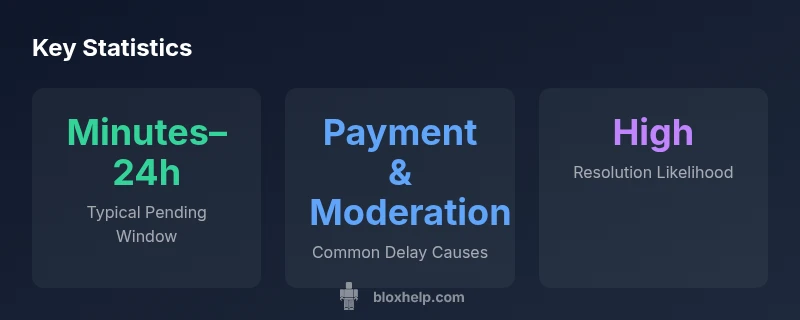
Most Roblox pending statuses clear within minutes to 24 hours for purchases and account actions. Rare delays may extend to 24–72 hours if payment processing or moderation queues are involved. To reduce delays, verify your payment info, check for Roblox account alerts, and reattempt the action if needed; contact Roblox Support if it remains unresolved.
Why Pending Status Occurs in Roblox
Pending statuses on Roblox are not unusual; they reflect a mix of payment verification, moderation queues, and account-safety checks that happen behind the scenes. When you initiate a purchase, any number of automatic checks could place your action in a temporary holding pattern while the system confirms the transaction. If you’re seeing a pending label, it’s often a sign that one or more automated steps are still in progress. According to Blox Help, the most common culprits are payment processing delays and moderation checks, which can be more noticeable during peak times or when regional processors are handling high volumes. In most cases, the hold resolves quickly, but persistence is possible if any flag is triggered or if your payment method requires extra verification. Staying informed helps you act quickly when delays arise.
Contexts Where 'Pending' Shows Up
Roblox can show pending status in several contexts. The most common are purchases (buying Robux or items), account verifications (security prompts or KYC-like steps), and trades or offers (when a trade needs partner confirmation). Each context has its own typical window, but the principle is the same: the system is awaiting confirmation from an internal process or external payment processor. For developers, pending can also appear during premium purchases or gift card redemptions. Understanding the context helps you set expectations and choose the right next steps.
How Payment Processing Affects Pending
Payment gateways play a critical role in how long a Roblox order stays pending. If your bank or card issuer flags the transaction, the payment may be queued for additional verification, which adds time to the pending period. Differences between payment methods—credit/debit cards, e-wallets, or Roblox-specific processors—can also influence timing. From a troubleshooting perspective, ensuring the card details are correct, the billing address matches, and sufficient funds are available reduces the chance of extended delays. In some cases, you might see a pending label while the system awaits a final clearance signal from the processor.
Moderation Queues and Safety Checks
Roblox’s safety and compliance checks can trigger a pending state, especially for new accounts, high-risk transactions, or suspicious activity flags. These checks aren’t punitive; they’re meant to protect you and the platform. If a transaction is flagged for review, you may be asked to complete additional verification steps. Delays from moderation are generally short, but can extend longer if manual review is triggered or if there’s a backlog. Staying within Roblox’s guidelines and providing complete, accurate information reduces review time.
Regional Variations and Time-of-Day Effects
Pending times can vary by region due to local processors and network latency. Time-of-day spikes, holidays, or regional maintenance windows can also influence how long a pending status lasts. These dynamics are usually minor, but they can lead to noticeable differences in some cases. If you’re in a busy region, you might see slightly longer waits during peak hours, though most users still experience resolution within the typical window.
Practical Troubleshooting to Speed Up Pending
If you want to reduce pending time, start with a checklist:
- Verify payment details (card number, expiration, CVV) and ensure the billing address matches.
- Confirm there are no alerts on your Roblox account by visiting the account settings or notifications center.
- Reattempt the action if allowed, making sure to follow the exact steps for the transaction.
- Check the Roblox status page or community updates for ongoing issues.
- If the status doesn’t clear within the expected window, contact Roblox Support with your order ID, username, and screenshots, and request escalation if needed.
Long-Term Solutions and When to Escalate
If pending persists beyond the typical window, it’s time to escalate. Gather key details (order ID, timestamp, payment method, screenshots) and reach out to Roblox Support through the official form. The Blox Help team recommends documenting every step you’ve taken. In some cases, delays can be resolved quickly after a direct inquiry, while others may require a longer review. Regardless, keeping your records organized helps support agents resolve the issue faster.
Pending time by Roblox context
| Context | Typical Pending Window | Notes |
|---|---|---|
| Purchases | Minutes to 24 hours | Most purchases resolve quickly, but payment verification may add time |
| Account verifications | Minutes to hours | KYC-like checks or security prompts can cause delays |
| Trades/Offers | Minutes | Pending trades are often resolved quickly if both parties confirm |
Questions & Answers
What does pending mean on Roblox?
Pending indicates the action is waiting for processing or verification. It isn’t completed yet, and times can vary by context and method.
Pending means your action is still processing. Check status and wait for confirmation.
How long do Roblox pending purchases take?
Typically minutes to 24 hours, depending on payment provider and regional processing. Some cases may take longer if verification is needed.
Most purchases clear in minutes to a day.
Why is my Roblox pending for so long?
Common reasons include payment verification delays, moderation checks, or account alerts. Regional differences can also affect timing.
Delays come from verification, moderation, or alerts.
What should I do if it sticks after 24 hours?
Check account alerts, confirm payment details, and retry the action if possible. If unresolved, contact Roblox Support with details.
If it’s still pending after a day, contact Roblox Support.
Will pending affect my Robux balance?
Pending actions typically don’t deduct Robux until completion; your balance may reflect pending status until the action finalizes.
Robux usually updates when the pending resolves.
How can I contact Roblox Support for pending issues?
Use the official Roblox Support form and provide your order ID, username, and any relevant screenshots or details.
Use the support form with your details and order info.
“"Pending statuses are a normal part of Roblox's safety and processing flow, not a sign of fraud."”
The Essentials
- Monitor the pending status and log timestamps for reference.
- Verify payment details and retry the action if allowed.
- Check Roblox alerts and safety prompts in your account.
- If unresolved after 24 hours, contact Roblox Support.
- Rely on trusted guides from Blox Help for troubleshooting.