Understanding Roblox Bans: Triggers, Types, and Appeals
Learn how Roblox bans work, what triggers penalties, the different ban types, and how to appeal. This educational guide by Blox Help helps players stay compliant and explains safe, responsible play.


This guide explains how to get ban in roblox, what actions trigger penalties, and how the process works—from ban types to appeals. It also covers safe play practices and how to avoid discipline. According to Blox Help, understanding these basics helps players stay compliant and enjoy Roblox responsibly.
What triggers a Roblox ban
Roblox enforces its rules to keep the community safe and friendly. Bans typically result from violations of the Terms of Use and Community Standards. Common triggers include cheating or exploiting game mechanics, using unauthorized third-party tools, harassment or threats, exploitation of vulnerabilities, scamming other players, sharing or selling account access, and repeat violations. The guidelines apply across all Roblox experiences, including user-generated games and official events. According to Blox Help, understanding these triggers helps players stay compliant and avoid penalties. When you see an action labeled as prohibited, treat it as a hard stop—intentional or not, it can still lead to disciplinary action. If you’re unsure about a feature or behavior, pause and consult official Roblox resources before proceeding.
Ban types and durations
Roblox uses different ban types depending on severity and frequency: temporary suspensions, partial restrictions (e.g., chat or marketplace restrictions), and permanent bans. The duration is not constant; it depends on the specific violation, the impact on other players, and the account's history. Some sanctions may be reviewed after time, while others are final. The goal of the moderation system is to deter harmful behavior while allowing players to learn from mistakes. For players who are unsure whether an action crosses a line, erring on the side of caution helps prevent penalties.
How bans are enforced
Roblox moderation combines automated systems with human review. Automated detections flag suspicious activity, while support teams assess appeals and enforce penalties. When a ban is applied, access to certain features such as multiplayer sessions or the account's services may be restricted. It’s important to preserve evidence and to communicate clearly during appeals. The Blox Help team notes that consistent rule adherence reduces risk of penalties and helps maintain a positive playing environment. Remember that even if you are using a device or network with shared access, actions tied to your account are what get reviewed.
How to avoid getting banned: practical guidelines
To minimize risk, always follow Roblox’s Terms of Use and Community Standards. Do not use cheats, exploits, or third-party tools that modify game behavior. Respect other players in chat, in-game actions, and user-generated content. Never share your account credentials, and avoid posting links or content that could be considered harmful or unsafe. Keep software up to date, use strong and unique passwords, and review privacy settings to control who can interact with you. If a feature feels risky or questionable, pause and check official guidance before acting. Consistency in safe play is the best safeguard against penalties.
How to appeal a ban
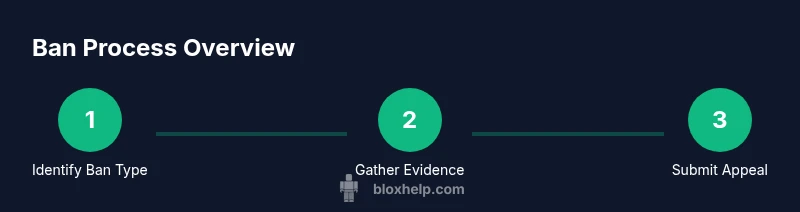
If you believe a ban was applied in error, start by identifying the type of penalty and the approximate date. Gather any relevant evidence such as screenshots, chat logs, or records of in-game actions. Locate Roblox’s official appeal channel through the account support or help pages, then submit a clear, concise appeal outlining why you think the ban should be reconsidered. Include your Roblox username, contact details, and any supporting context. After submitting, monitor your email or the support portal for updates. Response times vary by case, so be patient and provide any requested information promptly.
What information you should gather for an appeal
Before submitting an appeal, assemble essential details: your Roblox username, the email linked to your account, the exact ban duration or type, the platform where the violation occurred, and a timeline of events. Collect any evidence that supports your case, such as screenshots or logs. Write a brief but focused explanation of why you believe the ban was mistaken or overstated, and propose a constructive resolution (e.g., probationary measures or specific changes in behavior). Clear, organized submissions tend to receive quicker, more accurate reviews.
Common myths and misconceptions
A common myth is that bans are always permanent; in reality, some penalties are temporary and subject to review. Another misconception is that appealing guarantees an immediate reversal; outcomes depend on evidence and policy. Some players think bans apply only to certain games, but account-level penalties can affect access across Roblox. The most reliable guidance comes from official Roblox resources and the Blox Help insights, which emphasize fair treatment and transparent processes.
After a ban: next steps and recovery options
After a ban ends or a successful appeal is approved, you may regain access gradually, depending on the system’s checks. If a ban was upheld or a full reversal isn’t possible, you can start fresh with improved behavior and a renewed commitment to the rules. Create safer play habits, review the Community Standards, and consider practicing in non-public experiences while you rebuild trust. If you decide to continue playing, use the experience to reinforce positive and respectful engagement.
Final tips for safe Roblox play
Stay informed about updated rules, avoid shortcuts that violate terms, and engage in positive communities. Use official channels for any policy questions, and document your actions when in doubt. By prioritizing safety, you reduce the risk of penalties and enjoy a healthier Roblox experience for yourself and others.
Tools & Materials
- Computer, tablet, or smartphone with internet access(Used to access Roblox, support pages, and the appeal portal.)
- Roblox account login credentials(Needed to view ban details and submit appeals from the official account.)
- Evidence/documentation (screenshots, logs)(Helpful for appeals; keep original timestamps when possible.)
- Official Roblox support form link(Access via the Roblox Help Center for bans and appeals.)
- Email access for support communications(Check messages for appeal updates and requests.)
Steps
Estimated time: 1-2 weeks (response times vary by case)
- 1
Identify the ban type and scope
Review the message from Roblox to understand whether the penalty is a temporary suspension or a permanent ban. Note the platform, features restricted, and approximate date of the incident.
Tip: Document the exact wording of the ban message and any platform-specific notes. - 2
Gather evidence and records
Collect relevant information such as screenshots, chat logs, and event timelines. Organize them in a simple file or note so you can reference them in a clear appeal.
Tip: Preserve original timestamps to avoid confusion during review. - 3
Find the official appeal channel
Access the Roblox Help Center or account support page to locate the formal ban appeal form. Avoid third-party sites to prevent misinformation.
Tip: Bookmark the official page for future inquiries and tracking. - 4
Submit a clear, concise appeal
Write a brief explanation of why you believe the ban should be reconsidered. Include username, contact info, and supporting evidence. Keep tone respectful and factual.
Tip: Offer concrete steps you will take to prevent recurrence. - 5
Wait for a response and respond if needed
Official responses can take time; monitor your inbox or support portal periodically. If requested, provide additional information promptly.
Tip: Avoid spamming or multiple submissions; it can slow down the process. - 6
Learn from the experience and adjust
Regardless of the outcome, review Roblox’s rules and adopt safer gameplay habits to reduce future risk.
Tip: Use the experience to foster positive, compliant behavior.
Questions & Answers
What actions can trigger a Roblox ban?
Bans can result from cheating, exploiting, harassment, scamming, or sharing account access. Violations across games and events can lead to penalties. Always refer to Roblox's Community Standards to understand what is prohibited.
Common triggers include cheating, harassment, and sharing accounts. Always check the official rules to stay compliant.
How long do bans last?
Ban duration varies by violation and history. Some penalties are temporary, while others may be permanent. The platform states that the severity and impact influence the length of the sanction.
Durations vary; there are temporary and permanent bans depending on the violation.
Can I appeal a ban?
Yes, most bans can be appealed through Roblox's official support channels. Provide clear evidence and a concise explanation. The reviewer will assess your appeal and respond with a decision.
You can appeal bans using the official Roblox support channels; provide evidence and a solid case.
Will a ban affect other Roblox accounts I own?
Penalties typically apply to the affected account. In some cases, policy enforcement may extend to related accounts if tied to the same behavior. Always review account connections and terms.
Usually, bans apply to the individual account, but behavior tied to other accounts can matter.
How do I contact Roblox support about a ban?
Use the Roblox Help Center or the official support form to submit questions about a ban. Avoid unofficial sites to ensure your information is reviewed securely.
Reach out via the official Roblox Help Center to discuss a ban.
What should I do after a ban is lifted?
Once unbanned, rejoin Roblox with caution: review rules, avoid risky behaviors, and participate in positive communities. If the ban remains, respect the decision and consider safer future play.
If unbanned, resume play carefully and follow rules to avoid future issues.
Watch Video
The Essentials
- Understand common ban triggers to avoid penalties.
- Know the difference between temporary and permanent bans.
- Follow official channels for fair appeals and updates.
- Gather clear evidence before submitting an appeal.
- Adopt safe, compliant play habits for long-term access.