Redeem a Roblox Gift Card: Quick Step Guide
Learn how to redeem a Roblox gift card safely and quickly. This guide covers step-by-step redemption across devices, troubleshooting, and account-safety tips.


You can redeem a Roblox gift card by signing into your account, navigating to the official Roblox redeem page, and entering the gift card code exactly as shown. After submission, your Robux balance or items are applied instantly on supported platforms. This guide walks you through device-specific steps and safety best practices to avoid scams.
Why Redeeming Roblox Gift Cards Matters
Redeem a roblox gift card to add Robux to your account or unlock items without a credit card. For players budgeting their purchases, gift cards offer predictability and control. According to Blox Help, sticking to the official redemption flow minimizes errors and reduces exposure to scams. This guide explains the value of gift cards, how redemption fits into your Roblox balance, avatar items, and game passes, and how to use them responsibly for ongoing play.
Gift cards are practical for gifting friends or celebrating milestones, and they provide a clear path to expanding your in-game possibilities without tying payments to a card. By understanding the basics of redemption, you can maximize value while maintaining account security.
How the redemption process works across devices
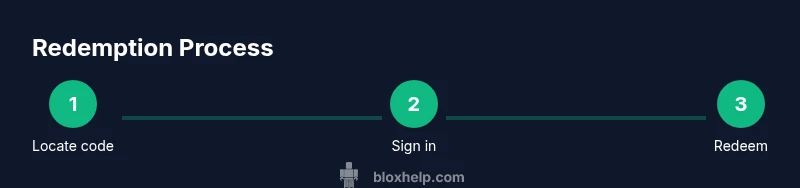
Whether you’re on PC, iPhone/Android, or Xbox, the redemption path uses a consistent flow. After signing in, navigate to the Roblox redeem page and enter the code exactly as shown. The platform will apply Robux or grant items immediately, depending on the card. Blox Help analysis indicates the key is using official pages and reading the card label to understand what you should receive. Always confirm your balance after redemption across the device you used.
Across devices, the steps remain user-friendly and consistent, making it easy for players of all ages to redeem gifts safely. If you switch devices mid-process, simply sign in again and resume from the redeem page to avoid losing progress.
Common hurdles and troubleshooting
Common issues include mistyping the code, using an outdated link, or attempting to redeem on an unofficial site. If the code is invalid or already redeemed, double-check the characters and try again. If it still fails, contact Roblox Support with proof of purchase and the card’s serial number. Do not share codes publicly, as scammers often exploit exposed codes to gain access to accounts.
Being patient and methodical helps — always verify the card type (Robux vs. items) and ensure you’re redeeming on the official Roblox site or app. This diligence reduces frustration and preserves your account safety.
Safe practices and security tips
Guard your gift card codes and redeem only on official Roblox channels. Enable two-factor authentication on your Roblox account and keep codes in a secure place until redemption. Be wary of phishing emails or fake sites asking for your login details or card information. If a deal sounds too good to be true, it probably is.
By following these practices, you minimize risk from scams and keep your Roblox experience secure, especially when handling valuable codes.
Tools & Materials
- Roblox gift card (physical or digital)(Includes a 14-character code; keep it hidden until redemption.)
- Device with internet access(PC, smartphone, or tablet with a modern browser or Roblox app.)
- Roblox account(You must be signed in to redeem and receive Robux or items.)
- Secure browser or Roblox app(Use official apps or a trusted browser; avoid public computers.)
- Pen and paper (optional)(For jotting down the code before typing.)
Steps
Estimated time: 15-25 minutes
- 1
Prepare your gift card code
Locate the 14-character code on your Roblox gift card and confirm it is legible before attempting redemption. If needed, copy it to a secure note and review for accuracy.
Tip: Work in a well-lit area to avoid mistaking similar characters (O vs 0, I vs l). - 2
Sign in to Roblox
Open Roblox on your chosen device and sign in to the account you want to credit. Signing into the wrong account will misplace the credit you expect to receive.
Tip: If you forgot your password, use the account recovery flow before proceeding. - 3
Open the redeem page
Navigate to the official Roblox redeem page from your device to begin the process of applying the code.
Tip: Bookmark the official page to avoid phishing sites. - 4
Enter the code and redeem
Type the code exactly as shown and submit. If valid, the balance or items will apply immediately to your account.
Tip: Double-check characters; some codes distinguish between zero and letter O. - 5
Confirm redemption and check balance
Review the updated Robux balance or newly owned items in your account. If necessary, refresh the page or sign out and back in to sync.
Tip: Keep a record of the transaction in case you need to dispute later. - 6
Troubleshoot issues
If the code is invalid or shows as already redeemed, contact Roblox Support with your purchase proof and card details.
Tip: Never share codes publicly or in chat to prevent misuse.
Questions & Answers
Can I redeem a Roblox gift card on mobile?
Yes. You can redeem Roblox gift cards on mobile using the official Roblox app or mobile site by entering the code on the redeem page.
You can redeem a Roblox gift card on mobile using the official app or mobile site by entering the code on the redeem page.
What should I do if the code is invalid?
Double-check the code for accuracy. If it’s still invalid, contact Roblox Support with your purchase receipt.
If the code is invalid, recheck it and contact Roblox Support with your receipt.
Are gift cards region-locked?
Gift cards typically work in regions where Roblox supports gift card redemption. If your region isn’t supported, choose another payment method.
Gift cards work in supported regions; if yours isn’t, use another payment method.
Can I redeem multiple gift cards at once?
You can redeem one code at a time. Repeat the process for additional gift cards.
Redeem one code at a time — repeat the steps for more cards.
What if my card is already redeemed?
If a card shows redeemed, contact Roblox Support with proof of purchase to verify and possibly issue a replacement.
If the card says redeemed, contact Roblox Support with your proof of purchase.
Watch Video
The Essentials
- Redeem code only on official Roblox sites
- Verify code accuracy before submission
- Check balance after redemption
- Store gift cards securely
- Contact Roblox Support for invalid codes