What Internet Speed Is Needed for Roblox: A Practical Guide
Learn the internet speeds Roblox needs, why latency matters for gameplay, and practical steps to test and optimize your connection in 2026.


Defining Roblox internet needs: you can start playing with as little as 3-4 Mbps download, but a stable 10-25 Mbps connection is recommended for smooth gameplay, especially with multiple devices. Prioritize low latency (ping under 60–100 ms) and a steady upload of 0.5–3 Mbps for reliable Roblox Studio uploads. For peak performance, consider wired Ethernet.
What Roblox Demands From Your Connection
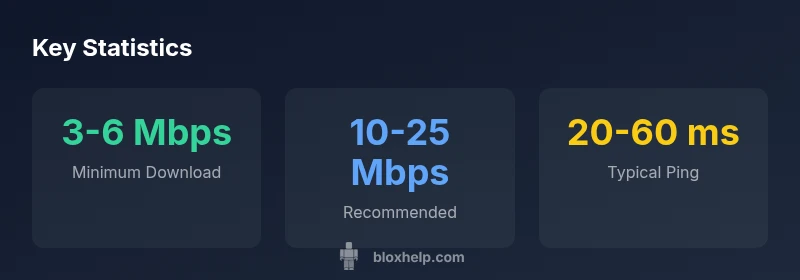
If you're asking what internet speed is needed for roblox, the short answer is that a connection with modest download throughput can get you logged in and play, but the real limiter is latency. Roblox is highly sensitive to ping, jitter, and occasional packet loss rather than raw speed alone. A stable connection reduces rubber-banding and missing actions. For most users, an initial target of 3-6 Mbps download with a modest upload is enough for basic play, while 10-25 Mbps provides headroom for adjacent devices and higher-quality graphics. In practice, you should measure your real-world performance across times of day and compare it to your router's performance. According to Blox Help, latency management is often more important than raw bandwidth.
Minimum Speeds to Play Roblox
Real-world play begins at modest speeds. For solo Roblox gaming on a typical mobile or tablet, a download speed in the range of 3-6 Mbps with an upload around 0.5-1 Mbps can suffice if the connection is stable and the latency is reasonable. If you share your network with others—streaming videos, video calls, or other games—it's prudent to target higher speeds. A practical mid-range target is 10-25 Mbps download with 1-3 Mbps upload to maintain a buffer during peak usage. Remember that your actual experience depends on latency, interference, and distance from the router.
Why Latency (Ping) Matters More Than Raw Speed
Latency matters because Roblox is a real-time multiplayer experience where every action must reach the server and return quickly. A fast download does little good if your ping spikes or your connection jitters. A 40-60 ms ping is often much more responsive than a 20 Mbps connection that fluctuates to 100 ms. To improve latency, ensure a stable wired or near-wireless connection, minimize hops by reducing VPN use, and keep devices on the same network segment with limited interference.
How to Test Your Speed: A Practical Guide
Testing speed gives you objective numbers to evaluate. Use a reputable speed test (e.g., a popular provider) at different times of day and from the same device to establish a baseline. Run tests with other devices off or paused to isolate your primary link. Record download/upload speeds and, crucially, measure latency by running a ping test to a nearby Roblox server or general game-testing endpoint. If you consistently see latency above 60-100 ms, investigate the router location, channel congestion, and possible firmware updates.
Speeds for Different Setups: Wi-Fi, Ethernet, Mobile Data
Wired Ethernet connections dramatically reduce variability and jitter compared with Wi‑Fi, making them the preferred option for Roblox. If you must use Wi‑Fi, place the router in a central location, minimize walls between the device and router, and choose a 5 GHz band when possible. Mobile data can work, but coverage, data caps, and network shaping can cause unpredictable performance. For best results, use Ethernet for desktops and laptops, and a high-quality router with QoS features to prioritize Roblox traffic.
Household Scenarios: Streaming, VPN, and Multiple Devices
Families often run several services simultaneously. Streaming video, video calls, and cloud syncing consume bandwidth and can increase latency or cause jitter if your plan isn’t sufficient. Consider enabling QoS on your router to prioritize Roblox traffic, or upgrade to a plan with higher download and upload ceilings. If you frequently game while others stream, aim for the upper end of the recommended ranges or split networks via guest networks to isolate traffic.
Roblox Studio and Roblox Games: Different Requirements
Roblox Studio sometimes demands higher upload bandwidth due to asset delivery and testing activities, in addition to low latency for immediate feedback in the editor. Regular Roblox games primarily require stable download speeds and low jitter for quick responses. If you’re developing, ensure your upload speed is consistently above the mid-range thresholds and test changes during off-peak hours to avoid bandwidth contention.
Troubleshooting Without Upgrading Your Plan
Before buying more speed, optimize your current setup: update firmware, reboot your router, and ensure nothing else is saturating your network during gaming sessions. Change the wireless channel to avoid interference, and use wired connections where possible. Close background applications on your gaming device and consider disabling VPNs or proxies that add latency.
Saving Bandwidth Without Sacrificing Playability
If upgrading isn’t possible, tighten your bandwidth usage: disable auto-updates, set Roblox to high priority in your device's task manager, and schedule heavy downloads for off-peak times. In many cases, maintaining a stable lower speed with minimal jitter yields a better Roblox experience than a higher but unstable connection.
Common Myths About Roblox Internet Speed
One common myth is that only download speed matters. In reality, latency, packet loss, and jitter drive performance. Another myth is that you must always have the highest speed to enjoy Roblox; in truth, stability and low latency outpace raw bandwidth for most players. Finally, many assume Wi‑Fi is always bad for gaming; with good router placement and modern hardware, Wi‑Fi can be close to ethernet in performance.
How to Plan For Upgrades: What to Look For In ISPs
When considering an upgrade, evaluate both download and upload speeds, latency averages, and the presence of true fiber or cable options in your area. Look for plans offering low contention ratios and minimal throttling during peak hours. If you can, choose an ISP that provides modern routers and clear QoS support, and confirm the service's reliability with recent customer reviews and uptime data.
Quick Reference Speed Ranges by Use Case
- Solo Roblox Gaming: 3-6 Mbps download; 0.5-1 Mbps upload; 20-50 ms latency.
- Group Play or Competitive: 15-25 Mbps download; 1-3 Mbps upload; 15-40 ms latency.
- Roblox Studio Development: 25-50 Mbps download; 1-5 Mbps upload; 15-35 ms latency.
- General Household: 10-25 Mbps download; 1-3 Mbps upload; 20-60 ms latency.
Speed ranges by use case
| Use Case | Download Speed | Upload Speed | Latency (ms) | Notes |
|---|---|---|---|---|
| Solo Roblox Gaming | 3-6 Mbps | 0.5-1 Mbps | 20-50 | Basic play on mobile or tablet |
| Group Play/Competitive | 15-25 Mbps | 1-3 Mbps | 15-40 | More devices; stable router recommended |
| Roblox Studio Development | 25-50 Mbps | 1-5 Mbps | 15-35 | Uploads and asset transfers |
Questions & Answers
What is the minimum internet speed required to play Roblox?
Roblox can run on as little as 3-4 Mbps download, but for reliable play you should target 10 Mbps or more, especially with shared networks.
Roblox can run on as little as 3-4 Mbps, but for reliable play aim for at least 10 Mbps.
Does latency matter more than download speed for Roblox?
Yes. Latency (ping) affects responsiveness much more than raw download speed; aim for low ping and stable connection.
Latency matters more than speed for Roblox; keep ping low for responsive gameplay.
Should I upgrade my internet if multiple devices are using Wi‑Fi?
If many devices share the network, upgrading to higher bandwidth or using QoS can help maintain Roblox performance.
Yes, consider more bandwidth or prioritize Roblox with QoS when many devices are online.
Is Roblox Studio more demanding than playing Roblox games?
Roblox Studio can push upload bandwidth and latency requirements; a stable connection helps asset uploads and testing.
Roblox Studio can be more demanding; ensure stable upload speeds for smooth development.
Can I play Roblox on mobile data?
Yes, but data plans and coverage vary; mobile data can be unstable and expensive for large sessions.
Yes, but mobile data may be unreliable and costly for long play sessions.
What is ping, and how can I reduce it?
Ping is the round-trip time to the game server. Reduce it by using Ethernet, moving closer to the router, or disabling VPNs.
Ping is round-trip time; lower it with wired connections and fewer network hops.
“Network performance for Roblox hinges on latency and stability as much as bandwidth, so a solid ping can outperform a faster but unstable link.”
The Essentials
- Start with a baseline: 3-6 Mbps for solo Roblox, higher for reliability.
- Aim for 10-25 Mbps to support multiple devices.
- Prioritize low latency; ping matters more than speed.
- Test speed at different times to gauge real performance.