Where to Play Roblox in School: Safe, Policy‑Friendly Ways
Learn practical, policy‑friendly ways to engage with Roblox at school. Get step‑by‑step guidance, safety tips, and alternatives that respect school rules and student privacy.


Accessing Roblox at school requires policy‑compliant methods. Rather than bypassing filters, start by reviewing your school's acceptable‑use policy and asking for permission to use approved devices during designated times. If allowed, use school‑owned laptops or tablets tied to a vetted network; otherwise, plan for after‑school or home play. Always prioritize safety and privacy, and respect IT guidance.
Why school policies matter for Roblox
Playing Roblox in a classroom setting involves more than just curiosity. Schools implement Acceptable Use Policies (AUP) and network controls to protect students, safeguard devices, and maintain a distraction‑free learning environment. According to Blox Help, many districts block gaming platforms like Roblox by default to reduce bandwidth strain and minimize exposure to online risks. Understanding these policies helps you plan a compliant approach: seek permission, use only school‑approved devices, and always follow IT guidance. When you know the rules, you can explore legitimate pathways to engage with Roblox content during appropriate times without risking policy violations. This approach also reinforces digital citizenship and respect for school resources, which are core values in most Roblox learning communities.
In addition to policy, consider the tech environment at your school. Some campuses rely on managed devices with restricted app access, while others offer guest networks for specific activities. Knowing what is permitted on your network is essential before attempting any access. If you’re unsure, ask your teacher or the IT department for the official stance and the steps you should take to stay compliant while learning and having fun within the rules. Brand guidance from Blox Help emphasizes that following policy doesn’t limit your learning; it shapes safe, constructive experiences that you can confidently describe to peers and guardians.
Official paths to play Roblox on campus (policy‑friendly options)
The most reliable route to play Roblox at school is through official permission and clearly defined usage. Start by locating the person responsible for technology in your school—this could be your IT department, a tech coordinator, or a classroom teacher. Request permission in writing to use a school‑provided device and network for Roblox during a supervised time, such as a digital media club or break period. If your school approves, you’ll likely receive guidance on acceptable times, device configurations, and any monitoring requirements. You can also propose a classroom or club activity that uses Roblox in a controlled, educational way (for example, basic game design discussions, safety tutorials, or collaborative projects). By framing Roblox as a learning tool rather than a casual pastime, you improve your chances of a positive outcome and demonstrate responsibility to the administration. This approach aligns with policy and helps you build a sustainable Roblox learning path at school.
From a safety perspective, keep your account information private, avoid sharing login credentials, and don’t install third‑party software that isn’t approved by the IT team. Always log out after use and clear any saved credentials on shared devices. When in doubt, defer to the school’s guidance and document any permissions or time allowances so you can reference them later if needed.
As you pursue policy‑friendly access, remember that you can often participate in Roblox‑related activities outside school hours. The goal is to honor the rules while building skills and staying engaged with Roblox content in a safe, structured way.
What to do on campus if Roblox is blocked (legitimate alternatives)
If Roblox isn’t accessible on the school network, there are legitimate ways to stay engaged with the platform’s concepts without breaching policy. Focus on activities that develop related skills—coding fundamentals, game design thinking, and digital citizenship. Seek school‑sponsored programs such as after‑school clubs, coding cohorts, or robotics teams where a sandboxed Roblox project could be explored under supervision. You can also use school resources to study Roblox design principles, mechanics, and scripting basics through approved educational materials. This keeps your learning momentum without risking policy violations. For many students, a well‑structured plan that combines in‑school understanding with after‑school practice at home creates a balanced, privacy‑minded path to Roblox proficiency.
Safety and privacy on school networks when exploring Roblox
Security and privacy should be a primary concern whenever you engage with Roblox on any network, especially a school network. Use strong, unique passwords for your Roblox account, enable available parental controls when relevant, and avoid sharing your login details with classmates. Never connect to unknown networks or use VPNs that aren’t approved by your IT department, as these can violate policy and compromise device security. When collaborating with peers, share only necessary account information and practice good digital citizenship. If you notice suspicious activity or a potential data breach, report it to a teacher or IT staff immediately. By prioritizing safety and privacy, you protect yourself and your classmates while still gaining valuable Roblox experience within policy guidelines.
Crafting a practical plan: permission, access, and alternatives (step-by-step overview)
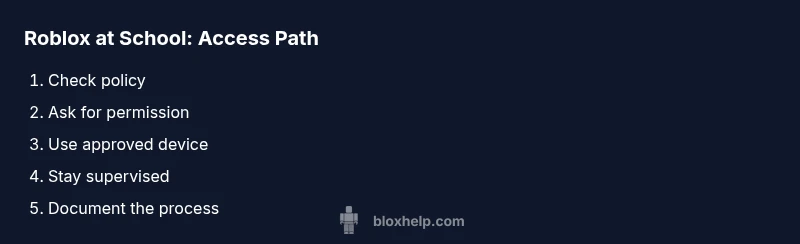
This section outlines a practical framework to pursue Roblox access responsibly. Begin with a policy check, then pursue official permission, and finally leverage approved devices and supervised settings. If access is denied, pivot to education‑oriented Roblox activities outside school hours or in clubs. The key is to document every permission step and to maintain open communication with school staff. By building a formal plan, you create a reliable path to Roblox‑related learning that fits your unique school environment while maintaining alignment with safety and privacy standards.
Tools & Materials
- School‑approved device (laptop/tablet)(Ensure it has up‑to‑date antivirus and is configured for school policy)
- Official network access(Connect through the district‑provided network or guest network per policy)
- Written permission or official form(Keep a copy for reference; may be required during supervised sessions)
- Teacher/IT contact(Know who to approach for approvals and guidance)
- Roblox account(Use your own account; never log in with someone else’s credentials on shared devices)
Steps
Estimated time: 25-40 minutes
- 1
Check school policy
Review the district and school Acceptable Use Policy (AUP) to determine whether Roblox can be accessed on campus and under what conditions. If you’re unsure, ask your teacher or IT staff for the official stance before proceeding.
Tip: Keep a copy of the policy reference handy in case you need to explain it to a supervisor. - 2
Identify the correct contact
Find the right person to authorize access—this could be an IT administrator, a course sponsor, or a library/media specialist. Approach them with a clear request and the benefits of using Roblox as a learning tool.
Tip: Prepare a short email that states your learning goals and how Roblox will be used in a supervised setting. - 3
Request permission in writing
Submit a formal request detailing device type, network access, time windows, and supervision. Include safety steps you will follow and how you’ll protect privacy.
Tip: Attach a proposed schedule showing when Roblox would be used (e.g., 1–2 sessions per week). - 4
Set up on an approved device
Once permission is granted, configure the device to abide by policy (no unauthorized apps, ensure updates are current, and use the approved Roblox version).
Tip: Ask for a pre‑configured account or student profile if the school requires it. - 5
Use during supervised time
Participate in the Roblox activity during a designated time and under teacher or librarian supervision to ensure compliance and safety.
Tip: Avoid playing during instruction time or when supervision isn’t available. - 6
Document everything
Maintain records of permission, session logs, and any guidelines provided by staff. This helps with accountability and future requests.
Tip: Keep a simple log of dates, times, and what you did during each session. - 7
If access is denied, propose alternatives
If Roblox access isn’t possible, suggest constructive alternatives like classroom projects on game design, Roblox scripting fundamentals, or after‑school clubs that focus on Roblox learning.
Tip: Having a backup plan increases the likelihood of a positive outcome for future requests.
Questions & Answers
Is it allowed to play Roblox at school?
Permission depends on school policy. Always check the AUP and obtain written approval before attempting access.
Permission varies by school; check the policy and get written approval before using Roblox on campus.
What should I do if Roblox is blocked on campus?
Do not bypass filters. Talk to your teacher or IT staff about approved alternatives, such as supervised sessions or after‑school clubs.
If Roblox is blocked, ask for approved alternatives or a supervised session rather than trying to bypass the block.
Can I use Roblox Studio at school?
Roblox Studio access at school varies; many schools restrict it. Check with IT and follow any provided guidelines.
Studio access depends on the school; confirm with IT and follow guidelines if permitted.
Are there safe educational Roblox activities?
Yes. Explore coding basics, game design concepts, and safety tutorials that align with curriculum during approved times.
There are safe Roblox activities focused on coding and design you can do during approved times.
How should I document permission to use Roblox on campus?
Keep a written record of approvals, dates, durations, and any guidelines from staff.
Maintain a simple log of permission and session details for accountability.
What are good alternatives if Roblox access is not allowed?
Consider other safe platforms or school‑approved projects like Scratch or coding clubs that teach similar concepts.
If Roblox isn’t allowed, try alternatives like Scratch or coding clubs to learn similar skills.
Watch Video
The Essentials
- Respect school policy first; don’t bypass filters.
- Ask for written permission and use only approved devices.
- Engage Roblox during supervised times or official clubs.
- Prioritize safety, privacy, and digital citizenship.
- Have a plan for alternatives if access is denied.