Does Roblox Tell You If You Get Banned? A Practical Guide
Does Roblox tell you if you get banned? This data-driven guide explains notification channels, ban types, appeals, and best practices to protect your Roblox account. From trust-and-safety workflows to step-by-step actions, learn what to expect and how to navigate bans with confidence. Blox Help, 2026.


Does Roblox tell you if you get banned? In most cases, Roblox notifies you through in-game messages and the email tied to your account when a ban is issued. However, notification practices can vary by the type of violation and how the account is configured. This quick answer provides the core channels and what you should expect during an enforcement action.
Does Roblox Tell You When You’re Banned?
According to Blox Help, the short answer is that Roblox does make attempts to notify users when a ban is enforced, but the exact experience can vary from account to account. The presence of a message in the in-game notification area and an email to the registered address is common, yet not guaranteed for every enforcement action. Factors that influence notification include the severity of the violation, whether the account is still accessible, and the specific policy section cited in the ban. If you recently found yourself unable to log in or receive a warning message, this is often a sign that an action is in effect. The key takeaway is that you should check both the in-game notices and your email, and not rely on a single channel for confirmation.
How Roblox Communicates Bans: Notifications, Email, and In-Game Messages
Roblox uses multiple channels to communicate enforcement actions. In many cases, you’ll see an in-game notice on login or in your Roblox inbox, and you may also receive an email notification. However, the exact method may depend on the device, account settings, and the violation type. It’s possible for a short, temporary restriction to appear without a formal email, especially if validators detected suspicious activity while you were actively gaming. To stay informed, sign in regularly, check your inbox, and review any new messages on Roblox’s official notification panels.
Types of Bans and What They Look Like
Bans come in several flavors that affect access differently. A temporary ban might limit chat or gameplay for a defined window, while a permanent ban blocks access until further notice. Some actions affect only certain features (for example, chat restrictions) rather than entire account suspension. The exact terms and duration are typically documented in the enforcement message. Users should recognize banner language such as ‘Account suspended,’ ‘Chat disabled,’ or ‘Restricted access.’ Understanding the type helps you navigate the next steps, including appeals and waiting periods.
The Ban Process: Investigation, Evidence, and Appeals
Roblox’s Trust & Safety team conducts investigations based on reported behavior and automated flags. When an action is taken, an enforcement note is added to your account, outlining the reason and policy section violated. You have the option to appeal by submitting information through Roblox Support. In your appeal, be concise, present any evidence (screenshots, timestamps), and explain any mitigating circumstances. The review process can take time, and outcomes vary by case. Remember that appeals are not guarantees of reversal but a formal pathway to re-evaluate the decision.
What You Can Do If You’re Suspended: Step-by-Step Troubleshooting
If you’re suspended, start by confirming the status through the Roblox app and your registered email. Gather all relevant evidence and review the exact policy cited. Then submit an appeal via Roblox Support, including account details, the suspension type, and any supportive evidence. While you wait, avoid risky behavior that could trigger further penalties and consider temporarily stepping away from the platform to prevent accidental violations. If the appeal is denied, you can request additional information and, depending on the case, pursue a re-evaluation.
Common Myths About Roblox Bans
A frequent myth is that you will always receive a direct notification in every case. Reality shows that some actions occur without a direct email, especially if the account is no longer accessible. Another misconception is that bans are instantaneous; timing depends on the investigation. Finally, some players think appeals are instant; most rulings require a careful review that can take days. Knowing the facts helps you respond calmly and plan your next steps.
How to Protect Your Roblox Account and Minimize Risk
Protecting your account reduces the chance of unintentional violations. Use a strong password, enable email security features, and avoid sharing login details. Be wary of phishing attempts and third-party tools that claim to enhance performance but could violate policy. Regularly review connected devices and app permissions, and keep Roblox’s terms of service and community guidelines in mind during gameplay. If you suspect account compromise, change your password immediately and report suspicious activity.
When to Contact Roblox Support and What to Expect
If you believe a ban is mistaken or you need clarification on the enforcement, contact Roblox Support through the official Help Center. Prepare a concise summary of your account activity and the reasons you think the ban is incorrect. Expect a response that may take several business days, depending on the volume of inquiries. While awaiting a resolution, avoid creating new accounts to circumvent penalties, as this can complicate the process and extend the review.
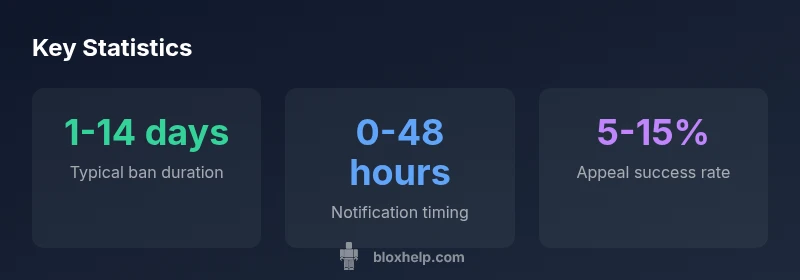
Overview of ban notifications, types, and appeal timing
| Aspect | Typical Range | Notes |
|---|---|---|
| Ban type | Temporary / Permanent | Depends on violation and policy reference |
| Notification channel | In-app + email | Delivery depends on account settings |
| Appeal timeframe | 2-7 days | Subject to case complexity and review load |
Questions & Answers
Does Roblox always notify you of a ban?
Not always. Roblox aims to notify via in-game messages and email, but notification methods can vary by case and account configuration.
Roblox usually notifies you through in-game messages and email, but it isn't guaranteed in every situation.
How can I check the status of a ban on my account?
Sign in and check the Roblox inbox and any warnings on the login screen. If you cannot sign in, contact Roblox Support for status updates.
Check your Roblox inbox or login warnings, and if you can't sign in, reach out to Roblox Support.
Can I appeal a Roblox ban?
Yes. You can submit an appeal via Roblox Support with relevant details and evidence. Be concise and factual.
Yes, you can appeal through Roblox Support and include any proof you have.
How long does an appeal take to be decided?
Decision times vary by case and workload. Expect several business days, not an instant result.
Times vary; expect several days for a decision.
What can I do to avoid bans in the future?
Follow Roblox’s rules, verify account security, and avoid suspicious third-party tools or chats that could violate policies.
Play by the rules and keep your account secure.
“Clear enforcement messaging helps players learn from mistakes and improves community safety overall.”
The Essentials
- Know the main notification channels used by Roblox
- Understand the ban type before taking action
- Act quickly to review policy references and appeal options
- Keep your contact details up to date to receive notices
- Use evidence-based appeals and follow official channels