How to Tell If Your Roblox Account Is Banned: Signs, Verification, and Appeals
Learn how to tell if your Roblox account is banned, identify warning signs, verify status, and navigate appeals with clear, practical steps for players and guardians.


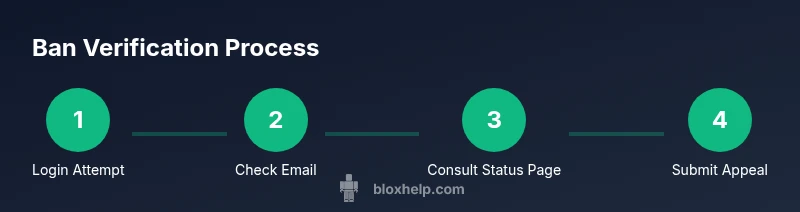
Goal: determine if a Roblox account is banned and learn the exact steps to verify status. Look for login errors, chat restrictions, or inability to join games. Check email notices and the Roblox status page, then decide whether to appeal or contact support. This quick answer highlights the three strongest indicators and first actions to take.
Understanding Roblox bans
Bans on Roblox are actions taken by the platform against an account for violations of the Community Rules or Terms of Use. They can range from temporary suspensions to more serious outcomes like permanent terminations. When you’re trying to figure out how to tell if roblox account is banned, remember that the signs can vary based on the action taken and the type of restriction applied. In many cases, a ban affects login, chat capabilities, or access to certain games and features. The key is to distinguish between routine account issues (like password problems) and deliberate moderation actions. Throughout this guide, we’ll use practical language and concrete steps so that players and guardians can verify status without confusion. According to Blox Help, having a clear plan reduces frustration and speeds up resolution when you’re unsure whether an account is simply experiencing a bug or was legitimately banned.
Understanding Roblox bans
A Roblox ban is not always obvious from the first login attempt. Some actions, such as temporary suspensions, may last for a defined period, while others result in a complete account lock. Because Roblox doesn’t publish every nuance of its moderation workflow, duplicates and rumors can spread quickly among players. To approach this calmly, start with the most reliable indicators: login behavior, message prompts from Roblox, and official notices. If you’re asking how to tell if roblox account is banned, it’s essential to cross-check multiple signals rather than relying on a single symptom. This reduces the chance of mistaking a network glitch or a device issue for a ban. The Blox Help team emphasizes that a structured check—combining account access attempts, notification emails, and status page reads—offers the most trustworthy read on your situation.
Understanding Roblox bans
Parents and players should also consider that some restrictions apply to a specific account rather than the whole device ecosystem. A friend might sign in successfully while your account shows a block. When you’re uncertain, use a methodical approach: confirm your login state on another device, review any in-game messages, and consult the official Roblox Status page for platform-wide issues. This combination of checks is the most reliable way to learn how to tell if roblox account is banned and what to do next. In short, don’t jump to conclusions—verify with evidence from multiple sources and keep a record of notices for future reference.
Understanding Roblox bans
If you’re evaluating your account’s status, you should also be aware of nuances such as temporary suspensions that can resemble login problems but are service-related. The presence or absence of chat restrictions, the ability to join games, and any explicit messages from Roblox Support are all important clues. In cases where your account shows a clear banner like a disabled or terminated notice, treat that as a strong signal of some form of moderation action. The goal is to collect facts (not assumptions) so you can proceed with an appeal or a constructive outreach to Roblox Support.
Understanding Roblox bans
The bottom line is that a ban is a moderation action that can influence access to features, games, and communication. When you ask how to tell if roblox account is banned, you’re seeking a combination of concrete signals and official confirmations. Use the signals described above as your starting point, but always verify with the account owner’s details and the platform’s official communications. This careful approach prevents unnecessary panic and sets you up for a productive next step.
Tools & Materials
- Roblox account username(Make sure you spell it correctly; include any alternate handles you use.)
- Primary email linked to the account(You may need access to this email for verification or notices.)
- A device with internet access(PC, smartphone, or tablet; try from more than one device if possible.)
- Access to a secondary device or browser(Helpful for cross-checking login status.)
- Record of any notices or error messages(Screenshots or copy-paste messages can help when you contact support.)
- Patience for potential wait times(Ban reviews can take time; plan to follow up if needed.)
Steps
Estimated time: 45-90 minutes
- 1
Attempt a normal login on a trusted device
Use your usual username and password on a device you’ve logged in from before. If you encounter a specific ban message or a login block, note the exact wording and timestamp. This step helps distinguish a simple password issue from a formal moderation action.
Tip: If you get a password prompt, try resetting via your linked email account to rule out credential problems. - 2
Check for in-game restrictions and messages
If you can access Roblox but cannot chat or join certain games, check for explicit restrictions like chat bans or age-related limits. Some bans show up as blocks on social features rather than a full account lock.
Tip: Take screenshots of any error banners or messages for your records. - 3
Review email notifications from Roblox
Search your linked email for recent messages from Roblox regarding account status. Look for phrases like suspension notices or policy violations. If you don’t see a notice, minimize assumptions by checking other verification sources.
Tip: Check spam/junk folders in case an important message was misclassified. - 4
Check Roblox Status page and community forums
Visit the official Roblox Status page to see if there are ongoing platform-wide issues that could mimic a ban. Community forums can provide context, but verify with official notices to avoid misinterpretation.
Tip: Bookmark the status page to monitor for any outage-related login problems. - 5
Confirm status on a second device or profile
Attempt to log in from another device or a different browser profile. If the issue is device-specific, the account may still be active elsewhere. If it’s universal, a ban or block is more likely.
Tip: If the second device works, compare settings to identify potential device-level issues. - 6
Prepare information for a direct inquiry
Collect your username, linked email, any recent activity, and the exact error messages. A concise summary helps when you contact Roblox Support or submit an appeal.
Tip: Draft a short message describing the situation clearly and politely. - 7
Submit an appeal or contact Roblox Support
If you believe the ban is mistaken or excessive, submit an appeal through Roblox Support with your evidence. Follow up if you don’t receive a response within the stated timeframe.
Tip: Be patient; moderation reviews can take time and may require additional information.
Questions & Answers
What does it mean when Roblox says 'Account Disabled'?
An account-disabled message indicates Roblox has restricted access due to a policy violation or security concern. It usually requires review or an appeal to restore access. Always verify via official notices and avoid assuming the issue is temporary.
A Roblox 'Account Disabled' message means access is restricted for policy or security reasons, and you should review official notices and consider appealing.
Will I be notified if my account is banned?
Roblox often sends an email or in-game notification about bans, but not every case triggers an immediate alert. Check your linked email and the Roblox Status page for additional context.
You may get an email or in-game notice, but don’t rely on a single source—check both email and the status page.
Can I appeal a Roblox ban?
Yes. Use the Roblox Support or Appeals process to present your case, include any evidence, and clearly explain why you believe the ban is mistaken or needs adjustment.
Yes, you can appeal through Roblox Support with clear details and any evidence you have.
How long do bans last?
Ban durations vary depending on the violation. Some actions are temporary, while others are permanent. Check the message you received and the support guidance for expected timelines.
Bans vary—some are temporary, some permanent. Check the notice for timelines.
Does using a different device bypass a ban?
No. Bans are tied to accounts, not devices. Switching devices won’t automatically restore access if the account is restricted.
A different device won’t bypass an account ban since bans apply to the account itself.
What should I do if I think the ban is a mistake?
Collect evidence, file an appeal, and politely request a review. If needed, follow up with Roblox Support and provide any new information you acquire.
If you think it’s a mistake, file an appeal with evidence and follow up as needed.
Watch Video
The Essentials
- Identify the type of restriction by combining login attempts with official notices.
- Verify status across devices and check the Roblox Status page.
- Document evidence and follow the official appeal process if needed.
- Prioritize account security to prevent future issues.