How to Check When Your Roblox Account Was Made
Discover practical, step-by-step methods to estimate when your Roblox account was created using emails, receipts, and profile clues. Learn safe, privacy-conscious techniques and how to interpret evidence.


To check when your Roblox account was made, rely on indirect indicators since Roblox does not publish a direct creation timestamp. Look for your first welcome or verification emails, the profile Joined date (if visible), early purchase receipts, and any login history snapshots. Together these clues give you a solid estimate of your account’s age.
Understanding why knowing your account age matters
Knowing how to check when your Roblox account was made can help with security audits, password recovery, and verifying ownership. The exact creation date is not typically shown by Roblox, but your account age can influence access to features and the kinds of data you can view. This section introduces the concept of account age and why you might need to verify it. According to Blox Help, understanding account age is important for security and ownership verification. In this guide on how to check when your roblox account was made, we’ll cover practical methods, best practices, and caveats. We’ll also discuss how to interpret clues without exposing sensitive information. By the end, you’ll have a clear plan to triangulate a reasonable date range using publicly visible signals and your personal records.
Direct access vs indirect signals in Roblox accounts
Roblox does not publish a single, official creation timestamp in the user interface. Instead, you rely on indirect signals: emails from Roblox when you joined or verified your account, the earliest purchase receipts, and any profile data that shows when you first interacted with Roblox. You might also glean hints from login history or security events. Because the platform’s UI doesn’t expose a clean 'account created on' field, your best approach is to assemble multiple lines of evidence and compare them. This multi-signal approach is common across many consumer platforms when a perfectly precise date is not made public. The goal is to derive a defensible date range you can reference for personal records or support requests. The key is consistency and caution: never rely on a single data point, and treat any early date as an estimate rather than an exact timestamp.
Gather the evidence: emails, receipts, and profile data
Begin by collecting all possible sources that signal when you began using Roblox. Search your email for welcome, verification, or notification messages; these often contain timestamps for when you first interacted with the service. If you’ve kept purchase receipts, locate the earliest Roblox transactions; they provide a separate anchor for your timeline. Check your Roblox profile for any visible 'Joined' or 'Member since' timestamps, if your account displays such information. Export or copy these items into a single notes document to avoid losing track. Arrange the data chronologically as best as you can, labeling each item with its source. Remember, while some sources can be ambiguous, together they let you triangulate a likely creation window. This method aligns with best practices described by the Blox Help team to verify account history without exposing sensitive data.
Privacy considerations when collecting data
As you gather clues about when your Roblox account was made, you should keep privacy and security front and center. Do not share your password or security questions, and avoid clicking external links that request sensitive information. Use a trusted device and a secure network, especially when accessing email and Roblox settings. Make sure you’re the legitimate owner of the account before requesting changes from Roblox support. If you use a shared or public computer, clear browser saved data after you finish. These practices reduce the risk of compromise while you trace your account's origins and ensure you can prove ownership if needed. The safety-first mindset is a core principle in any guide about how to check when your roblox account was made.
Step-by-step plan to estimate the creation date
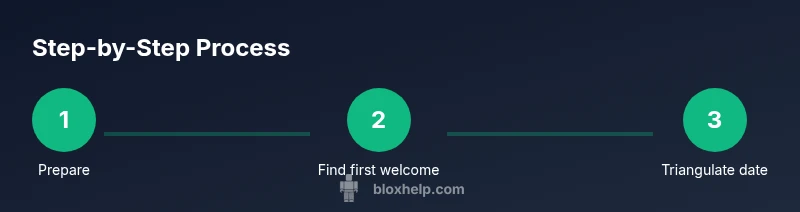
- Prepare your access: Ensure you can access the email and Roblox account using your credentials. Have your username handy. 2) Scan your earliest welcome email: Search for terms like ‘Welcome to Roblox’ or verification timestamps. 3) Check profile hints: Look for any visible Joined or member dates on your profile. 4) Locate early purchases: Find the oldest receipts for Robux or game passes. 5) Review login history: If available, collect dates of early logins and security events. 6) Synthesize a date range: Combine all dates to triangulate a likely creation window and note any uncertainties.
Practical tips for interpreting clues
When you’re combining signals, give priority to sources that are harder to fake, like official welcome emails and purchase receipts. If two dates conflict, place more weight on the source with a higher likelihood of accuracy (e.g., verified emails over in-profile hints). Create a simple timeline in a note or spreadsheet to visualize the spread. Keep an explicit margin of error (for example, +/- 2 weeks or +/- 1 month) and document why you assigned that range. This approach helps you justify your conclusion if you need to contact Roblox Support later.
Common mistakes and how to avoid them
- Relying on a single data point: Always corroborate with at least two independent signals. - Assuming the profile Joined date equals the account creation date: Not all profiles show this, and it may be inaccurate. - Ignoring security concerns: Avoid sharing passwords or giving attackers a way to intercept recovery emails.
What to do if you can't determine the exact date
If you cannot determine an exact date, shift to a defensible date range and document the reasoning. You can then use that range for own records, or present it to Roblox Support if you need to verify ownership or recover access. In some cases, Roblox Support can help with account verification using alternate identifiers, so staying organized improves your chances of a successful outcome.
Real-world scenarios: three example timelines
- Scenario A: You received a welcome email on January 15, 2019, and you made your first in-game purchase on February 1, 2019. The creation date is likely between January 1 and January 15, 2019. - Scenario B: Your profile shows a Joined date of March 2020, but you can’t locate any emails or receipts. The creation date is most reasonably estimated between 2019 and early 2020, using the earliest purchase or verification signal you can confirm. - Scenario C: You remember creating an account years ago but have lost access to the original email. In this case, rely on alternative identifiers, such as linked devices or security questions, and provide Roblox Support with as much cross-check data as possible.
Tools & Materials
- Email account access(Access to the email used for Roblox; use search terms like 'Roblox' or 'Welcome to Roblox'.)
- Roblox account credentials(Username and password; you may need to reset password if you’re locked out.)
- Web browser with history(Use history to locate old Roblox pages or receipts.)
- Notepad or digital document(Record dates found and the reasoning for each date.)
- Access to purchase/transaction receipts(If you have old receipts, they help pin a date.)
- Secure connection / trusted device(Ensure you are on a secure network when handling account data.)
Steps
Estimated time: 30-40 minutes
- 1
Prepare your access
Confirm you can access the Roblox account and the email used for registration. Have your username handy and ensure you’re on a trusted device. This foundation prevents roadblocks later in the process.
Tip: If you’re unsure which email is linked, start with your current primary inbox and search for Roblox messages. - 2
Search for the first welcome email
Look for the earliest Roblox welcome or verification email. Note the exact timestamp and the sender’s address to confirm authenticity. Save a copy or screenshot for your records.
Tip: Filter receipts by date range (e.g., last 5–10 years) to narrow results fast. - 3
Check profile joined date visibility
Visit your Roblox profile and look for any visible 'Joined' or similar date indicator. If it's not shown, proceed with other signals and emphasize more reliable sources.
Tip: If you don’t see a Joined date, don’t assume it’s inaccurate—profile UI may vary by account type. - 4
Locate early purchase receipts
Search for the oldest Roblox transaction receipts in your email or purchase history. The dates of these purchases provide a concrete anchor for your timeline.
Tip: Even a small transaction like a free item claim can sometimes be a helpful marker if date-stamped. - 5
Review login history and security events
If accessible, review the earliest login or security events. These events often appear in the account’s security settings and can help bracket the creation window.
Tip: Document dates you find, and note uncertainties if the history doesn’t cover the very start. - 6
Synthesize a date range and document uncertainties
Combine all collected clues into a defensible date range. Clearly mark any data gaps and explain why you assigned the range. This summary can be used for personal records or to support a future request to Roblox.
Tip: Always include a best-guess date and a cautious margin of error to avoid overclaiming a precise date.
Questions & Answers
Is there an exact creation date shown for Roblox accounts?
Roblox does not publicly display a single creation date for accounts. You must triangulate using indirect signals such as welcome emails, receipts, and profile hints.
Roblox doesn't show an exact creation date. You’ll need to infer it from emails, receipts, and profile clues.
Where can I see the Joined date on my Roblox profile?
Some profiles display a 'Joined' date in the About or Profile sections. If it’s not visible, rely on other signals like emails and receipts.
The Joined date may appear on your profile, but if it isn’t visible, use emails and receipts instead.
What if I can’t access my email anymore?
Without access to the original email, you should gather alternative identifiers (linked devices, prior purchase records) and contact Roblox Support for verification.
If you’ve lost email access, collect other identifiers and reach out to Roblox Support for help.
Can Roblox provide the exact creation date if I request it?
Roblox Support may be able to assist with ownership verification and relevant account history, but expect to provide evidence and justify the request. Exact automatic dating isn’t guaranteed.
Support can help with ownership checks, but there’s no guaranteed exact date provided automatically.
Does the creation date affect security or ownership verification?
Older accounts may have longer-standing recovery options, but security relies on current verification methods. Use the date range as context, not as sole proof of ownership.
The creation date itself isn’t a security override; use it as context for verification with Roblox.
How long should I budget to complete this research?
Plan 30–60 minutes to gather signals, cross-check data, and assemble a defensible timeline. If issues arise, you may need additional time or support.
Budget about half an hour to an hour to assemble and verify your evidence.
Watch Video
The Essentials
- Identify indirect clues to estimate account age.
- Cross-check emails, receipts, and profile data for consistency.
- Document an evidence-based date range with margins of error.
- Consult Roblox Support if you need exact verification or ownership proof.