How to Check Roblox Account Age: A Practical Guide
Learn how to check Roblox account age with practical steps. Find join dates, understand privacy limits, and verify your own age when needed for moderation.


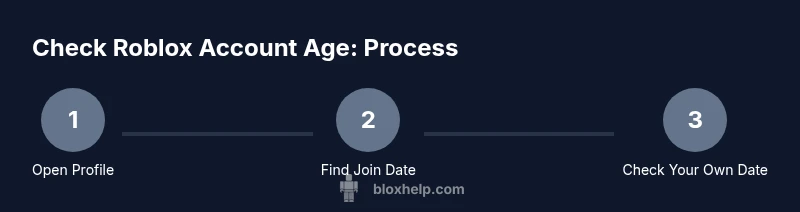
Goal: determine a Roblox account's age. Roblox does not publish exact birthdates, so the most reliable clue is the profile join date, if Roblox displays it. Quick steps: 1) Open the user’s profile and look for 'Joined' or 'Member since'. 2) If you’re checking your own account and the date isn’t visible, go to your profile/settings to find the join date. 3) If the date remains hidden, contact Roblox Support for confirmation.
What 'account age' means on Roblox
On Roblox, 'account age' isn't a published birthdate. The phrase how to check roblox account age refers to determining roughly when an account came online, usually by looking at the profile's join date. Roblox does not publicly reveal every user's age due to privacy, so you should treat any age information with caution. The join date, when shown by Roblox, is the most direct indicator. Other signals such as first-game interactions or early badges can hint at age but are inherently speculative. For safety and trust, consider the join date as the baseline when you’re trying to assess credibility. Remember: this article follows a privacy-conscious approach, and you should avoid sharing or inferring sensitive data about others without consent.
Why age matters for safety and trust
Understanding how old an account is can help you assess its credibility and risk level in Roblox communities. Newer accounts might be more prone to mischief or less trustworthy, whereas older accounts, if verified publicly, may have established a consistent presence. This section explains that age is a soft signal rather than a hard credential. It also covers how age awareness supports safer interactions, reporting decisions, and moderation workflows for players, parents, and guardians. The goal is to empower you with practical, privacy-respecting checks rather than invasive scrutiny. Throughout, we emphasize Blox Help's stance on responsible data handling and transparent user safety practices.
Privacy and visibility: what you can see about age
Roblox prioritizes user privacy, which means that exact ages are typically not visible to the public. What you may see is the join date on a profile, sometimes labeled as 'Joined' or 'Member since'. If the profile owner has chosen aggressive privacy settings or if the platform has updated UI elements, this join date might be hidden. When join dates are visible, they offer a concrete anchor for estimating age. When they aren't, you must rely on contextual cues and avoid drawing firm conclusions from content alone. This section helps you distinguish between observable signals and private data, and explains why you should always respect user privacy.
How to check join date on a Roblox profile
The most reliable public indicator of account age is the join date displayed on the profile. To locate it, navigate to the account’s profile page and scan for a line near the avatar or bio that reads 'Joined' or 'Member since'. On desktop, this often sits under the About section; on mobile, visibility can vary by app version. If the join date is visible, compare it to the current date to estimate age in years and months. If the date is not shown, there is no official way to reveal exact age via the user interface. In that case, avoid third-party tools claiming to disclose private age data, as they can be misleading or unsafe.
Checking your own account age on desktop and mobile
If you own the account, you have the best chance of locating the join date. On desktop, open your profile and look for 'Joined' or 'Member since' near the header. On mobile, tap your avatar, navigate to your profile, and check the same sections. If the join date is not visible, you may find it in the account settings or privacy sections, depending on Roblox's current UI. If you still cannot see the date, consider using the official Roblox Support channels to request confirmation, especially for moderation or safety checks. Always document your steps for future reference.
Estimating age when the date is hidden
When the join date is not publicly visible, you can estimate age using indirect cues, such as content history, first interactions, or the account's activity window. Note that these indicators are not precise and should be treated as rough approximations. Do not rely on them for legal or formal age verification. This section provides careful, non-invasive strategies to form a reasonable estimate without exposing personal data. Remember: privacy-first reasoning protects both you and others in the Roblox community.
Common misconceptions and safety considerations
A frequent mistake is assuming that a newer account is automatically fraudulent or that an older account guarantees reliability. In reality, age is only one factor among many. Safety practices—such as enabling two-factor authentication, reviewing privacy settings, and reporting suspicious behavior—are more important than guessing age. This section debunks myths about age indicators and stresses the importance of integrity and respectful curiosity when assessing other players. Blox Help emphasizes inclusive safety practices and data stewardship.
When you need official confirmation: contacting Roblox Support
If you require formal verification of account age for a legitimate reason (for example, moderation, parental oversight, or account recovery), use Roblox Support. Provide the username, the context, and a clear request. Support may require additional verification steps; you should be prepared to supply information that proves ownership or legitimate need. This section explains when it is appropriate to escalate to support and how to communicate your request politely and effectively.
AUTHORITY SOURCES
- Roblox Help Center: https://en.help.roblox.com/hc/en-us
- The Verge: https://www.theverge.com
- The New York Times: https://www.nytimes.com
Tools & Materials
- Device with internet access(Any computer, tablet, or smartphone)
- Roblox profile URL or username(The account you want to check; include username or profile link)
- Screen capture tool(Optional for saving join date or profile details)
- Notepad or note-taking app(Useful for recording dates or estimates)
- Roblox Support contact form(Only if you need official confirmation)
Steps
Estimated time: 5-15 minutes
- 1
Open the user’s Roblox profile
Navigate to the target account’s profile page and prepare to scan for date indicators. If you’re on a mobile device, switch to the profile tab and ensure you’re viewing the correct account.
Tip: On desktop, use the search bar to quickly reach the profile; on mobile, use the profile icon in the bottom navigation. - 2
Find the join date label
Look for a line labeled 'Joined' or 'Member since' near the avatar or bio section. This is the most direct public indicator of account age when available.
Tip: If you don’t see a join date, the account may have private settings or Roblox may have updated the UI. - 3
Check your own account date
If you’re checking your own account, view your profile or account settings to locate the join date. Some layouts place this under a Privacy or Security section.
Tip: Take a screenshot if you find the date; it might be helpful for future moderation needs. - 4
Estimate age when the date is hidden
When the join date isn’t public, you can estimate age using non-sensitive signals like duration since first interactions, but treat it as a rough estimate.
Tip: Avoid claiming precise age; clearly label estimations as approximate. - 5
Request official confirmation if needed
For formal confirmation (e.g., moderation or parental oversight), contact Roblox Support with a clear request and ownership proof where required.
Tip: Provide the exact username and the reason for verification to speed up the process.
Questions & Answers
Can you determine someone's exact Roblox account age?
No. Roblox does not publicly publish exact birthdates; you can only estimate age if a join date is visible on the profile. Use join date as the primary indicator when available.
No. Roblox does not publicly publish exact birthdates; you can only estimate age based on the join date if it is visible.
Where can I find the join date on a Roblox profile?
Look for a label like 'Joined' or 'Member since' near the avatar or bio on the profile page. Some profiles may not display this date due to privacy settings.
Look for a 'Joined' or 'Member since' label near the avatar on the profile; if you don't see it, the date may be hidden.
Is there a way to verify age for moderation?
Official verification typically goes through Roblox Support with appropriate ownership proof. Avoid relying on third-party tools for age confirmation.
Official verification usually goes through Roblox Support with proof of ownership; avoid third-party tools for age confirmation.
Does the Roblox mobile app show join date?
The visibility of join date can vary by app version and device. Some profiles show it, others don’t. Check the profile on your device and switch to desktop if needed.
Join date visibility depends on the app version and device; try checking on mobile or desktop to compare.
Why might join date be hidden on some profiles?
Privacy settings or platform updates can hide join dates. This is not a reflection of the account’s trustworthiness.
Privacy settings or updates can hide join dates; this isn’t a verdict on the account's trustworthiness.
Watch Video
The Essentials
- Check the profile join date as the primary age indicator.
- If the date is hidden, there is no official public age data to reveal exact age.
- Use your own account settings to locate join date when possible.
- When in doubt, contact Roblox Support for verification.