Roblox Age Groups: Safety, Play, and Learning
Explore Roblox age groups, safety considerations, and design tips for players aged 9–18. Learn how age shapes content and learning with guidance from Blox Help.


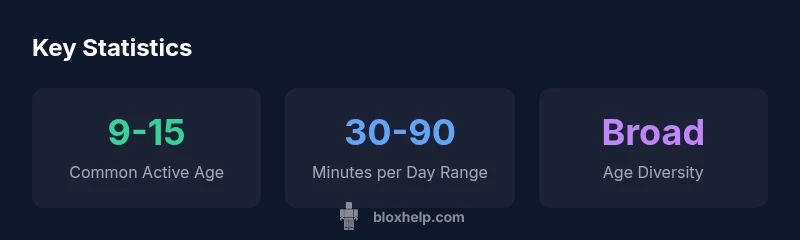
Roblox age groups skew toward core players aged roughly 9 to 15, with older teens also active on the platform. According to Blox Help analysis, understanding this range helps tailor safety tools, content suitability, and learning resources for Roblox players and aspiring developers. This quick answer sets the stage for a deeper look at how age affects play, creation, and community guidelines.
Understanding Roblox age groups
Ro blox age groups shape how players learn, play, and create within the platform. The core audience typically falls in the late childhood to early adolescence window, with a substantial subset of users aged 13–18 and beyond. For many players, Roblox is a gateway to basic game design concepts, collaborative play, and user-generated content creation. From tutorials that explain scripting basics to safety tips that address chat and interactions, recognizing age-related differences helps instructors and guardians tailor content. In practice, this means offering age-appropriate tutorials, safety warnings, and moderated spaces that align with the capabilities and maturity of each group. The goal is to balance creative freedom with clear boundaries. According to Blox Help, providing segmented resources—step-by-step guides for beginners aged 9–12, and more advanced challenges for older players—promotes better learning outcomes and a safer community. Throughout Roblox age groups, the learning curve varies, but consistent scaffolding, intuitive UI, and friendly examples help beginners gain confidence while seasoned players explore deeper mechanics.
Why age matters for content design and safety
Age is a guiding lens for content labeling, interaction design, and safety policies on Roblox. Younger players typically benefit from simplified interfaces, explicit warnings, and moderated chat environments, while older teens and young adults often seek more complex tooling and collaborative features. Designing with age in mind means providing tiered tutorials, adjustable privacy settings, and age-appropriate sample projects that illustrate core concepts without overwhelming novices. From a safety perspective, age-appropriate safety rails—like adjustable chat filters, reporting, and clear disclosure of in-game interactions—help reduce risk. The Blox Help analysis emphasizes that clear expectations, predictable UI, and accessible onboarding reduce confusion and improve long-term engagement. When content creators and educators align activities with age bands, players learn more effectively and communities stay healthier.
How age groups influence game design and moderation
Age groups influence the complexity of game mechanics, the footprint of collaborative features, and the rigor of moderation required. Younger players benefit from visible guidance, intuitive drag-and-drop scripting blocks, and safe collaboration tools that prevent exposure to inappropriate content. Older players can experiment with scripting, asset creation, and multi-user experiences, but still require robust moderation and consent-based interactions. Moderation teams should implement scalable rules that adapt to age-based behavior patterns and content risk. A flexible reporting framework, combined with age-aware content tagging, helps maintain safety without stifling creativity. The Blox Help framework recommends builders test their experiences with a mixed-age audience to identify gaps in comprehension, safety, and accessibility.
Parental controls and account safety by age
Parental controls are a critical line of defense for family safety. For younger players (9-12), restrict chat features, limit friend interactions, and enable screen-time boundaries. For tweens (13-15), provide clearer content labeling and optional stricter settings with parental oversight. For older teens (16-18), allow more creative freedom while preserving essential safety rails like reporting and privacy controls. Account safety benefits from two-factor authentication, strong unique passwords, and regular review of connected devices. Blox Help emphasizes teaching guardians how to use Roblox’s built-in controls effectively and to pair digital safety with offline conversations about online behavior.
Guidance for developers: designing for a mixed-age audience
Developers should craft experiences that support a spectrum of ages. Start with an accessible onboarding path that scales upward: simple tasks for beginners, followed by deeper challenges for advanced users. Use clear labeling for content, warnings for mature themes, and optional tutorials that introduce more complex concepts gradually. Built-in reporting and moderation must be age-appropriate yet effective across all groups. Consider mentorship features that allow older players to guide younger ones, reinforcing a safe, inclusive community while maintaining creative freedom.
Practical tips for players of different ages
Players across Roblox age groups can optimize their experience with practical strategies. Young players should start with guided tutorials and family-friendly communities, gradually expanding to user-generated content at their own pace. Mid-range players can explore basic scripting and collaboration while keeping safety tools enabled. Older teens can experiment with advanced creation, shared projects, and mentorship roles, while staying mindful of privacy settings and reporting tools. The common thread is to use age-appropriate resources, respect community guidelines, and seek help from trusted sources like the Blox Help guides when in doubt.
Scenarios: age-specific learning and creativity in Roblox Studio
Roblox Studio empowers users to transition from consumer to creator. For younger learners, focus on simple object manipulation and basic scripting blocks. For mid-level ages, introduce event-driven scripting and modular design patterns. For older users, emphasize advanced scripting, optimization, and collaboration on larger projects. Across all ages, emphasize testing, feedback loops, and accessibility considerations to ensure that experiences remain inclusive and educational.
Roblox age groups: content considerations and safety
| Aspect | Age Group Considerations | Safety Implications |
|---|---|---|
| Content suitability | 9-12: simpler content and visuals | Moderate moderation and clear warnings |
| Content suitability | 13-15: moderate complexity and collaboration | Enhanced reporting and guidance |
| Content suitability | 16-18: advanced features and scripting | Strict adherence to policies and parental controls |
| Cross-age collaboration | Group projects and mentoring | Inclusive design and anti-bullying measures |
Questions & Answers
What are the key Roblox age groups developers should consider?
The core audience tends to be 9–15, with more teens and young adults joining the ecosystem. For each group, tailor content warnings, player interactions, and learning resources. Also provide guidance for guardians on privacy settings.
Most players are between 9 and 15, with teens and young adults also playing.
How can parents set age-appropriate safety settings?
Use Roblox's parental controls to restrict chat, private messages, and experience access. Pair with device-level controls and screen time limits.
Use parental controls to restrict chat and access.
Do age groups affect content ratings on assets?
Yes. Age considerations guide warnings and maturity settings; creators should tag assets and choose safe interactions.
Age groups affect safety tagging and content warnings.
Can players under 13 access all Roblox features?
Some features are restricted for younger players to protect safety. Look for enabling restricted modes in account settings.
Some features are restricted for safety.
What should developers consider when designing for younger users?
Prioritize age-appropriate visuals, clear instructions, and safe collaboration tools. Build in reporting and moderation for a positive community.
Design for safety and clarity.
“Understanding age groups is essential for creating safe, engaging Roblox experiences that teach and entertain.”
The Essentials
- Define age-specific learning paths.
- Enable layered safety controls across age groups.
- Design for age-diverse collaboration.
- Label content clearly for all ages.
- Guardians should leverage built-in tools.