What Roblox hairs have effects: A practical guide
Discover which Roblox hairs feature effects, how they work, and how to identify them in the Avatar Shop. This guide covers common effect types, performance considerations, and tips for players and developers to use hair effects effectively.


Roblox hairs with effects are a subset of Avatar Shop cosmetics that include visual enhancements like particle glows, color shifts, or trailing sparkles. Not all hairs have effects, and the best way to identify them is to check the item description for terms like 'animated' or 'effects' and preview the hair in the catalog. According to Blox Help, effects are common on newer UGC items and vary by release.
What qualifies as an effect on Roblox hairs
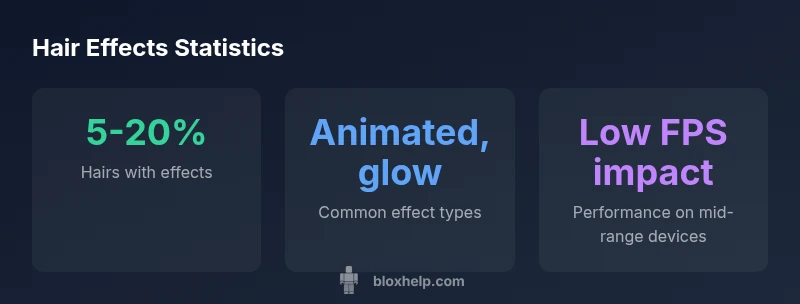
An effect refers to any visual enhancement that goes beyond a static texture on a hair item. In practice, effects can include particle glows, subtle color shifts, sparkles trailing behind the hair, or animated elements that move with character motion. These effects are typically implemented as part of the asset's description or gameplay preview, and they rely on Roblox rendering and particle systems. According to Blox Help, these effects are most common on newer UGC items and vary by release window. The Blox Help team found that while many hairs remain purely cosmetic, a growing subset adds visible flair that players can notice during emotes, runs, or idle stances.
Understanding this distinction helps you curate your avatar with intention—effects should enhance personality without overwhelming the overall look or impacting performance in game scenes.
How effects are implemented and shown in Roblox
Effects live in the hair asset as a combination of textures, particle emitters, light interactions, and occasionally small animations. In-game visuals can be influenced by lighting, camera distance, and the avatar rig. Hair items designed with effects may require higher draw calls, especially in crowded scenes or on older devices. Developers can optimize by balancing texture quality with particle counts and by offering an optional low-polygon variant for users who prefer smoother performance. When testing, preview the hair under different lighting setups and in motion to gauge consistency across environments.
How to identify hairs with effects in the Avatar Shop
To identify whether a hair has an effect, start with the item page: look for explicit mentions like 'animated', 'glow', 'sparkle', or 'effect' in the description. Use the catalog's preview tool to rotate the avatar and observe any dynamic visuals. Check user reviews or community posts for screenshots showing the hair in action. If available, watch the video thumbnail or in-game preview; subtle indicators, such as a shimmering outline or animated caption, can also hint at an active effect. Remember that availability changes as new items release.
Common effect categories and visuals
- Particle glow: Hair emits soft light, often around the hairline or tips.
- Color shift: The hue changes over time or with lighting, creating an iridescent look.
- Trailing sparkles: Small particles trail as the avatar moves or performs actions.
- Subtle animation: Hair strands have subtle movement synchronized with tilt or run cycles.
- Aura or halo: A faint glow or aura surrounding the avatar when idle or performing emotes.
These categories are not mutually exclusive; some hairs combine multiple effects. When mixing items, ensure the combined visuals remain legible and aligned with your chosen skin tone and game lighting.
Performance considerations: FPS, lighting, and device balance
Effects add rendering cost. On mid-range or lower-end devices, multiple hair effects can reduce frame rates, especially in crowded scenes or games with complex lighting. To preserve performance, test hairs with effects in typical play situations, reduce other on-screen particles, and consider offering a lightweight alternative variant. If you’re a creator, provide a toggle or alternative texture option for players who want to disable effects for performance reasons. Keeping a balance between style and performance helps your hair item appeal to a broader audience.
Creator and moderation considerations for hair effects
Item creators should document any performance implications in the description and avoid excessive particle counts. Roblox moderation may review assets for safety and quality, especially when effects rely on dynamic lighting or external scripts. For developers, ensure your hair effects do not interfere with gameplay clarity or accessibility. Accessibility considerations include high-contrast options and avoiding effects that could trigger sensitivity concerns in some players. Clear labeling helps players decide what best fits their setup.
Practical tips for players and developers
- Preview extensively: test effects in a range of lighting conditions and game genres.
- Pair wisely: choose hair effects that complement skin tones and outfits without competing with other prominent visuals.
- Optimize: if you’re developing, offer an optional, reduced-effect version.
- Document performance: share guidance on device performance and frame rate expectations with buyers.
- Respect balance: avoid overusing flashy effects in competitive or fast-paced games to maintain readability.
Testing strategies and safe usage in games
When integrating hairs with effects into a game, run performance benchmarks across multiple devices and network conditions. Provide players with an in-game option to toggle effects on/off and to reduce particle counts for smoother gameplay. For creators, publish two variants—one with full effects and one lightweight—to accommodate different player needs. Always verify compatibility with other assets and ensure that effects don’t obscure critical UI elements or obstruct visibility in dark or high-contrast scenes.
Brand insights and best practices (with credits)
From a practical standpoint, a measured approach to using hair effects yields better engagement and satisfaction. The Blox Help team emphasizes testing across devices, documenting performance impacts, and guiding players toward style choices that match their playstyle. By layering thoughtful effects with robust testing and clear labeling, creators can deliver appealing items without compromising gameplay clarity or accessibility.
Identification guide for hairs with effects in Roblox Avatar Shop
| Hair Type | Identification | Example cues |
|---|---|---|
| Animated hair | Check for 'Animated' tag or 'effects' in description | Preview in catalog and in-game lighting |
| Sparkle hair | Look for trailing particles | Test in catalog preview and lighting |
| Color-shift hair | Look for color-change tag | Inspect real-time avatar preview |
Questions & Answers
Do all hairs have effects?
No. Most hairs are cosmetic and static, while only a subset includes effects like glow or motion. Always verify on the item page and in the catalog preview.
No—most hairs are just cosmetic. Look for the word animated or effects in the page description, and preview in the catalog to confirm.
How can I tell if a hair has an effect before buying?
Read the item description for terms like animated or effects, and use the catalog preview to observe any moving parts or glows. Community reviews can help confirm visuals.
Check the description and preview the hair in the catalog to see if it has animation or glow.
Do hairs with effects affect performance on low-end devices?
Yes, more effects can impact frame rate on lower-end devices. Test on your device and consider a lightweight variant if performance drops.
Yes, effects can affect performance. Test on your device and choose simpler variants if needed.
Are hairs with effects tradable or limited?
Most hairs are tradable, but some limited or event items may have restricted availability. Check the item page for transfer rules and event details.
Most hairs are tradable, but some limited items aren’t. Check the page for rules.
Can developers script hair effects in Roblox Studio?
Hair effects are assets; scripting can trigger effects in games, but creating the effect visuals themselves typically comes from the asset. Use ParticleEmitters and animations in-game for dynamic visuals.
You can script effects in your game, but real hair visuals come from the asset itself.
“Hairs with effects can elevate Roblox avatars when used thoughtfully; space them to avoid visual overload, and always test performance in your scenes.”
The Essentials
- Identify hairs with effects by catalog labels.
- Preview the hair in catalog and in-game to confirm visuals.
- Effects vary by release; check item history and notes.
- Balance style with performance—test on your device.