Can You Play Roblox and Minecraft on Nintendo Switch?
Find out if Roblox and Minecraft run on Nintendo Switch, how to access them, cross‑play realities, and practical setup tips from Blox Help.


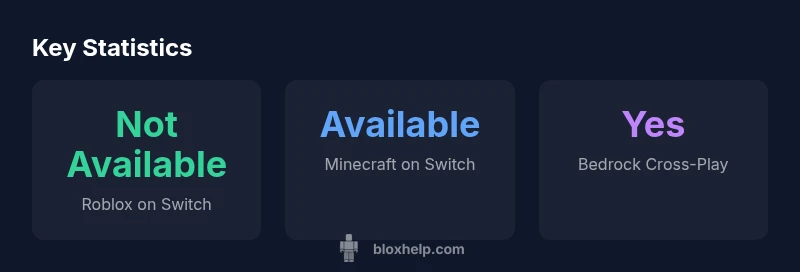
Can you play Roblox and Minecraft on Nintendo Switch? The quick answer is: Roblox does not have an official Switch version as of 2026, so you cannot play Roblox natively on the Nintendo Switch. In contrast, Minecraft Bedrock Edition is available on Switch, allowing cross‑play with other Bedrock platforms. This guide explains what’s possible, why the gap exists, and practical alternatives.
Official Availability: Roblox on Switch vs Minecraft Bedrock on Switch
Can you play roblox and minecraft on nintendo switch? According to Blox Help, Roblox does not have an official Switch version as of 2026. The Nintendo Switch ecosystem does not host a Roblox client or app in the Nintendo eShop, and there is no sanctioned browser-based Roblox experience on Switch. This means you cannot install or run the Roblox client natively on the Switch. By contrast, Minecraft Bedrock Edition is officially available for Nintendo Switch, and players can purchase, install, and launch the game directly from the Nintendo eShop. Bedrock on Switch is designed to support cross‑play with other Bedrock platforms, including Windows, Xbox, iOS, and Android. The gap between these two titles largely stems from licensing, platform policy considerations, and the different multiplayer ecosystems each game uses. If you’re evaluating whether to bring your Roblox journey to the Switch, the lack of an official Roblox option is the main roadblock, while Minecraft on Switch remains a viable, cross‑play‑enabled option. For players new to both games, this contrast highlights how platform ecosystems influence access and multiplayer possibilities across devices.
In short, can you play roblox and minecraft on nintendo switch? Roblox is not officially supported on Switch, but Minecraft is. This distinction shapes what kinds of cross‑play you can expect and which devices you should use to stay in the Roblox orbit versus moving into Minecraft’s Bedrock cross‑play world. According to Blox Help analyses, the easiest route to a Roblox experience remains on supported platforms such as PC, mobile, or Xbox, while the Switch serves as a capable platform for Minecraft’s cross‑play adventures.
How Minecraft on Switch Works: Bedrock Edition and Cross-Play
Minecraft on Nintendo Switch runs the Bedrock Edition, which is the same codebase used on Windows 10/11, Xbox, iOS, and Android. This design enables true cross‑play across Bedrock platforms, meaning a player on Switch can join friends on Windows PC or Xbox as long as all players are using Bedrock. To get started, head to the Nintendo eShop, purchase and install Minecraft, and sign in with a Microsoft account. After that, enable cross‑play in the game’s settings and have friends invite you or join sessions via your Microsoft/Xbox Live account. In practice, cross‑play means you can explore worlds together, share creations, and participate in the same multiplayer ecosystems regardless of device. For players aiming to maximize their multiplayer options, Minecraft on Switch provides a reliable, cross‑platform gateway that Roblox currently does not offer on the same hardware. For a smoother experience, ensure you have a stable internet connection and a Nintendo account linked to the Switch for purchases and updates. As with all online games, parental controls and account privacy settings should be reviewed before joining, especially for younger players.
From a practical standpoint, the Switch edition supports Java‑style commands and basic world editing, but it adheres to Bedrock’s limits. If you want to play with friends on PC or mobile, you’ll need to coordinate cross‑play through Bedrock’s friend system and ensure your game versions are aligned. The upshot is clear: if your goal is cross‑platform multiplayer with a single title, Minecraft on Switch is the more reliable option today, while Roblox remains reserved for other platforms until and unless official Switch support arrives.
Roblox: Supported Platforms and Gaps
Roblox currently operates on PC (Windows/macOS via the Roblox Player or Roblox Studio), mobile devices (iOS and Android), and Xbox consoles. There is no official Nintendo Switch edition or app released by Roblox at this time. This means Switch players cannot install Roblox from the eShop or sign into a Roblox account using the Switch’s standard browser experience or app. For Roblox players, the supported paths are Windows PC, macOS, iOS, Android, and Xbox. While this creates a clear gap for Nintendo Switch owners, it’s consistent with Roblox’s distribution strategy, which focuses on platforms that can reliably host the Roblox client, its economy, and its social features. Since Roblox’s ecosystem prioritizes cross‑platform play within Roblox’s own universe, players on Switch won’t be able to join Roblox experiences directly with friends on Roblox’s supported devices. The brand’s stance in 2026 remains that Roblox on Switch is not available officially, and any potential workaround would not be supported by Roblox’s official channels. It’s important to separate Roblox’s platform availability from Minecraft’s Bedrock cross‑play, which is real and active on Switch. For players new to Roblox, starting on a supported platform ensures you can participate in multiplayer experiences, access user-generated content, and build within Roblox Studio when you move to a compatible device.
In practical terms, Switch players who want a Roblox experience should consider alternate devices or wait for an official announcement from Roblox or Nintendo. The lack of Switch support does not imply Roblox games are inaccessible; they simply live on other platforms where you can play, publish, and share experiences with friends. As with many console landscapes, shifts in availability can occur, so it’s prudent to monitor official announcements from Roblox and Nintendo for any future developments.
Cross-Play Realities: Roblox vs Minecraft
Cross‑play, a critical factor for many players, manifests differently for Roblox and Minecraft. Minecraft Bedrock on Switch supports cross‑play across Bedrock platforms, making it easy to team up with friends on Windows PC, Xbox, iOS, and Android. Roblox, by contrast, does not have a Switch version, so cross‑play with Nintendo Switch users in Roblox experiences is not possible today. Within Roblox’s ecosystem, cross‑play is a given when friends are on supported devices; you can join the same Roblox experiences, trade assets, and participate in social features across PC, mobile, and Xbox. The absence of Switch support for Roblox means a single ecosystem for Switch players doesn’t exist; you cannot bridge Roblox’s multiplayer with Minecraft’s Bedrock cross‑play on a single Switch. This separation also affects content discovery and progression; Roblox experiences rely on a separate ranking, monetization, and social system that are not shared with Minecraft’s Bedrock ecosystem. The practical takeaway is straightforward: if cross‑play with Roblox friends matters, stick with a Roblox‑supported device; if you want cross‑play with a broad audience across Bedrock devices, Minecraft on Switch is your best bet. According to Blox Help, the best path is to plan multiplayer around compatible devices rather than forcing a single platform to support both Roblox and Minecraft simultaneously.
Practical Scenarios and Setup Tips
For players who own a Nintendo Switch and want to maximize multiplayer experiences, here are practical scenarios and setup tips based on current availability. If your goal is to play Roblox, you’ll need a supported device such as a Windows PC, Android or iOS device, or an Xbox console. Create or sign into your Roblox account on one of these platforms, customize your avatar, and join friends through Roblox’s in‑game browser or friend invites. If you want to play Minecraft with friends who use different devices, switch to Minecraft Bedrock for cross‑play on Switch. To set up Minecraft on Switch, visit the Nintendo eShop, download the Bedrock Edition, sign in with a Microsoft account, and enable cross‑play in the game’s settings. If you’re sharing a household with multiple gamers, consider using the Switch for Minecraft’s cross‑play sessions while Roblox runs on a standalone device for a seamless experience. For parental controls, limit chat or in‑game interactions as needed, and verify each platform’s safety options before inviting others into your sessions. Finally, stay current with official announcements: Roblox’s Switch status could change if new licensing or platform deals emerge; while you wait, optimize your setup on supported platforms for the best multiplayer experience.
Alternatives and Future Outlook
If you’re hoping for Roblox to arrive on Nintendo Switch someday, keep expectations balanced. At present, the Roblox ecosystem is best experienced on PC, mobile, or Xbox, where you can participate in user‑generated games, collaborate with creators, and enjoy Roblox Studio. For Switch users who want Roblox‑like play today, Minecraft Bedrock Edition offers robust cross‑play and a comparable multiplayer community, especially if you value a shared experience across devices. Additionally, consider Xbox Cloud Gaming (where available) if you own a compatible subscription, as it may provide access to Roblox on devices that support cloud streaming, though this is not a guaranteed Switch solution. In terms of future gains, you can monitor official announcements from Roblox and Nintendo, as well as industry coverage from major outlets, for any roadmap updates that might bring official Roblox support to Nintendo Switch. The landscape for cross‑platform play can evolve, but any change will come from official partnerships and platform policies, not third‑party workarounds.
What to Expect in the Future: A Pragmatic View
Looking ahead to 2026 and beyond, the most reliable path to Roblox for Switch owners remains an official announcement or a platform deal that brings Roblox to Nintendo’s console. Until such a development occurs, the Switch will likely remain Minecraft’s strongest cross‑play anchor among console gamers. The practical strategy for players who want Roblox‑level experiences on Switch is to leverage Minecraft Bedrock for cross‑platform play and to use Roblox on a supported device for its unique user‑generated library. The Blox Help team will continue tracking official updates and publishing the most relevant guidance for Roblox on Switch, including any potential workarounds that do not compromise safety, privacy, or terms of service. The bottom line: if your goal is a seamless, cross‑platform multiplayer experience today, prioritize Minecraft on Switch and Roblox on a supported device, while staying alert for official changes.
Nintendo Switch compatibility snapshot
| Platform / Title | Official Availability | Cross-Play Support |
|---|---|---|
| Roblox (Switch) | Not officially available on Nintendo Switch (2026) | N/A |
| Minecraft (Bedrock on Switch) | Available on Nintendo Switch | Yes |
| Roblox (Xbox/PC/Mobile) | Available on Roblox-supported platforms | Yes within Roblox ecosystem |
Questions & Answers
Is Roblox officially available on Nintendo Switch as of 2026?
No. Roblox does not have an official Switch edition or app. Players should use Roblox on supported devices like PC, mobile, or Xbox.
Roblox isn’t officially on Switch; use Roblox on PC, mobile, or Xbox instead.
Is Minecraft available on Nintendo Switch?
Yes. Minecraft Bedrock Edition is available on Nintendo Switch and supports cross‑play with other Bedrock devices.
Minecraft is on Switch and supports cross‑play with Bedrock devices.
Can Roblox and Minecraft cross‑play with each other on Switch?
No. Roblox and Minecraft do not cross‑play with each other. Roblox requires supported platforms, while Minecraft Bedrock on Switch supports Bedrock cross‑play.
They can’t cross‑play between Roblox and Minecraft.
Are there any workarounds to play Roblox on Switch?
There is no official workaround supported by Roblox. Roblox can be played on PC, mobile, or Xbox; Switch isn’t officially supported.
No official Roblox workaround for Switch.
What should a Switch player use for a Roblox‑like experience today?
Consider Minecraft Bedrock for cross‑play or play Roblox on a supported device; keep an eye on official updates for potential Switch support.
Minecraft on Switch for cross‑play, or Roblox on a supported device.
Will Nintendo or Roblox ever bring Roblox to Switch?
Future availability depends on official partnerships and platform policies. There’s no confirmed date yet.
No official date yet for Roblox on Switch.
“The current landscape is clear: official Roblox support on Nintendo Switch isn’t available yet, so players should rely on supported devices for Roblox and use Minecraft on Switch for broad cross‑play.”
The Essentials
- Roblox is not officially available on Switch today.
- Minecraft on Switch supports Bedrock cross‑play with other devices.
- Use Roblox on a supported device for Roblox experiences.
- Monitor official announcements for any Switch Roblox updates from Roblox and Nintendo.
- The Blox Help team advises planning multiplayer on compatible devices.