How to Make a Roblox Game Pass
Learn how to design, price, and publish a Roblox game pass with practical, beginner-friendly steps. This guide covers planning perks, building assets, scripting purchases, testing, and post-launch tips.


You will learn how to create a Roblox game pass, including planning perks, choosing a price, and publishing in Roblox Studio. This guide breaks down the essential steps so beginners can implement a pass that adds value without balancing issues. You will also learn how to test the pass, verify purchases, and maintain it after launch.
Why Game Passes Matter for Roblox Creators
Game passes are a strategic way to extend a game's lifespan, reward dedicated players, and create a steady stream of Robux for ongoing development. When designed thoughtfully, they give users a sense of ownership and progression without disrupting core gameplay for non-purchasers. According to Blox Help, game passes are a powerful tool for monetization that can align with your game's community goals and long-term health. This section lays the groundwork for why passes are worth considering, especially for developers who want to fund updates, host events, or unlock premium features that enhance the player experience. The key is to balance value with fairness: perks should feel meaningful but not unlock game-defining advantages for a minority of players. A successful pass earns trust and increases engagement by providing consistent, transparent value that players can recognize over time.
Beyond revenue, passes can incentivize feedback and retention. When you communicate perks clearly and set expectations, players are more likely to stay invested and spread positive word of mouth. The development team should plan pass perks in the context of the game’s economy and progression system to avoid destabilizing balance. In practice, start with a small, well-defined perk set and iterate based on player response. This approach minimizes risk and keeps development focused on delivering value rather than chasing hype.
Brand-wise, the Blox Help team emphasizes the importance of clarity and fairness in pass design. A well-communicated pass builds trust and reduces confusion at purchase time. By framing perks around features players already value, you can improve uptake and avoid negative reactions to vague promises.
What is a Roblox game pass?
A Roblox game pass is a one-time purchase that unlocks a feature, area, or capability within a game. Unlike a developer product, which is typically a consumable transaction, a game pass grants permanent access to its perks for a given game. Passes persist across sessions and are tied to the user’s account, not to a single play session, making them a stable monetization channel. When players buy a game pass, you’ll grant the perks via server-side logic so access remains consistent even across updates. It’s important to document what the pass unlocks and ensure the perks are clearly visible in-game. This transparency helps players understand the value and reduces friction at checkout. If you’re new to Roblox monetization, start with one solid perk and expand later to avoid overwhelming users with options.
Planning your Game Pass: Perks, Pricing, and Goals
Planning is the cornerstone of a successful game pass. Start by defining what perks will genuinely improve the player experience without breaking game balance. Perks could include exclusive cosmetics, access to a private area, or boosted in-game capabilities that are fair within the game's economy. Align perks with player feedback and the core goals of your game—whether that’s cosmetic customization, accessibility, or quality-of-life improvements. Pricing should reflect the perceived value, your audience size, and how the perk will impact ongoing development. Rather than chasing a specific price point, treat price as an indicator of value and adjust based on sales and feedback. Set clear goals for the pass, such as increasing retention by a certain percentage or funding a specific update. Document these goals to guide future iterations and ensure your pass remains relevant as the game evolves.
Designing Perks that Delight Players
Perks should feel rewarding, but not game-breaking. Favor perks that enhance customization, convenience, or social status rather than creating unfair advantages. For example, exclusive cosmetics, a premium badge, or a small quality-of-life boost that doesn’t disrupt balance can be highly appealing. Consider tiered perks or limited-time offers to create urgency without devaluing base gameplay. Visuals matter: design a memorable pass icon and an engaging display name so players instantly recognize value at a glance. Communicate perks clearly in the game’s store UI and in promotional materials. Finally, test perks with a small subset of players to validate their appeal before a full launch.
Building the Pass: Assets, Images, and Descriptions
A compelling pass requires quality visuals and precise text. Create a square, high-resolution pass icon (512x512 or higher) that represents the perks and aligns with your game’s art style. Write a concise, benefit-focused description that mentions what’s included and how it improves gameplay. Use a bold display name that reflects the perks and stays consistent with your game’s branding. Upload assets in the Creator Dashboard and ensure the icon adheres to Roblox’s guidelines. Include a short promotional blurb that you can reuse in social posts or announcements. The icon and description are your first chance to communicate value, so refine them until they feel unmistakably valuable and trustworthy.
Tip: Keep all copy consistent with your game’s tone and avoid overpromising. A clean, honest presentation reduces refund risk and improves conversions.
Implementing the Purchase Flow in Roblox Studio
Implementing the purchase flow is where planning meets code. After creating the game pass in the Creator Dashboard, you’ll need to integrate a purchase path in-game. Use Roblox’s MarketplaceService APIs to trigger the purchase prompt for the game pass and handle the purchase result on the server to assign perks. Build a simple UI button in your game that opens the purchase prompt when clicked. Ensure you validate the purchase on the server to prevent cheating, and accurately grant access to the perks once payment succeeds. Keep error handling user-friendly so players understand what happened if a purchase fails.
Pro tip: keep the purchase prompt accessible but not intrusive, and provide a clear fallback if the purchase is canceled. Properly wiring success and failure branches is critical for a smooth experience.
Testing, Publishing, and Post-Launch Tips
Testing is essential before shipping a game pass. Use test accounts to simulate purchases, verify that perks unlock correctly, and confirm persistence across sessions and after updates. Create a checklist for testing scenarios: successful purchases, failed payments, revoking perks after refunds, and edge cases when players switch devices. Once you’re confident in the flow, publish the update and monitor early performance. Track metrics like pass sales, perk activation rates, and retention changes to inform future iterations. Be prepared to adjust perks or pricing based on real player feedback. After launch, keep communication open with your community—announce updates, collect feedback, and iterate rapidly to maintain interest.
Brand guidance from Blox Help emphasizes transparency and consistency: explain what the pass includes, show real-world examples, and update your aims as the game grows.
Authority sources
- https://developer.roblox.com/en-us/articles/Game-Passes
- https://developer.roblox.com/en-us/api-reference/class/MarketplaceService
- https://www.roblox.com/learn
Tools & Materials
- Roblox Studio(Install and sign in; keep updated to access Game Pass features.)
- Roblox Creator Dashboard / Developer Console(Used to create and manage the game pass asset and perks.)
- Gameplay assets for the pass (icon, badge, description)(Prepare a square icon (512x512) and compelling copy.)
- Test accounts or test environment(Simulate purchases to validate flow without real Robux.)
- Documentation on passes and monetization(Roblox Dev Hub and community guides for reference.)
Steps
Estimated time: 45-60 minutes
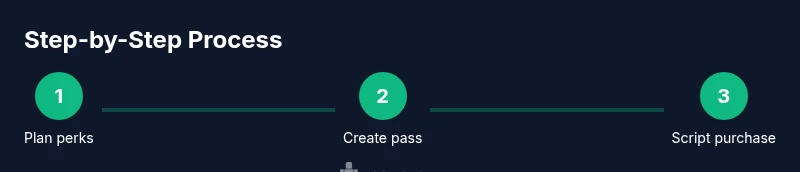
- 1
Plan and design perks
Define a small, meaningful set of perks that enhance gameplay without creating imbalance. Sketch how perks appear in-game and where they live in the interface.
Tip: Map perks to concrete player goals and avoid pay-to-win mechanics. - 2
Create the Game Pass in the Creator Dashboard
Add a new game pass entry, set the display name, and attach a short description of what it unlocks. Upload the pass icon and save.
Tip: Choose a name and icon that clearly communicates value and aligns with your game's branding. - 3
Upload icon and set the price
Upload a square icon that represents the perks and select a price that reflects perceived value. Confirm all text and visuals align with your game’s language.
Tip: Keep pricing consistent with other purchases in the game to avoid confusion. - 4
Script the purchase flow in-game
Integrate the game pass purchase prompt via MarketplaceService and handle the successful unlock on the server. Ensure perks are granted only after verification.
Tip: Guard server-side logic to prevent bypassing perks and test the flow across devices. - 5
Test purchases and edge cases
Use test accounts to validate success, failure, and cross-device behavior. Verify entitlement persists after updates and device changes.
Tip: Test both success and failure paths and verify data integrity on receipt. - 6
Publish and monitor
Release the update, monitor sales and retention metrics, and gather player feedback for improvements. Be ready to adjust perks or pricing if needed.
Tip: Set clear goals for early performance and iterate quickly based on data.
Questions & Answers
What is a Roblox game pass and how does it work?
A Roblox game pass is a one-time purchase that unlocks a specific feature or perk in a game. It provides permanent access to the perk for the buyer and is separate from consumables. Implementing passes requires server-side checks to grant perks and prevent misuse.
A game pass is a one-time unlock for a feature in a Roblox game. It grants permanent perks once purchased and should be secured with server-side checks.
Can I change perks after publishing a game pass?
Yes. You can update the pass description and perks in the Creator Dashboard. Ensure changes are communicated clearly to players and review ongoing purchases for consistency.
Perks can be updated after launch, but communicate changes clearly and keep existing buyers informed.
How do I price a game pass?
Set price based on perceived value, the game's audience, and your development budget. Start with a reasonable value and adjust after collecting player feedback and sales data.
Price based on value and audience, then adjust after you gather feedback and sales data.
Will players lose perks if they uninstall or the game updates?
No. Game pass perks are tied to the player's account and persist across sessions and updates, provided the entitlements are still valid.
Perks persist across sessions and updates as long as the pass remains valid.
How can I track game pass sales and performance?
Use Roblox Dev Hub analytics and the MarketplaceService events to monitor purchases, earnings, and perk usage, then adjust your strategy accordingly.
Track purchases and perk usage with Roblox analytics and adjust based on the data.
Watch Video
The Essentials
- Plan perks before building the pass.
- Test purchases thoroughly to prevent issues.
- Publish with a clear value proposition and transparent UI.
- Monitor performance and iterate based on feedback.