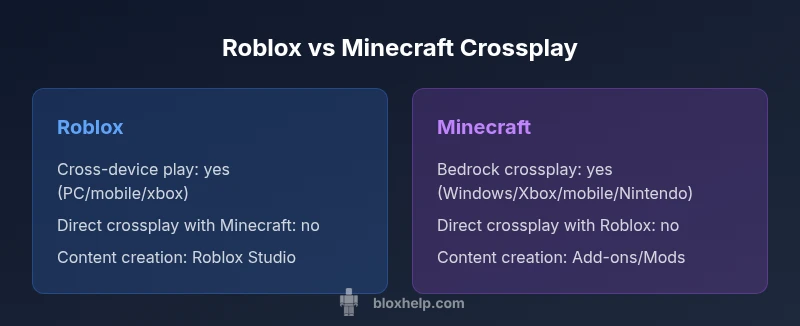
Roblox and Minecraft Crossplay: A Comparative Guide
Explore Roblox and Minecraft crossplay with an analytical, side-by-side view. Learn about official support, cross-device play, content creation, monetization, safety, and practical paths for coordinating friends across platforms.


Bottom line: There is no direct crossplay between Roblox and Minecraft. If you must compare, focus on cross-device play within each game, content creation tools, and monetization models. Minecraft Bedrock supports crossplay across Windows, Xbox, mobile, and Nintendo, while Roblox offers broad device support for one account across PC, mobile, and consoles. For group play, coordinate sessions across games using social tools like Discord, but expect each game to keep its own ecosystem separate.
Why Cross-Platform Play Matters in 2026
In a world where friends are spread across devices, cross-platform play has become a practical expectation rather than a curiosity. For players exploring Roblox and Minecraft, the question of crossplay is less about hype and more about how easy it is to stay connected, share progress, and run communities across phones, tablets, desktops, and consoles. The keyword here is compatibility: the more platforms a game natively supports, the larger the social circle you can invite to your virtual world. For Roblox and Minecraft enthusiasts, this means different paths to co-op play, distinct design philosophies, and unique constraints that shape how you play together. According to Blox Help, understanding these cross-platform realities helps players set realistic expectations and design schedules that respect everyone’s device limitations. In 2026, players often plan gaming sessions around who has access to hardware, and cross-platform support is a key factor in choosing which ecosystem to invest time and creativity in. This article compares Roblox and Minecraft across the same lens to help you decide where to invest your social energy, with a focus on roblox and minecraft crossplay realities.
The Big Difference in Crossplay Philosophy: Roblox vs Minecraft
Roblox and Minecraft approach crossplay from fundamentally different angles. Roblox centers on user-generated experiences delivered through a single, unified ecosystem that scales across PC, mobile, and certain consoles. Minecraft, particularly the Bedrock edition, emphasizes cross-platform compatibility across Windows, Xbox, mobile, and Nintendo devices, but it treats Java edition as a separate ecosystem with its own rules. The philosophy difference matters because it shapes how easy it is to invite friends and how content is discovered and shared. The Blox Help Editorial Team notes that Roblox prioritizes creator-hosted experiences where social features are embedded in the game hub, while Minecraft modularity relies on add-ons, worlds, and servers. If your goal is to run a shared project across devices, these distinctions determine where collaboration will feel natural or forced. Finally, remember that roblox and minecraft crossplay between the two games themselves is not officially supported, which affects planning and expectations for cross-title friendships.
Cross-Platform Capabilities: What Each Game Supports
Understanding platform reach helps set expectations for how far your friend group can go without switching ecosystems. Roblox offers cross-device play by design: players can sign in with a single account and access games on PC, iOS, Android, and certain consoles with consistent progress and access to their avatar. Minecraft Bedrock expands this reach even further, enabling crossplay across Windows, Xbox, Nintendo, iOS, and Android with shared inventories and progress in many cases. The difference matters when you want to schedule a night where everyone joins a session regardless of device. However, the two games do not connect with each other; there is no official roblox and minecraft crossplay between Roblox and Minecraft. In practice, you’ll coordinate sessions via external tools and choose a single game to explore together.
Crossplay Realities: What You Can Do Today
Today’s reality is straightforward: you cannot hop directly between Roblox and Minecraft in a single multiplayer session. If your friend group wants to game together, you’ll need to pick one ecosystem for a given night or run parallel sessions with coordinated times. Roblox shines for quick, creator-driven experiences that are easy to access across devices, while Minecraft shines for cross-device building and exploration, especially on Bedrock. A practical approach is to align on a shared social platform—such as Discord—then schedule separate Roblox or Minecraft sessions back-to-back. This approach preserves the social energy of your group without forcing players into incompatible platforms. For families and classrooms, this also clarifies expectations and avoids confusion about which game to install, which edition to buy, and how to manage accounts across devices.
Connecting Friends Across Games: Workarounds
Even without direct crossplay, you can maintain a cohesive social night by leveraging social and scheduling tools. Create a central chat on Discord or a similar platform where friends post their availability and device. Use a shared calendar to slot Roblox evenings and Minecraft mornings or weekends. Consider setting up a simple newsboard in your community hub that lists upcoming Roblox Studio projects or Minecraft world seeds you plan to explore. For content creators, cross-promotion matters: share clips, build guides, and tutorials across both ecosystems to keep the group engaged. Finally, be mindful of account and data privacy: avoid sharing login details and educate younger players about online safety, especially when coordinating across devices and platforms.
Content Creation and Modding: Studio vs Bedrock Add-Ons
Roblox Studio is a powerful, integrated development environment that enables rapid prototyping and multiplayer experiences within Roblox itself. It emphasizes scripting with Lua and designing experiences that are immediately publishable to the Roblox catalog. Minecraft, on the other hand, relies on a mix of Java Edition (PC-centric, highly moddable) and Bedrock Edition (cross-platform, add-ons mainly through official marketplace). The modding culture for Minecraft is vibrant, with thousands of community-created mods and addons that can dramatically alter gameplay. If your goal is heavy customization and a wide modding community, Minecraft Java/Bedrock holds a different set of possibilities than Roblox Studio. In both ecosystems, creators must respect platform policies, content guidelines, and marketplace rules when monetizing or sharing content.
Safety, Moderation, and Community Standards
Safety and moderation differ across platforms. Roblox maintains a robust content moderation system with community guidelines, parental controls, and age-appropriate defaults intended to minimize exposure to harmful content. Minecraft’s safety model relies on Mojang’s guidelines plus platform-level protections on Bedrock and parental controls for younger players. When planning cross-device play, you should educate players about privacy, screen time, and reporting abuse within each ecosystem. The key takeaway is that cross-title play does not diminish the need for good safety practices: verify age-appropriate content, use moderation tools, and ensure your group adheres to each platform’s terms of service.
Monetization and Economics: In-Game Currencies and Marketplaces
Roblox uses Robux and a creator economy that enables users to monetize experience passes, items, and avatar accessories via the Roblox economy. Minecraft monetizes through the official Marketplace, add-ons, and skins, with revenue sharing influencing creator incentives. The two ecosystems approach monetization differently: Roblox emphasizes ongoing engagement through user-generated experiences, while Minecraft emphasizes curated content and paid add-ons delivered through the official store or community-run servers. If you plan to monetize content, you’ll want to study each program’s terms of service, revenue models, and distribution mechanisms. When considering roblox and minecraft crossplay, remember that monetization paths stay within each platform and do not cross over between Roblox and Minecraft.
User Experience on Different Devices: UI and Performance
Device differences affect how players experience Roblox and Minecraft. Roblox aims for a uniform experience across desktops, tablets, and consoles, with a consistent avatar system, HUD, and in-game menus. Minecraft Bedrock emphasizes cross-platform UI that adapts to touch and controller input; performance can vary based on device specs, with mobile clients often delivering a different pace and control scheme than PC or console experiences. For players with friends on multiple devices, this means planning control schemes and navigation expectations ahead of play sessions. In practice, expect slightly different control feels, load times, and screen layouts depending on platform, but both games strive for accessible entry points on multiple devices.
Beginner's Roadmap: Start Here for Roblox or Minecraft
If you’re new to Roblox, start by creating a Roblox account, installing the client, and exploring the Creator Hub to find beginner-friendly experiences. For Minecraft, decide whether you’ll play Java or Bedrock edition; then install the corresponding launcher, set up your Microsoft account, and explore official add-ons or community servers. A practical path is to join beginner-friendly worlds or tutorials in either game, then gradually branch into content creation tools (Roblox Studio or Minecraft Add-ons) as you gain familiarity. To support long-term engagement, set realistic goals: weekly co-op sessions with friends, small build projects, and a cadence for learning development tools. Remember that the two titles are separate ecosystems; you’ll invest time in whichever path aligns with your goals and your friends’ preferences.
Common Myths and Realities About Crossplay
A common myth is that crossplay is always possible across all major titles; the reality here is more nuanced. Roblox and Minecraft lack direct crossplay with each other, and even within Minecraft, Java and Bedrock editions remain separate ecosystems with different feature sets. Another myth is that crossplay automatically means identical experiences across devices; while Bedrock offers broad cross-device play, content, controls, and performance still differ by platform. By recognizing these realities, players can set expectations, choose the most suitable platform for shared play, and avoid disappointment when attempting to coordinate across different ecosystems.
Decision-Making Framework: Which Path Is Right for You?
To decide between Roblox and Minecraft when crossplay is a consideration, start with your group’s priorities: do you want quick, creator-led experiences with a built-in content marketplace, or wide, cross-device building and exploration across multiple devices? If your group prioritizes rapid social play and ease of access, Roblox may be the better fit. If you seek deep building projects, modding potential (Java/Bedrock add-ons), and a more expansive cross-device network on Bedrock, Minecraft might suit you better. Remember that crossplay directly between Roblox and Minecraft isn’t supported, so plan social nights around a single ecosystem at a time. Ultimately, the right choice aligns with your goals, your friends’ devices, and your tolerance for learning curve in content creation tools.
Comparison
| Feature | Roblox | Minecraft |
|---|---|---|
| Direct crossplay with the other game | not supported | not supported |
| Cross-device play within the game | Yes across PC, mobile, and some consoles | Yes across Windows, Xbox, mobile, Nintendo (Bedrock) |
| Account model and continuity | Single Roblox account across devices with avatar and progress tied to that account | Microsoft account for Bedrock; Java separate; progression tied to each edition |
| Modding and content flexibility | Roblox Studio integrated; primarily scripted experiences with built-in constraints | Minecraft Java supports extensive mods; Bedrock uses add-ons and official marketplace add-ons |
| Monetization and economy | Robux economy; creator revenue within Roblox ecosystem | Minecraft Marketplace and add-ons revenue; creator monetization varies by platform |
| Safety and moderation | Roblox moderation with parental controls; in-game reporting | Mojang/Microsoft safety policies; community guidelines; parental controls |
| Best use case | Rapid creation and social hubs; quick discovery of new games | Deep building, exploration, and mod-friendly environments |
Benefits
- Clear side-by-side view of two popular sandbox ecosystems
- Highlights where cross-device play is strongest
- Shows differences in content creation and monetization
- Helps families plan shared play sessions across platforms
- Supports informed decision-making for players and learners
What's Bad
- No direct crossplay between Roblox and Minecraft may disappoint fans
- Two very different ecosystems can create cognitive load for newcomers
- Cross-title comparisons can blur unique community norms and safety rules
Roblox and Minecraft are best evaluated as two distinct ecosystems rather than a single cross-title path
If you want true cross-platform play, choose Bedrock Minecraft for broad device support; if you want rapid content creation and a large creator economy, Roblox offers a streamlined workflow. Direct crossplay between the two games isn’t supported, so plan social nights within one ecosystem at a time. The Blox Help team recommends aligning with your group’s preferred devices and content goals to maximize enjoyment.
Questions & Answers
Can Roblox players play with Minecraft players directly?
No direct crossplay is supported between Roblox and Minecraft. Each game runs on its own platform with separate accounts, content creation tools, and communities. You can still coordinate social sessions via chat or voice apps, but you’ll play in separate ecosystems.
Direct crossplay isn’t possible; you’ll need to coordinate sessions in Roblox or Minecraft separately.
Is crossplay possible between Roblox PC and Minecraft Bedrock?
No. Roblox and Minecraft Bedrock do not share crossplay capabilities. Players will need to stick to their chosen game for multiplayer sessions, then use external tools to coordinate schedules.
No crossplay between those two games; coordinate via Discord or similar tools.
What are the best ways to coordinate friends across Roblox and Minecraft?
Use external social tools like Discord to schedule sessions, share invites, and discuss builds. Create a recurring calendar with Roblox nights and Minecraft weekends, and post updates about new builds or games to try. This minimizes confusion and keeps the social energy intact.
Coordinate via Discord; schedule Roblox nights and Minecraft weekends.
Does Minecraft Java Edition crossplay with Bedrock?
No. Java Edition and Bedrock Edition are separate ecosystems and do not support crossplay. Players should choose one edition based on their platform and modding preferences.
Java and Bedrock don’t crossplay.
Can Roblox content creators use mods or external tools?
Roblox relies on Roblox Studio and published experiences; external mods are restricted. Minecraft, especially Java Edition, supports a large modding community with extensive add-ons. If modding is important, Minecraft may be a better fit.
Roblox uses Studio; mods aren’t supported like Minecraft.
Are there official crossplay features in 2026?
There is no official crossplay between Roblox and Minecraft. Each title remains within its own ecosystem, with cross-device play available within Roblox and Minecraft Bedrock.
No official crossplay between Roblox and Minecraft.
The Essentials
- Compare ecosystems, not titles, for crossplay planning
- Minecraft Bedrock supports wide cross-device play; Java does not cross with Bedrock
- Roblox centers on built-in game creation tools and economy
- Direct Roblox-Minecraft crossplay is not available
- Coordinate sessions with social tools to maximize shared play time