Roblox or Minecraft for Kids: A Practical Side-by-Side Review
A balanced, analytic comparison of Roblox and Minecraft for kids, covering safety, learning value, costs, cross‑platform play, and how to choose based on a child’s interests.


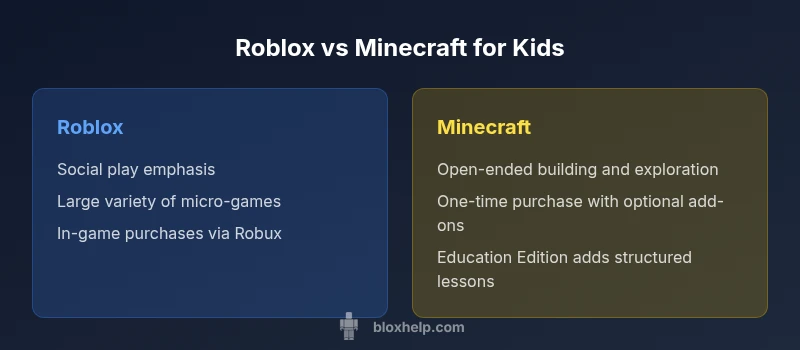
When deciding between roblox or minecraft for kids, families should weigh safety settings, creative scope, and cost. Roblox emphasizes social play and quick-start experiences built from user-generated content, while Minecraft centers on open-ended building and exploration. The best choice depends on your child’s interests and your comfort with in-game purchases and parental controls. For many households, testing both options with free accounts can reveal which environment aligns with daily routines and safety expectations.
Roblox or Minecraft for Kids: A Pragmatic Comparison
In evaluating roblox or minecraft for kids, families should weigh safety settings, creative scope, and cost. Roblox emphasizes social play and quick-start experiences built from user-generated content, while Minecraft centers on open-ended building and exploration. The goal of this guide is to provide an objective, parent-friendly framework for deciding which platform aligns with a child's interests and family rules. We will explore safety tools, content variety, learning opportunities, cross-platform access, and long-term value. Throughout, we reference practical criteria like age-appropriate experiences, parental controls, and the quality of built-in tutorials. By the end, you should have a clear sense of which option fits your household’s routines and priorities. According to Blox Help, safety configurations and parental controls are essential to making an informed choice. The content balances social dynamics, creative opportunities, and the realities of ongoing costs across both ecosystems.
Safety and Moderation: How Each Platform Guards Young Players
Safety is a top concern for families keeping a watchful eye on gaming time. Roblox uses a combination of age-appropriate settings, account restrictions, and a large moderation team to filter user-generated content. Parents can activate features like account PINs, chat filters, and experience restrictions to limit interactions with strangers. However, given the scale and openness of the platform, some experiences can slip through the cracks, so ongoing supervision and using curated experiences is advised. Minecraft, conversely, emphasizes a more contained approach: server moderation, private worlds, and clear in-game chat rules. The base game itself is relatively tame, and when enabling Education Edition or Creative modes, the social layer becomes easier to supervise. Since both titles rely on community-generated content, parents should set expectations around chat, skins, and downloaded resources. The bottom line is: enable the strongest safety settings you’re comfortable with, review friend lists, and consider enabling time limits.
Creative Potential: Building, Modding, and World Design
A core distinction between roblox or minecraft for kids is how each title channels creativity. Roblox offers thousands of micro-games and experiences, many built with its own Lua-based scripting engine. For a child who enjoys role-playing, speed-running, or mini-games, Roblox provides a rapid path from idea to playable demos. Minecraft emphasizes open-ended building, exploration, and problem-solving through redstone logic and resource gathering. In Minecraft, kids learn spatial reasoning as they design intricate structures, farms, and adventures. Modding is easier in Minecraft for families who want to customize mechanics, though it often requires extra steps and careful maintenance. In terms of learning outcomes, Roblox can teach basic game design concepts and event-driven logic, while Minecraft can foster computational thinking and systems thinking through contraptions. The important point: both platforms reward experimentation, but they do so through different creative cultures.
Learning Outcomes: Education, Skill-Building, and Critical Thinking
When considering Roblox vs Minecraft for kids, think about learning goals beyond sheer play. Roblox Studio introduces budding developers to game design concepts like pacing, UI, and event handling in a guided environment. Kids who dive into scripting learn the basics of programming logic, conditional statements, and resource management. Minecraft Education Edition is widely used to teach geometry, collaboration, and problem solving through guided lessons and simulations. For homeschooling or after-school programs, Minecraft can offer structured activities that align with STEM standards, while Roblox can support quick prototyping and teamwork in a social framework. Beyond formal education, both ecosystems encourage iterative testing: build a level, test it with peers, gather feedback, and refine. For families evaluating roblox or minecraft for kids, choosing a platform should align with whether the child enjoys social mini-games and guided experiences (Roblox) or long-form building and experimentation (Minecraft).
Costs, Monetization, and Value: What Families Pay
Cost is a practical lens through which to compare roblox or minecraft for kids. Roblox operates on a free-to-play model with optional microtransactions for Robux, the in-game currency used to access premium experiences, cosmetics, and creator-friendly tools. A key consideration is ongoing spending: even small purchases can add up if a child explores popular experiences or buys cosmetic items. Parents should consider setting spending limits, using account-level restrictions, and guiding kids toward experiences with transparent pricing. Minecraft typically requires a one-time purchase to access the base game, with optional add-ons such as expansion packs, skins, or Realms subscriptions for persistent multiplayer worlds. The long-term cost depends on how often a family participates in multiplayer servers or Education Edition licenses, which may carry separate pricing. In practice, both platforms can be affordable if families set boundaries and use family accounts that allow monitoring, budget caps, and scheduled play times. The choice depends on whether you prefer ongoing microtransactions or a one-time purchase with optional extras. Based on Blox Help analysis, clearly defining spend rules early helps prevent surprises.
Cross-Platform Play and Device Availability
Cross-platform play can influence the decision, especially in households with multiple devices. Roblox is widely accessible across Windows, macOS, iOS, Android, Xbox, and even some VR configurations, enabling a shared ecosystem for a family with mixed devices. Minecraft also spans Windows, macOS, iOS, Android, and consoles, but the cross-play experience can vary between editions (Bedrock vs Java) and is sometimes more robust within the Bedrock edition. For younger kids, the ability to pick a game that runs well on tablets or smartphones is a practical factor. Both titles support offline play in limited forms—Minecraft in Creative or offline modes; Roblox offline play is limited to pre-downloaded experiences or local play in some configurations. When evaluating roblox or minecraft for kids, map your devices, the preferred screen size, and the quality of multiplayer experiences you expect to supervise. A shared device strategy can be effective if you set clear rules and monitoring.
Content Variety, Quality Control, and Moderation
The sheer variety of experiences in Roblox creates a dynamic content library, but it also introduces a wide quality range. Some experiences are polished and well-suited for kids, while others may be less appropriate or educational. Parents should rely on curated experience lists and family-friendly tags, and consider restricting access to the most reputable creators. Minecraft's content is more cohesive due to its core sandbox design, but modded content and community servers vary in quality and safety. The Education Edition portfolio adds classroom-ready resources, improving consistency for teachers and guardians. For families choosing roblox or minecraft for kids, ensure you have a content-filtering policy, regularly review activity, and use in-game reports and moderators to handle trouble spots. The best approach is to start with recommended experiences and gradually expand as trust builds and the child demonstrates responsible screen time habits.
Parental Controls, Screen Time, and Guidance
Parental controls are central to safe play. Roblox offers age-appropriate settings, family accounts, and chat filters, but these require proactive setup and ongoing adjustments as children grow. Minecraft's parental controls are deeper in some ecosystems (Education Edition and Realms) but may be less visible in the base game, depending on the edition. The key is to craft a family policy: set daily or weekly screen-time limits, discuss in-game purchases, and agree on safe chat practices. Consider co-playing sessions to model good behavior and to build a healthy tech habit. You can also pause or remove microtransactions by using gift cards with spending caps or by selecting experiences that do not require additional purchases. The goal is to balance autonomy with supervision, so kids can explore, create, and learn while staying within boundaries that you’re comfortable with.
Social Experience and Community Norms
Both Roblox and Minecraft offer vibrant communities, but the social dynamics differ. Roblox emphasizes social experiences, avatars, and user-generated games that encourage interaction, collaboration, and competition within structured experiences. Minecraft fosters cooperative world-building, survival challenges, and server communities where friends gather to build together and share ideas. In Roblox, you can curate contact with strangers to an extent; in Minecraft, you can invite trusted friends and family to join private worlds. For families, it’s important to discuss online etiquette, recognize online scams or risky behavior, and enable safety features like chat filters and private servers. Encouraging positive peer relationships, setting expectations on sharing, and using parental oversight helps keep social play aligned with family values. In the end, roblox or minecraft for kids can offer social development when paired with deliberate supervision and clear guidelines.
How to Decide: Aligning With Your Child’s Interests
When choosing between roblox or minecraft for kids, start with your child’s interests and temperament. If they crave social games, quick setups, and a marketplace of user-generated adventures, Roblox may be the better fit. If they prefer open-ended building, exploration, and a steady progression of personal projects, Minecraft could be more engaging. Consider your device ecosystem, desire for education-grade resources, and willingness to supervise content. Try both platforms for a limited time with free accounts or trial modes before making a commitment. Some families create a rotation schedule, letting kids spend alternating weeks on Roblox and Minecraft to diversify experiences while maintaining oversight. Finally, assess long-term goals: are you hoping for formal education value, or simply creative play and family bonding? A thoughtful approach will help you select roblox or minecraft for kids in a way that supports curiosity, safety, and responsible screen time.
Quick Start Guide for Parents
Getting started doesn’t have to be overwhelming. Create child-friendly accounts with strong, unique passwords and enable two-factor authentication where possible. Set a spending cap on Roblox through account settings and discuss what constitutes an appropriate in-game purchase. For Minecraft, decide whether to purchase the base game, consider Realms subscriptions for safe multiplayer, and review available Education Edition options if you plan to use instructional content. Establish a family gaming schedule that includes offline breaks and joint play sessions. Use the built-in safety tools to restrict friends, chats, and server access, and regularly review activity logs together to reinforce trust. Finally, document family rules in a simple checklist: allowed genres, online interactions, and daily play time. This practical framework helps families implement roblox or minecraft for kids with confidence and minimize risk.
The Decision Framework: A Simple, Repeatable Model
To make a decision that sticks, use a lightweight framework: goal, guardrails, and trial. Goal: clarify what your child hopes to achieve—social play, engineering basics, or solo creativity. Guardrails: set safety boundaries, budget limits, and device-compatible checks. Trial: run a two-week test period with both platforms, comparing engagement, enjoyment, and the ability to maintain healthy screen time habits. Collect feedback from the child and observe how they collaborate with peers and solve problems. If safety concerns overshadow engagement, or if cost becomes a burden, you should pivot toward the platform that better aligns with your guardrails. The key takeaway for roblox or minecraft for kids is that there is no one-size-fits-all answer; the right choice depends on your family's values, risk tolerance, and the child's learning style. With a thoughtful, structured approach, you can implement a solution that balances fun, safety, and education.
Comparison
| Feature | Roblox | Minecraft |
|---|---|---|
| Core experience | Social, user-generated experiences with monetization | Open-ended sandbox building with exploration |
| Safety controls | Chat filters, PINs, parental controls; moderation scale varies | Private worlds, optional moderation in Education/Bedrock editions |
| Educational potential | Intro to game design and scripting concepts | STEM-focused learning via geometry and logic |
| Cost model | Free-to-play with Robux microtransactions | One-time purchase with optional add-ons |
| Cross-platform play | Broad multi-device support across many platforms | Bedrock cross-play is strong; Java varies by edition |
| Content quality control | Wide variance; rely on curated lists and creator reputation | More cohesive content; mods and servers vary in safety |
| Audience suitability | Wide age range with kid-friendly experiences | Best for ages depending on edition; youth-friendly servers |
Benefits
- Strong social features and quick-start experiences
- Huge, diverse content library and rapid onboarding
- Minecraft offers deep creative building and problem solving
- Active communities with family-friendly options and safety tools
What's Bad
- Quality of experiences on Roblox varies widely
- In-game purchases can add up without boundaries
- Minecraft community content and mods require careful supervision
- Age- and edition-related differences can cause confusion
Minecraft excels for long-form creativity and structured learning; Roblox wins for fast social play and broad content variety
For families prioritizing open-ended building and education value, Minecraft is the stronger long-term pick. If social experiences, quick entry, and a vast array of user-made games matter most, Roblox is the better fit. Most households benefit from exploring both under clear safety rules to balance play and learning.
Questions & Answers
Is Roblox safe for kids in practice?
Roblox provides chat filters, parental controls, and account restrictions. However, due to user-generated content, ongoing supervision and selecting child-friendly experiences are essential to maintain safety.
Roblox has safety controls, but parents should supervise and choose kid-friendly experiences.
Is Minecraft more educational than Roblox?
Minecraft Education Edition offers classroom-ready resources and structured activities, while Roblox teaches basic design and scripting through its creator tools. Education value depends on how you structure play.
Minecraft Education Edition emphasizes classroom-style learning; Roblox focuses on design and scripting through play.
Can these games be played offline?
Minecraft supports offline Creative and single-player modes. Roblox requires an online connection to access its experiences, though some local features may exist in specific configurations.
Minecraft can be offline in Creative mode; Roblox generally needs internet access.
Which is cheaper in the long run?
Minecraft is typically a one-time purchase with optional extras, while Roblox is free to start but relies on ongoing microtransactions for premium content. Costs depend on usage and purchases.
Minecraft usually costs once, Roblox can involve ongoing purchases.
Do parental controls work well on both platforms?
Both platforms offer controls, but the depth and ease of use vary by edition and device. It’s best to enable the strongest available settings and review activity regularly.
Controls exist on both; set limits and review activity often.
Can kids learn coding with these platforms?
Roblox Studio teaches basic scripting with Lua, while Minecraft Education Edition includes coding-focused activities. Both foster computational thinking when guided.
Yes—Roblox teaches scripting; Minecraft offers coding activities in Education Edition.
The Essentials
- Define the child's goals before choosing a platform
- Enable robust safety settings and set spending rules
- Test both platforms with guided intro sessions
- Monitor content and model good online behavior
- Plan a structured play schedule to balance learning and fun