Best Buy Roblox Gift Card Guide 2026
Learn how to buy and redeem a Best Buy Roblox gift card, with denomination tips, regional availability, safety cues, and practical steps from Blox Help.


Best Buy Roblox gift card options are widely available for both in-store and online purchases, redeemable for Robux and Premium upgrades. The quick takeaway is to confirm the card denomination, ensure regional compatibility, and distinguish between physical cards and eGift codes before checkout to avoid delays, expiration concerns, or misapplied balances.
Why Best Buy Roblox Gift Cards Matter for Gamers
For many Roblox players, a gift card is the simplest gateway to Robux, avatar items, and premium upgrades without linking a bank account. When you shop for a Best Buy Roblox gift card, you’re choosing a retailer with wide accessibility in many regions and a familiar checkout experience. The Blox Help team has found that buying from a reputable retailer reduces the risk of counterfeit codes and missing balances compared to less-known sellers. In practice, Best Buy’s gift cards come in physical cards and digital codes (eGift), both redeemable directly on Roblox. The choice between physical versus digital often hinges on timing: if you need a gift instantly, eGift is preferable; if you want to give a tangible present, a physical card can feel more tactile. Customers should also confirm denomination options before checkout because not all stores display every value, and Roblox balance is generally fixed by the card’s face value. Finally, keep the card and code in a secure place until you’re ready to redeem; a spoiled or misplaced code can throw a project off schedule for a budding developer who relies on Robux to test new gear and scripts. The goal is a smooth, predictable path from purchase to spending, with no surprises at the moment of redemption.
How to Buy and Redeem Roblox Gift Cards at Best Buy
Best Buy offers Roblox gift cards both in-store and online. To buy in person, visit electronics or gift-card displays and select a denomination that matches the Robux amount you plan to purchase. Online, you can add the card to your cart and choose digital delivery if available; some regions may pull from stock for physical cards only. After purchase, you’ll receive either a physical card with a code printed behind a scratch-off panel or a digital code delivered by email. To redeem, log into your Roblox account on the Roblox website or mobile app, navigate to the Redeem Roblox Gift Card section, and enter the 12-digit code exactly as shown. The balance appears immediately and is usable for Robux purchases, avatar items, and Premium upgrades. If you’re gifting, consider pairing the code with a written note to avoid the recipient forfeiting it or misplacing it. For beginners, keep a small bankroll in mind and test with a low denomination first to learn the process without overspending. Finally, monitor your receipt for any errors in the checkout line or email, and contact Best Buy support if you encounter issues.
Denomination Guidance: Choosing the Right Value
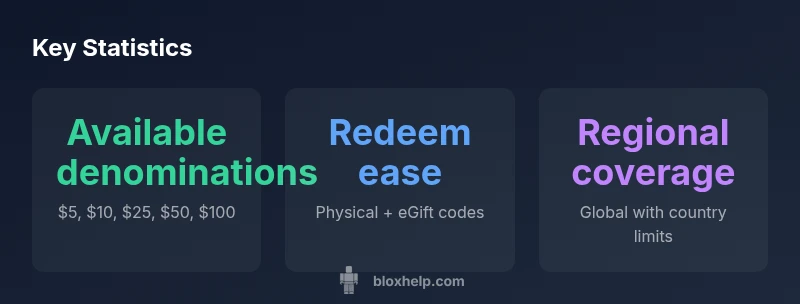
Denominations for Roblox gift cards typically cover a range of values. Common options include five, ten, twenty-five, fifty, and one hundred dollars; some retailers also offer bundles or promotional variations. When selecting a denomination, align it with your Roblox spending plan: if you mainly buy Robux, estimate the Robux-to-dollar conversion rate at current prices and decide whether you want a small starter balance or a larger top-up. For brand-new accounts, starting with a smaller denomination helps you learn the redemption process and manage your balance. If you’re shopping as a gift, choose a denomination that matches the recipient’s typical spending or a nice round amount that makes budgeting easier. Always check whether the gift card is physical or digital because delivery speed and activation times differ. After purchase, verify the code or card number and immediately redeem it to confirm the balance is correct. If any discrepancy occurs, contact customer support rather than waiting for the issue to escalate. In general, planning your denomination ahead of time reduces post-purchase anxiety and ensures you’ll maximize the value of your Best Buy Roblox gift card.
In-Store vs Online: Quick Delivery and Access
The choice between in-store and online purchases often comes down to timing and convenience. In-store shopping lets you see the card in person, verify its packaging, and walk away with instant access if you’re buying a physical card, which can be ideal for last-minute gifts. Online purchases, including eGift variants, typically provide immediate delivery to your email or Roblox account, enabling instant redemption from any device. If you’re buying a gift, digital delivery accelerates the process, while physical cards can offer a tangible present for younger players or if you want to include a card in a gift bag. Regardless of delivery mode, always confirm the retailer’s checkout security, ensure the code is legible, and redeem promptly to verify the balance. And if you’re saving time, apps and retailers sometimes offer one-tap redemption options that streamline the procedure for Roblox fans who are eager to start playing.
Comparison of Roblox gift card options across major retailers
| Retailer | Gift Card Type | Redeem Method | Notes |
|---|---|---|---|
| Best Buy | Physical & digital (eGift) | Roblox website / Roblox app | Check regional availability and balance |
| Alternative retailers | Physical & digital | Roblox account redemption | Availability varies by country |
Questions & Answers
Are Best Buy Roblox gift cards available in all regions?
Availability varies by country; check Best Buy’s site for your location and Roblox region compatibility before purchasing.
Region availability varies; check your country on Best Buy’s site and Roblox compatibility before buying.
Do Roblox gift cards from Best Buy expire?
Roblox gift cards generally do not expire, but always review the terms on the card packaging or the Roblox redemption page.
Roblox gift cards don’t normally expire; just verify the terms on the card or Roblox site.
Can I use a Best Buy Roblox gift card for Robux on mobile?
Yes. After redeeming the code to your Roblox account, you can spend Robux on mobile through the Roblox app.
Yes—redeem to Roblox, then spend Robux on mobile within the app.
What’s the difference between a physical card and an eGift card from Best Buy?
Physical cards arrive in-store and have a printed code; eGift cards are delivered by email. Both redeemable on Roblox.
Physical cards come in-store; eGift is emailed; both can be redeemed on Roblox.
How do I redeem a Best Buy Roblox gift card?
Log in to Roblox, go to Redeem Gift Card, enter the code exactly as shown, and the balance updates immediately.
Sign in to Roblox, redeem the code, balance appears instantly.
Are there common scams to watch for with Roblox gift cards?
Avoid codes from unofficial sellers; buy only from trusted retailers like Best Buy and verify the code before sharing.
Stick to trusted retailers; beware of fake codes from third parties.
“Roblox gift cards should be treated like any trusted online purchase: verify legitimacy, balance, and regional validity before checkout.”
The Essentials
- Verify denomination before purchase.
- Choose physical or digital based on timing.
- Check regional availability and redemption method.
- Redeem promptly to confirm balance and avoid issues.