How to Buy a Roblox Gift Card: A Practical Guide
Discover how to buy a Roblox gift card securely, where to shop, how to redeem, and tips to avoid scams. This practical guide from Blox Help covers digital and physical options, value tiers, and best checkout practices.


Buying a Roblox gift card is a straightforward way to fund Robux or a Premium subscription. You can purchase digital codes or physical cards from Roblox’s official site or trusted retailers, then redeem them at Roblox.com. This quick guide covers where to shop, how to redeem, and safety tips to avoid scams.
Why buying a Roblox gift card makes sense
Choosing to buy a roblox gift card is a practical and beginner-friendly way to manage in-game purchases. For many players, a gift card removes the need to link a bank account or payment method directly to Roblox, offering a simple, controllable budget. Gift cards are especially convenient when shopping for younger players, as they provide a clear spending limit and a concrete gift that can be given digitally or in person. The ability to gift Robux or a Premium subscription makes this option versatile for celebratory occasions, such as birthdays or holidays. When you plan to buy a roblox gift card, you’ll typically encounter two main formats: digital codes delivered instantly and physical cards mailed to you or the recipient. Both formats have their pros—digital codes are fast and eco-friendly; physical cards can be a cherished present with a tangible keepsake.
Where to buy a Roblox gift card
There are several trusted avenues to obtain a Roblox gift card. Officially, you can buy directly from the Roblox website, which provides digital codes and sometimes physical card options depending on your country. In addition, major retailers and e-commerce platforms commonly stock Roblox gift cards in both digital and physical formats. If you’re shopping in-store, look for gift cards at electronics retailers, supermarkets, or convenience stores. For online shoppers, use retailers with strong user reviews and transparent checkout processes. Always verify the retailer’s legitimacy before entering payment details, and avoid third-party marketplaces that offer unusually steep discounts, as these are common scam vectors. By sticking to recognized sources, you minimize the risk of fake codes or compromised accounts when you buy a roblox gift card.
Understanding gift card values and Roblox currency
Roblox gift cards come in value tiers to fund Robux purchases and subscriptions. When you plan to buy a roblox gift card, think in terms of value tiers rather than chasing a single number. These tiers are designed to cover a range of spending needs—from small top-ups for casual players to larger balances for more sustained use. The exact conversion to Robux can vary by country and currency, so it’s important to review the current terms on Roblox’s official pages. Remember that gift card value can often be applied to either Robux or a Premium subscription, depending on how you redeem it and your country’s policy. If you’re budgeting, consider the typical costs of Robux bundles and Premium plans to pick a card value that matches your goals.
How to redeem a Roblox gift card
Redeeming a Roblox gift card is straightforward but must be done on the official site to ensure accuracy and security. Start by signing into your Roblox account and navigating to the gift card redemption page. Enter the exact code from your digital or physical gift card, then submit. If the code is valid and region-appropriate, your balance will appear as Robux credit or Premium credit depending on the card and redemption method. After redeeming, verify that your account balance reflects the change and that you received the expected benefits. If you encounter a mismatch, double-check the code, confirm your country settings, and contact Roblox support if needed. Always keep the gift card code private until you’re ready to redeem it.
Gift card safety and scams
Gift card safety should be a top priority when you buy a roblox gift card. Only use official Roblox channels or well-known retailers to reduce the risk of counterfeit codes. Be wary of unsolicited emails or social media posts offering unusually low prices or urgent, emotional appeals to hurry your purchase. Never share your gift card code publicly, such as in chat or forums, and avoid entering codes on unofficial pages. When you buy a roblox gift card, check the retailer’s return policy and seek receipts or order confirmations for your records. If a deal sounds too good to be true, it probably is—stick to trusted sources and verify codes before redeeming.
Using Roblox gift cards for Robux or Premium
A Roblox gift card can be used to fund Robux purchases, a Premium subscription, or both, depending on the redemption flow in your region. If you want to maximize value, consider how you plan to use Robux versus Premium features such as monthly Robux grants, access to creator features, or exclusive items. After redemption, you can allocate the value to Robux in your account or set up a Premium plan if the card and region support it. Keep in mind that you may need to navigate separate pages for Robux purchases and Premium sign-ups, and some gift cards may be limited to one option per redemption. Always review the current terms for your country to avoid surprises at checkout.
Regional considerations and currency
Regional rules influence how Roblox gift cards are valued and redeemed. Some currencies and regions may restrict gift card use to Robux only, while others allow a mix of Robux and Premium credits. If you travel or relocate, check how gift cards are configured for your new country, as card codes are often region-locked. When you buy a roblox gift card, you should confirm whether the card is compatible with your region’s Roblox account and currency before purchasing. This helps prevent misalignment between the card value and your intended use, ensuring a smooth redemption experience.
Delivery times and digital vs physical cards
Digital gift codes are typically delivered instantly to the purchaser’s email or account, making them ideal for last-minute gifting. Physical cards require shipping and handling, which adds a delay but provides a physical keepsake. If you’re pressed for time, a digital code is usually the fastest option when you buy a roblox gift card. For gifts, physical cards can be a nice presentation, especially when paired with a card or note. Always verify delivery and accessibility—digital codes should appear in your purchase history and email promptly after checkout.
Troubleshooting common issues
If you encounter issues after purchasing or redeeming a Roblox gift card, start with the basics: re-enter the code carefully, check for extra spaces, and confirm you are on the official Roblox site. If the code fails, verify your country settings and ensure the card matches the country where your account is registered. Retain your receipt or order confirmation in case you need to appeal a rejected code. When problems persist, contact Roblox Support with the card details, purchase timestamp, and your account username to get a resolution. Don’t rely on third-party sellers for problematic codes—stick to official channels for reliable results.
Maximizing value: tips, promos, and gifting
To maximize value when you buy a roblox gift card, watch for official promotions, seasonal bundles, or bundled Robux offers tied to gift card purchases. Some retailers provide bonus Robux or time-limited perks with certain values. If you’re gifting, consider pairing the card with a small note or a gameplay plan to help the recipient use the funds effectively. When budgeting, compare the cost of multiple smaller cards versus a single larger card to see which option delivers better per-dollar Robux or Premium value. Remember to keep track of your balance and plan purchases to avoid missing out on seasonal discounts.
Tools & Materials
- A supported device with internet access(PC, Mac, iOS, or Android; ensure browser or Roblox app is up to date)
- Valid payment method or funds(Credit/debit card, PayPal, or digital wallet; used for online purchases)
- Roblox account(Needed to verify balance after redemption)
- Gift card code or packaging(Digital code or physical card; keep code private)
- Receipt or order confirmation(Helpful for returns or disputes)
Steps
Estimated time: 10-45 minutes
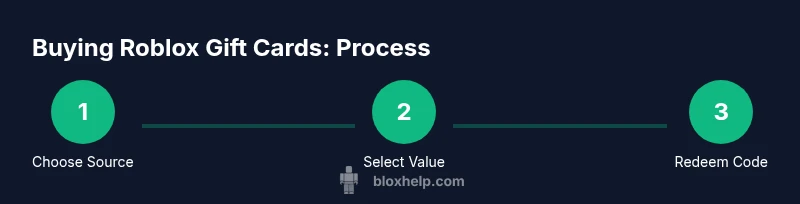
- 1
Choose where to buy
Decide between the Roblox official site or a trusted retailer. This initial choice sets the safety baseline and delivery format (digital vs physical).
Tip: Prioritize official channels or well-known retailers to minimize risk. - 2
Select a value tier
Pick a value that fits your goal—whether funding Robux, a Premium plan, or both. Remember to consider regional pricing and currency.
Tip: Avoid impulse buys; estimate how many months of Premium you want. - 3
Checkout securely
Proceed to checkout on a trusted device and network. Review the cart, confirm the currency, and complete payment with your chosen method.
Tip: Use a private network and enable two-factor authentication where available. - 4
Receive and store the code
If digital, locate the code in your email or account order; if physical, locate the code under the scratch-off panel.
Tip: Do not share the code publicly and store it in a secure place. - 5
Redeem the code
Sign into Roblox, go to the redeem page, and enter the code exactly as shown. Confirm the result.
Tip: Avoid extra spaces when copying the code. - 6
Verify the balance
Check your Robux balance or Premium status to confirm the credit was applied correctly.
Tip: Refresh the page if the balance doesn’t update right away. - 7
Keep records for disputes
Save your receipt or order confirmation in case you need to contest a code.
Tip: Keep digital copies in a dedicated folder. - 8
Secure future purchases
If you gift, consider pairing the card with a note or an in-game plan to help the recipient use the funds wisely.
Tip: Set a reminder to check for discounts on future purchases.
Questions & Answers
Where can I buy Roblox gift cards?
You can buy on Roblox's official site or from trusted retailers in your region. Digital codes are delivered instantly; physical cards ship if available in your area.
Buy from Roblox or trusted retailers; digital codes are instant, physical cards may take longer to arrive.
Do Roblox gift cards expire?
Roblox gift cards typically do not expire, but terms vary by country. Check the local terms on the gift card or Roblox site.
Gift cards usually don’t expire, but rules vary by country—check the terms.
Can I use Roblox gift cards outside my country?
Gift cards are often region-locked. Verify country compatibility before purchase and ensure your account is registered in the same region.
They're usually country-specific, so confirm compatibility before buying.
How do I redeem a Roblox gift card?
Sign into Roblox, go to the redeem page, enter the code accurately, and confirm. The balance will apply to Robux or Premium depending on the card.
Go to the redeem page, type the code correctly, and confirm.
What should I do if a code doesn't work?
Double-check the code for accuracy, ensure it matches your country, and review the purchase receipt. If it still fails, contact Roblox Support.
Recheck the code and country, then contact support if needed.
Can I convert gift card value into Premium?
Yes, depending on the redemption flow in your region, you can apply the value toward Robux or Premium credits.
Redeem as Robux or Premium credit, depending on your region.
Watch Video
The Essentials
- Buy from trusted sources to minimize fraud.
- Redeem on Roblox.com and verify the balance immediately.
- Keep codes private and secure after purchase.
- Understand value tiers to fit your budgeting.