How to Play Roblox Free: A Practical Starter Guide
Learn how to play Roblox for free with our practical, beginner-friendly guide. Set up your account, install Roblox, find free experiences, and stay safe online in 2026.


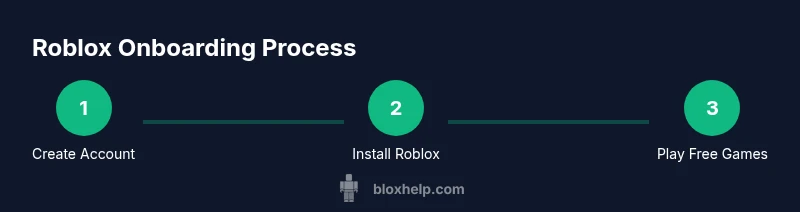
Roblox is free-to-play, and you can start by creating a free account, downloading the Roblox launcher on your device, and exploring thousands of free games and experiences. You only need a compatible device and internet connection. No payment is required to begin playing, though optional purchases exist. This makes it easy for beginners to try new games without investing money upfront.
Why Roblox Free-to-Play Works
Roblox operates on a free-to-play model that invites players to explore, create, and connect without an upfront cost. For newcomers asking how to play roblox free, the path is straightforward: sign up for a free account, install the launcher or app on your device, and begin with free-to-enter experiences. The platform monetizes mainly through optional in-game purchases, premium memberships, and developer-created experiences, but you can absolutely enjoy a rich Roblox experience without spending a dime. This section breaks down how the system supports free-to-play play, what you should expect to pay for later, and how to stay mindful of costs while still having fun. The goal is to empower you to dive in confidently and learn the basics before expanding into paid content if you choose to do so. As you start, remember that the quality of experiences varies, so it’s worth trying a few different experiences to discover what you enjoy most.
Getting Ready: Devices, Accounts, and Safety Essentials
Before you jump into Roblox, gather a few essentials to ensure a smooth start. You don’t need premium gear to play, but a reliable internet connection and a compatible device are non-negotiables. Roblox supports PC, Mac, iOS, Android, and Xbox, so pick the platform you already own. Create a free Roblox account on roblox.com or via the mobile app. Protect your account with a strong password and enable basic privacy settings to control who can message you or join your games. This step is essential for younger players and aligns with best practices recommended by Blox Help. You’ll also want a basic understanding of in-game safety—avoid sharing personal information and report anything that makes you uncomfortable. The early setup is the most critical step in ensuring a safe, enjoyable experience while you learn the ropes of the Roblox ecosystem.
Step-by-Step: Create Your Free Roblox Account
To begin, visit the official Roblox site or open the app and choose Sign Up. Fill in the required fields with a username and password, then verify your email if you choose to connect one. The account is free, and you do not need to provide payment details to start. Once registered, navigate to your profile and review privacy settings to tailor who can chat, message, or invite you to experiences. This setup is foundational for a positive experience as you explore the Roblox library of free games and experiences. Pro tip: enable two-factor authentication if available for additional security while you play.
Step-by-Step: Install Roblox on Your Device
After creating an account, install the Roblox client on your chosen device. On a computer, download the Roblox player from the official site and run the installer. On mobile devices, visit the App Store or Google Play store and install the Roblox app. Sign in with your newly created account to unlock access to games. The installer is lightweight for most devices, but ensure your device meets minimum requirements to avoid performance issues. Pro tip: keep the app up to date for the latest features and security updates.
Exploring Free Experiences: Games, Modes, and Tips
Now that you’re set up, start exploring free experiences. Use the search bar to filter for free-to-play titles, check user reviews, and read game descriptions to gauge content quality and suitability. Many experiences are free to join and feature multiplayer modes, challenges, or collaborative builds. Save time by bookmarking favorites and joining in-progress events that don’t require payment. A smart strategy is to try a variety of genres—adventure, obbies, simulations, and social hubs—to discover what resonates before you commit to any purchases. This phase is all about learning Roblox’s creative ecosystem without spending money.
Safety and Privacy Best Practices for Younger Players
Safety comes first, especially for younger players. Set clear privacy rules within Roblox’s settings: limit who can message you, restrict friend requests to people you know, and enable account restrictions if available. Be cautious about sharing personal information or location in chat and experiences. Teach children to use reporting features if they encounter harassment, scams, or inappropriate content. If you’re a parent or guardian, review the in-game chat settings and consider enabling parental controls. The goal is to enjoy free play while keeping personal data, devices, and accounts secure from scams and predators.
Saving Progress, Cross-Platform Play, and Data Basics
Roblox saves progress in the cloud whenever you’re logged in, which means you can pick up where you left off on other devices. This is particularly convenient if you switch between a PC, tablet, or console. To maximize cross-platform continuity, always sign in with the same account and keep your password secure. Regularly review your account activity and connected devices, especially if you share your device with friends or family. If you encounter issues with progress, check Roblox’s status pages or support forums for reported outages or maintenance windows. This maintenance can temporarily affect saving and syncing across devices, so plan ahead when playing on multiple devices. Pro tip: periodically review your privacy and security settings to maintain consistent, safe cross-device play.
Common Pitfalls and How to Avoid Them
A few common missteps can derail early Roblox experiences. Avoid entering payment details into unfamiliar pages or games that prompt you to “unlock everything” with a single click. Beware of scammers who pretend to offer free Robux or premium accounts; these schemes often require personal data. If a game’s difficulty spikes unexpectedly, switch to a lighter experience to prevent frustration, then gradually build up skills. Finally, avoid overcrowded servers or chat channels that seem noisy or unsafe—these environments can make it hard to learn and stay safe. By starting with reliable, well-reviewed experiences, you’ll reduce risk while building confidence in the Roblox ecosystem.
Tools & Materials
- Stable internet connection(Recommended minimum 3 Mbps; wifi or wired connection works best)
- Device with compatible OS (PC, Mac, iOS, Android, Xbox)(Check for available storage and system requirements before installation)
- Roblox account (free)(Create via roblox.com or app; no payment needed to start)
- Web browser or Roblox app(Used to access Roblox depending on platform)
- Headphones or speakers(Optional for in-game chat or immersive audio)
- Basic parental controls knowledge(Important for younger players to manage safety)
Steps
Estimated time: Total time: 30-60 minutes
- 1
Create your Roblox account
Go to the Roblox site or open the app and sign up with a username and password. Verify your email if you choose to add it. This creates the foundation for a free-to-play journey and lets you access everything Roblox offers without payment upfront.
Tip: Choose a memorable username and enable two-factor authentication if available. - 2
Choose your platform and install Roblox
Decide whether you’ll play on PC, Mac, mobile, or console. Download and install the Roblox client for your device, then sign in with your new account. The installation is quick and lightweight on most devices.
Tip: Ensure you download Roblox from the official source to avoid fake apps. - 3
Set up safety and privacy basics
Open the account settings and configure privacy controls: who can message you, who can join you in games, and what data is shared. This helps keep your Roblox experience safe, especially for younger players.
Tip: Review privacy options before joining any public game. - 4
Explore free games and experiences
Use the search and discovery tools to find free-to-play games. Read descriptions and player reviews, favorite a few, and try several genres to find what you enjoy most.
Tip: Start with highly-rated, well-moderated experiences for a smoother introduction. - 5
Enter your first game and customize
Join a free game and customize your avatar if you’d like. Adjust audio, graphics, and control settings to fit your device and comfort level.
Tip: Experiment with settings to reduce lag and improve visuals. - 6
Save progress and stay connected
Sign in across devices and allow cloud saves so you can resume later. Keep your password secure and periodically review connected devices and security options.
Tip: Log out on shared devices to protect your account.
Questions & Answers
Is Roblox free to play on all platforms?
Yes. Roblox is free to play on PC, Mac, iOS, Android, and Xbox. Some experiences offer paid features or in-app purchases.
Roblox is free to play on all major platforms, with optional paid features in some games.
Do I need to pay to access games in Roblox?
Most games are free to enter. Some experiences offer premium access, items, or currency as optional purchases.
Most games are free to enter; payments are optional for extras.
Are there in-game purchases in Roblox?
Yes, there are optional purchases such as cosmetic items, boosts, and premium memberships. You can play for free without buying anything.
There are optional in-game purchases, but you can enjoy Roblox without buying anything.
Can I play Roblox offline?
Roblox requires an internet connection to access its games and services. Some experiences may load offline once downloaded, but core play needs online access.
Roblox needs an internet connection to play most experiences.
What are the minimum system requirements?
Requirements vary by platform. Generally, ensure a stable internet connection and a device that meets the platform’s minimum specs.
Make sure your device meets the platform’s minimum specs and you have internet access.
How can I stay safe while playing Roblox?
Use strong passwords, enable privacy controls, and report anything suspicious. Parents should review safety settings for younger players.
Use strong passwords, set privacy controls, and report unsafe content.
Watch Video
The Essentials
- Activate a free Roblox account to begin.
- Install the Roblox client on your device and sign in.
- Explore free experiences first before spending money.
- Prioritize privacy settings and safer-chat options.