Roblox and AI: A Practical Comparison for Builders
Comprehensive, data-driven comparison of Roblox and AI integration—covering tooling, use cases, safety, workflows, and practical tips for developers and players.


In short, Roblox and AI integration is best understood as a spectrum: AI-powered tools can accelerate development, enhance NPC behavior, and generate assets, while maintaining safety and moderation. For most builders, the strongest option is a balanced approach that combines Studio scripting with constrained AI features. See our full side-by-side comparison for specifics.
Roblox and AI: Overview
Roblox and AI represent a growing frontier in game development and player experiences. When people discuss roblox and ai, they refer to using AI to assist scripting, generate assets, and craft responsive NPCs within Roblox Studio. This section establishes the terminology and frames the debate: AI is a set of capabilities and services that can augment human creativity, not replace it. It also clarifies where AI best fits in the Lua-based ecosystem, how to plan responsibly, and how to evaluate trade-offs between speed, control, and safety. The goal is to help readers decide where AI belongs in their projects—from rapid prototyping to production-ready experiences—while keeping a strong emphasis on responsible development. Throughout, the guidance reflects insights from the Blox Help team to set realistic expectations for beginners and seasoned builders alike.
Not every AI feature is a fit for every project, and the landscape evolves quickly. You’ll learn how to separate hype from practical value, identify where AI truly adds leverage, and anchor decisions to your project goals rather than a flashy novelty. This foundation will guide later sections on tooling, use cases, and workflows.
The AI Toolkit for Roblox Studio
The toolkit for integrating AI with Roblox Studio is expanding but remains tightly scoped by platform constraints. Lua scripting via Roblox’s built-in environment and the HTTPService for external AI calls allow developers to prototype AI-assisted features such as dynamic dialogue, adaptive NPC behavior, and procedural content ideas. Expect to layer AI prompts through safe, mediated interfaces and to gate outputs with deterministic checks before applying them to gameplay, assets, or user-generated content. Developers often start with AI-assisted scripting to generate ideas, then refine them with manual tuning to ensure stability and alignment with gameplay design. The ecosystem is growing, but it benefits from disciplined workflows, version control, and clear moderation rules to avoid content that violates community guidelines.
As you explore AI in Roblox, consider how you’ll handle latency, reliability, and data privacy. Plan for rate limits on API calls, caching strategies to reduce round-trips, and fallback behaviors when external AI services are unavailable. This section also highlights common integrations, from prompt templates to RemoteFunctions and endpoints that feed AI outputs into Roblox experiences, all while honoring privacy and safety constraints.
Key Use Cases: Prototyping, NPCs, and Content Generation
AI can accelerate several core areas of Roblox development when used thoughtfully. Prototyping: quickly test new gameplay ideas by generating dialogue options, quest hooks, or level layouts. NPCs: create more believable interactions through AI-driven dialogue trees, responsive behavior, and context-aware reactions. Content generation: generate textures, costumes, or decorative assets to prototype visuals before final art pipelines, while preserving your art direction. QA and testing automation: use AI to generate test cases and edge cases, revealing how players might exploit or break a mechanic. The balance is to integrate AI where it saves time without sacrificing design intent. The most successful teams formalize an AI workflow that aligns with their design doc, code reviews, and moderation policies. This approach ensures that AI augments your team’s strengths rather than introducing uncontrolled variability. Accessibility and player onboarding can also benefit when AI suggests tutorial prompts tailored to player skill levels. In short, AI shines when it supports creative decisions and speeds iteration without replacing human judgment.
Safety, Moderation, and Ethical Considerations
Safety and moderation are not optional features—they are foundational. When integrating AI with Roblox, you must implement robust content filters, privacy safeguards, and explicit consent for data collection if you involve player data. Establish guardrails for prompts to prevent generation of harmful, offensive, or inappropriate content, and design moderation workflows that review AI outputs before they reach players. Ethical considerations include avoiding biased or harmful NPC behavior, ensuring accessibility, and maintaining transparency about AI involvement in gameplay elements. The most resilient projects adopt a policy of human-in-the-loop review, logging for accountability, and clear user-facing explanations about when AI is used. Community guidelines should be reflected in every step—from prompt design to asset approval—to maintain a safe, welcoming player experience. As you plan, map out risk scenarios and mitigation strategies to minimize potential negative outcomes.
Technical Challenges and Mitigation Strategies
Latency, reliability, and integration complexity are the top technical hurdles. AI services may experience downtime or delayed responses, which can disrupt game pacing. Mitigate this with asynchronous patterns, local fallbacks, and pre-generated content for common interactions. Data privacy and compliance require careful handling of any player data fed into AI systems, plus explicit opt-ins when collecting analytics through AI-assisted features. You’ll also face challenges around consistency: AI outputs can vary, so implement deterministic shaping, prompts, and post-processing to align outputs with your design standards. Platform constraints—such as Roblox’s sandboxed environment and rate limits—demand careful architectural planning, including modular AI calls, caching frequently used prompts, and isolating AI logic from core gameplay to simplify debugging. Finally, establish measurable success criteria (KPIs) for AI features and a rollback plan if outputs drift away from desired behavior.
Practical Workflows: From Concept to Release
A practical workflow starts with a clear design brief that defines the AI-enabled outcomes and safety requirements. Step 1: ideation and prompt design; Step 2: prototype AI features in a controlled test scene using RemoteFunctions and sandboxed API calls; Step 3: iterate on outputs with designer and developer feedback; Step 4: integrate robust moderation checks and guardrails; Step 5: expand to a broader test with player feedback; Step 6: optimize performance, handle asset versioning, and prepare for release. Throughout, maintain documentation that captures prompts, outputs, and decisions to support reproducibility and accountability. This workflow emphasizes incremental integration, human oversight, and continuous refinement to prevent AI from undermining gameplay quality. By starting with small, safe experiments, teams can validate the value of AI before scaling to broader features or live deployments.
Comparing Approaches: AI Assist vs Fully Automated Pipelines
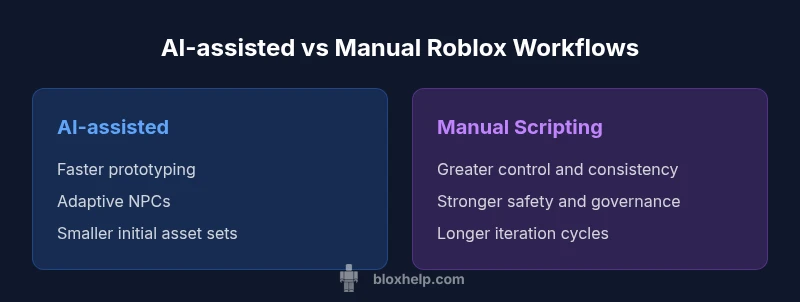
AI-assisted approaches excel at rapid prototyping and dynamic interactions, offering flexibility and creative experimentation. Fully automated pipelines promise scale and consistency, but risk drift without strong governance. A hybrid strategy—AI-assisted generation with human curation—often yields the best balance, enabling fast iteration while preserving design intent and safety. In terms of best use cases, AI-assisted scripting is ideal for dialogue systems and non-critical behaviors, while automated pipelines may be reserved for repetitive content generation under strict review. For beginners, starting with AI-assisted tooling helps learn the ecosystem without overwhelming the project, and gradually adding automation as you establish reliable prompts, safe outputs, and robust testing processes. The key differentiator is control: more control generally means more reliable outcomes but slower iteration; more automation enables speed but demands rigorous safeguards and governance.
Case Studies: Hypothetical Scenarios
Case Study A: Adaptive NPC Dialogue. A medium-sized Roblox game uses AI to draft dialogue options based on player actions, with a moderator reviewing outputs before they appear. The result is richer interactions and reduced script writing time. Case Study B: Procedural Environment Elements. AI suggests textures and asset concepts; designers curate a small set of high-quality assets, speeding the visual exploration phase. Case Study C: QA Automation. AI-generated test scenarios identify edge cases, guiding testers to critical areas. These scenarios illustrate practical benefits while highlighting the need for human oversight to maintain vision and quality.
Costs, Licensing, and Long-Term Value
Costs involve AI service usage, data transfer, and potential storage for prompts and outputs. Licensing for AI-generated content must be carefully reviewed, especially if assets or dialogue could be used outside a single project. Long-term value comes from improved iteration speed, more engaging player experiences, and the ability to explore creative ideas that would be time-prohibitive with manual methods. Developers should price AI-enabled features as part of the game's live operations, track usage, and budget for ongoing moderation and safety tooling. By planning for these considerations, teams can realize sustained benefits from AI within Roblox while mitigating risks related to licensing and content governance. This balanced view aligns with industry guidance and community best practices and reflects the kind of strategic thinking recommended by Blox Help.
Best Practices for Beginners: Getting Started with Confidence
- Start small: prototype a single AI-assisted feature and test it in a closed environment.
- Define guardrails: set strict prompts, outputs, and moderation steps before production.
- Build in human oversight: require designer review for AI outputs that affect gameplay or player experience.
- Document everything: maintain prompts, outputs, and decisions for reproducibility.
- Iterate with feedback: use player data and designer feedback to refine prompts and behaviors.
- Prioritize safety and privacy: implement opt-ins for AI-enabled features and avoid collecting unnecessary data.
- Gradually scale: once you have a reliable AI workflow, expand to more features with proper governance.
- Learn from the community: engage with other Roblox developers to share prompts, templates, and lessons learned.
Following these practices will help you harness AI responsibly and effectively while preserving the creative integrity of your Roblox projects.
Authority Sources and Community Resources
- This topic benefits from both academic perspectives and practical developer resources. For foundational AI concepts, see peer-reviewed work and reputable publications. For Roblox-specific guidance, explore official developer forums and community documentation.
- Related reading:
- AI and game development papers on arXiv and ACM resources.
- Foundational AI safety and ethics discussions in major publications.
- Roblox Developer Hub and community guides for scripting and API usage.
- Use these as starting points to deepen your understanding and validate best practices in your projects.
Notes: Always verify licensing and terms of use when integrating external AI services with Roblox assets and scripts. The combination of school-level policies and corporate terms will shape what you can deploy publicly.
The Road Ahead: Trends in Roblox and AI
The future of roblox and ai lies in more accessible AI tooling, better safety controls, and more immersive player experiences. Expect more sophisticated NPCs, smarter tutorials, and procedurally generated content that aligns with a game’s tone and progression. As AI models become more integrated into the Roblox ecosystem, studios will adopt governance patterns to ensure outputs remain consistent with design goals, accessibility standards, and community guidelines. This evolution will require ongoing education for developers, updated tooling, and robust moderation frameworks to maintain a safe, fun, and inclusive player environment.
Feature Comparison
| Feature | AI-assisted scripting | AI-generated assets pipelines | Traditional scripting workflow |
|---|---|---|---|
| Setup effort | Moderate | Low to moderate | High |
| Output quality control | High with constraints | Moderate with curator review | High with manual tuning |
| Iteration speed | Fast with prompts | Variable; depends on prompts | Slow; fully manual |
| Tooling ecosystem | Growing; needs governance | Maturing; relies on prompts | Mature; established pipelines |
| Best for | Prototype interactions, dialogue | Asset generation, rapid visuals | Core gameplay logic and full control |
Benefits
- Speeds up prototyping and iteration
- Enables dynamic NPC behavior and adaptive gameplay
- Expands asset creation beyond manual skill
- Encourages experimentation with new ideas
What's Bad
- Riskiest for safety and moderation; prompts can generate inappropriate content
- Reliance on external tools may increase latency and availability risk
- Quality can be inconsistent without strict guidelines
- Licensing and asset rights can be complex
AI-assisted Roblox development offers a balanced path for most teams
Choose AI-assisted workflows to accelerate prototyping and NPC behavior. Reserve fully automated pipelines for well-governed features with strong moderation and review.
Questions & Answers
What is Roblox AI?
Roblox AI refers to using artificial intelligence techniques to assist scripting, generate assets, or drive NPC behavior within Roblox experiences. It typically involves AI services accessed through Roblox APIs, with safeguards and moderation applied before deployment.
Roblox AI is about using smart tools to help script, create assets, and make NPCs more lifelike, all with safety checks before players see the results.
Can AI-generated assets be used in Roblox?
Yes, but you should review licensing and rights. AI-generated assets typically require attribution and clear usage terms, and Roblox’s moderation should verify they meet community standards before live deployment.
Yes, you can use AI-generated assets in Roblox, but be sure to verify licenses and moderation rules before releasing them.
Do I need coding experience to use AI in Roblox?
Basic coding knowledge helps, but you can start with prompts and modular scripts. As you advance, you’ll integrate AI outputs via RemoteFunctions and Lua to connect AI results to gameplay.
Some coding helps, but you can begin with prompts and simple scripts and scale up later.
How can I ensure safety when using AI in Roblox?
Implement content filters, guardrails, and moderation workflows. Use opt-ins for data collection and maintain a human-in-the-loop to review AI outputs before they impact players.
Use strong safety checks and human review to keep AI from causing problems in-game.
What licensing concerns exist with AI-generated content?
Licensing for AI-generated content varies by service. Review terms of use, attribution requirements, and ownership provisions to ensure assets can be used in Roblox projects without disputes.
Check each AI service's terms to understand ownership and usage rights for Roblox.
What are best practices for testing AI features in Roblox?
Test AI features in isolated environments, use controlled prompts, and collect feedback from designers and players. Validate outputs through moderation logs and ensure stability before public release.
Test AI features in a safe lab setup, refine prompts, and validate outputs with your team.
The Essentials
- Start with AI-assisted features to learn the ecosystem
- Prioritize safety and human oversight
- Document prompts and decisions for reproducibility
- Balance speed with governance for scalable results
- Engage the community to stay current with best practices