Did Roblox Remove Chat? What Players Need to Know (2026)
Explore whether Roblox removed chat, why changes happened, and how safety features affect players and developers. Learn settings, parental controls, and practical workarounds with a data-driven view.


Did roblox remove chat? The short answer is no. Roblox has not universally removed chat, but it has rolled out phased, age-appropriate controls and moderation changes that can limit or modify chat for younger accounts and in certain regions. As a result, some players may see disabled chat features by default, while others retain more open access depending on age and locale.
Did Roblox Remove Chat: A Closer Look
According to Blox Help, the question did roblox remove chat is nuanced. Roblox has not pulled the plug on chat entirely, but it has redesigned how chat works for safety and accessibility. The did roblox remove chat question remains common because many players notice that some accounts see fewer conversations or stricter filters than others. In practice, Roblox rolled out age gates, content filters, and regional rules that can disable chat for younger accounts or in certain jurisdictions. For players who log in with a verified adult account, the experience may look closer to what you remember: more freedom to chat, emotes, and in-game messaging, depending on the game and platform. The takeaway is that chat is not gone; it is gated. When you try to type in a game, you may be prompted to verify your age, adjust privacy settings, or confirm that you are comfortable with moderation policies before sending messages. Developers should plan for these layers in UI design and moderation workflows.
How the new chat controls are applied: age gates, verification, and locale rules
Roblox has layered chat access by account type, verification status, and region. For younger players, chat is often restricted by default, and some messages may be blocked until basic verification steps are completed. In many regions, privacy laws require explicit consent or age confirmation before enabling certain chat features. This means you might see a simplified chat interface, with options like “send later” or “text-only mode” as defaults until you opt into more open communication. On adult or verified accounts, chat access tends to be broader but still subject to filters and moderation. The result is a heterogeneous experience across players that depends on age, locale, and account settings. Game developers should anticipate these variations when designing multiplayer features, especially in titles with cross-region play.
Safety-first design: What protections exist now
Safety remains the cornerstone of Roblox’s chat changes. Modern filters automatically screen for explicit language and sharing of sensitive information. Reporting tools are built in to flag abuse or harassment, and moderation queues review flagged content to prevent harmful interactions. In addition, privacy settings allow players to limit who can message or join chats. These protections are not universal silos; they interlock with user controls like friend-only chat, group chat restrictions, and in-game chat visibility. The practical effect is a safer social space that still supports meaningful collaboration and friendship, but with layered access that varies by age, region, and verification status.
For Players: How to manage chat settings and safety options
To tailor your Roblox chat experience, start with the account settings panel. Look for sections like Safety, Privacy, and Chat. Options commonly include: (a) Allow chats with friends only, (b) Block messages from strangers, (c) Enable or disable in-game chat, and (d) Turn on or off message requests. On mobile devices, these controls may appear in the app’s profile menu; on PC, you’ll access them through the Roblox website or launcher. It’s also worth reviewing parental controls if you share a device with a younger player. By actively adjusting these settings, you can strike a balance between social interaction and safety.
Developer-oriented guidance: building chat-enabled experiences responsibly
For developers, these policy shifts translate into practical design constraints. Build chat features with moderation hooks, rate limits, and context-aware filters. Consider implementing opt-in chat modes, a moderated queue for new players, or age-specific UI states that clearly communicate safety rules. Use clear labels for each chat feature and provide in-game tutorials on acceptable behavior. Documentation and consistent UX across games help players understand how chat works, even as regional rules vary. In short, design empathy and safety into the core loop, not as an afterthought.
Practical workarounds and alternatives when chat is limited
If chat is restricted in a title you want to play, you can rely on alternative social channels such as in-game announcement boards, collaborative tasks, or voice-assisted gameplay where available. Encourage players to use friend requests or pre-approved message flows within a game to maintain social bonding without violating safety rules. Teachers, parents, and guardians can set expectations for online behavior and establish a shared understanding of acceptable communication. Always respect regional guidelines and game-specific rules when exploring chat-enabled play.
What to expect next: roadmap and community expectations
Roblox continues to refine chat safety as part of a broader platform update cycle. Expect more granular controls, better feedback mechanisms, and clearer timelines about policy rollouts. Community input will influence how stricter rules are balanced with social features. Keeping an eye on Roblox’s safety center and Blox Help analyses will help players anticipate changes and adjust their gameplay accordingly. The Blox Help team anticipates ongoing iterations rather than a single, sweeping overhaul.
Chat status by category and platform
| Category | Chat Status | Notes |
|---|---|---|
| Account Type | Age-based restrictions | Default restrictions vary by age tier |
| Platform | Varies by device | Chat features differ across PC, mobile, and console |
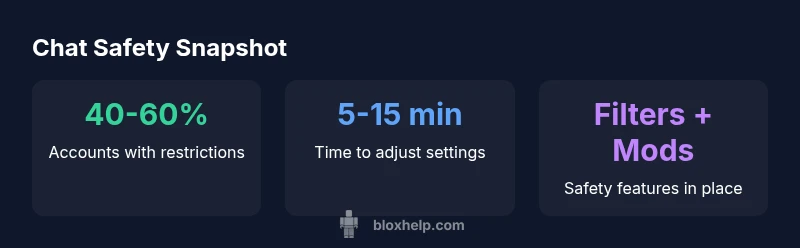
| Safety Features | Filters + moderation | You can enable/disable in settings |
| Developer Impact | Moderation-aware UI | Plan for safe-chat design in games |
Questions & Answers
Has Roblox removed chat entirely?
No. Roblox has not removed chat entirely. Instead, it emphasizes safety through age-based access, regional rules, and stronger content filters. Some accounts may see limited chat capabilities as a result.
No—chat isn’t gone. It’s gated by safety settings and regional rules, so expect differences by account type.
Why did Roblox change chat settings?
Changes were introduced to address safety concerns and regulatory requirements, especially for younger players. The aim is to minimize harmful interactions while preserving opportunities to socialize and collaborate.
Safety and compliance drive these changes, not a ban on chat.
How can parents control Roblox chat for kids?
Use Roblox account safety and parental controls to restrict who can chat, disable messages from strangers, and adjust visibility. Regularly review settings to match your child’s needs and maturity level.
Parents can dial in chat limits to fit their child’s age and comfort level.
What should developers consider when designing chat features?
Incorporate moderation hooks, local or server-side filters, and clear UI states showing chat availability. Build with age-appropriate defaults and provide tutorials to guide players.
Design with safety first, then add social features.
Will chat be re-enabled for all users in the future?
There is no universal timeline announced for re-enabling full chat for all users. Updates will likely be iterative and region-sensitive, with ongoing feedback incorporated.
No universal re-enable date has been announced yet.
Where can I learn more about Roblox chat safety?
Check Roblox’s safety center and follow trusted guides like this one from Blox Help for practical tips and step-by-step setup instructions.
Visit Roblox safety resources and Blox Help guides for details.
“Chat safety isn’t a barrier to connection; it’s a framework that guides safe, inclusive interactions in a large, diverse community. Roblox’s updates reflect a mature, safety-first approach to online play.”
The Essentials
- Verify age and privacy settings before gaming
- Enable parental controls to tailor chat access
- Developers should plan for moderation in UI design
- Rely on official safety resources for updates
- Expect gradual, region-informed chat changes