Do Roblox Private Servers Expire? A Practical Guide
Explore whether do Roblox private servers expire, how ownership and Robux costs influence longevity, and practical tips to keep VIP servers running smoothly over time.


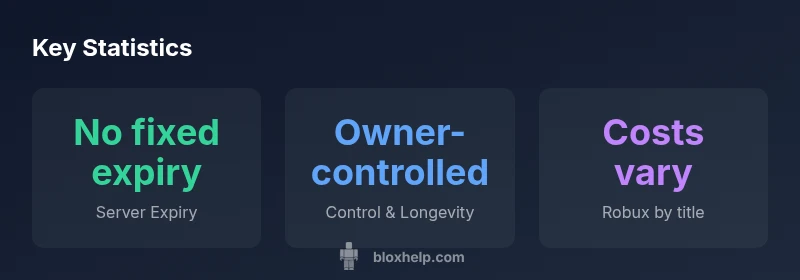
As of 2026, Roblox private servers (VIP servers) do not have a built-in expiration date. A private server persists as long as you own it and continue paying the associated Robux cost, or until you delete it. Some games may retroactively delete servers for policy or maintenance reasons, but expiry is not automatic.
Do roblox private servers expire
Do roblox private servers expire? The short answer is that there is no universal timer that ends a VIP server after a fixed period. In practice, do roblox private servers expire only if the owner deletes them, the game changes its VIP policy, or Roblox enforces a new rule. For most players, the longevity of a private server hinges on ownership, the game's policies, and the ongoing Robux cost. Understanding this can help you plan long-term play sessions without unexpected loss of access.
How private servers work across games
Private servers are tied to individual games. The creation price, maintenance requirements, and rules can vary widely from one title to another. Some games let you keep a VIP server indefinitely after a one-time fee, while others may impose periodic renewals or usage limits. The key takeaway is that longevity is highly game-specific, not universally determined by Roblox itself. Always check the VIP server page for the game you care about to confirm any expiry or renewal conditions.
Expiry myths and reality you should know
A common myth is that inactivity or long gaps in playing will cause a server to expire. In reality, inactivity does not automatically end a VIP server. Instead, expiration is more often tied to a game's policy updates, the owner's actions, or a change in terms of service. Additionally, some developers may temporarily disable VIP servers during maintenance or updates, which can create the appearance of expiry even though the server itself remains owned by you.
Managing a private server: practical steps
To manage a private server effectively, start by keeping track of the specific game’s VIP policies, including any renewal windows. Regularly verify your server's status on the game's VIP page. If you anticipate a policy change, consider budgeting Robux in advance and communicating with invited players about potential changes. If a server is no longer needed, deleting it is straightforward and helps avoid ongoing costs.
Policy changes and game developer actions
Roblox and individual game developers may adjust VIP rules over time. A policy update might alter how long a server remains available or whether it can be accessed with certain features. Staying informed through official announcements and the game’s community channels will help you adapt quickly. In some cases, developers may revert VIP servers if a game is discontinued or reworked.
Privacy, security, and data considerations
Private servers raise typical privacy concerns: who can join, how your progress is stored, and what data is shared with the host game. Always review the game's privacy settings and avoid sharing sensitive information with players you do not trust. Regularly audit invited players and use Roblox's built-in privacy controls to limit access when needed.
Costs and long-term ownership: a realistic view
The financial aspect of private servers varies by game but generally involves Robux. Some titles require a one-time fee, others may have recurring costs. Plan your spending and consider whether the benefit of a private environment justifies the ongoing Robux expense. The key is to treat VIP servers as a long-term tool rather than a one-off purchase.
What to do if a game changes its VIP policy
If a game's VIP policy changes, act quickly: review the new terms, communicate with your server members, and decide whether to keep, modify, or delete your private server. If access is restricted, explore alternative settings like private co-op modes or creator-supported options, if available. Always back up important progress where possible to minimize disruption.
Comparison of Roblox private server expiry factors
| Aspect | Should Expect Expiry? | Control | Cost (Robux) | Notes |
|---|---|---|---|---|
| Expiry policy | No fixed expiry | Owner-controlled | Varies by game | Check each game's VIP page |
| Ownership | Tied to owner | Owner can delete or renew | One-time or recurring | Depends on game design |
| Policy changes | Possible by developers | Stay informed | Game-dependent | Policy updates can affect access |
| Data & access | Managed by game | Roblox-safe practices | Varies by game | Back up important data |
Questions & Answers
Do Roblox private servers expire automatically?
No automatic expiry is applied on a timer across all games. VIP servers persist until you delete them or a game developer changes the policy. Some exceptions exist when developers disable access for maintenance or rule changes.
No automatic expiry across all games; check each game's VIP rules for specifics.
Can a game developer remove a private server?
Yes. Developers can disable or remove VIP servers tied to a game, especially if the game updates, violates terms, or changes its VIP model.
Developers can disable VIP servers for their game.
What happens if I stop paying Robux for a VIP server?
If a game requires ongoing Robux for VIP status, access may be restricted or the server could be removed. In some cases, ownership remains but visibility or access changes.
Access may be restricted if ongoing Robux payments are required.
Are private servers transferable to another account?
Typically not. VIP servers are tied to the original owner’s account and aren’t usually transferable. You may need to recreate the server on the new account.
VIP servers usually stay with the original account.
Is my private server data saved if Roblox changes policies?
Data retention depends on the game and Roblox's storage policies. Back up important progress locally when possible and monitor policy announcements for changes.
Back up important data; policies can change.
How can I tell if a game will keep VIP servers long-term?
Review the game's VIP section, read patch notes, and follow official channels for policy updates. If uncertain, prepare a contingency plan for moving to alternatives.
Check official game pages and patch notes for VIP stability.
Do private servers affect account security?
Private servers themselves don’t inherently reduce security, but inviting players increases exposure. Use Roblox privacy controls and invite only trusted players.
Be mindful about who you invite to reduce risk.
“Private servers don’t have a universal expiry date; their longevity is determined by ownership, game policies, and your Robux budget. Understanding these factors helps you plan maintenance effectively.”
The Essentials
- Understand there is no universal expiry for private servers
- Check game-specific VIP policies before investing Robux
- Private servers are typically owner-controlled
- Be ready for policy updates that can affect access