locked codes roblox: A Safe Guide to Redemption
Learn how locked codes Roblox work, how to spot scams, and how to redeem legitimate promo codes safely with practical steps and expert guidance from Blox Help.


To handle locked codes Roblox, you will learn how legitimate promo codes work, how to spot scams, and how to redeem codes safely from official sources. According to Blox Help, this quick guide highlights steps to verify codes, avoid expired offers, and protect your account while enjoying rewards. It also explains common pitfalls.
What locked codes roblox mean and why players encounter them
In Roblox, promo codes are issued during events and partnerships and usually redeemable for in-game items, currency, or boosts. When people mention 'locked codes roblox', they are typically referring to codes that are not currently obtainable by most players. This can happen for several reasons: expiration, regional restrictions, or limited-time bonuses tied to specific campaigns. Understanding these nuances helps players avoid scams and set realistic expectations about what rewards are available. The concept of a code being locked emphasizes access control rather than any fault with the player. For beginners, this means focusing on legitimate sources and verifying dates before attempting to redeem anything. Throughout this guide, Blox Help will show you how to identify official channels and safeguard your account while exploring legitimate promos.
Legitimacy and sources of codes: what to trust
Official Roblox codes come from Roblox's own events, announcements, or verified partner promotions. Scams often use convincing-looking websites or social posts to steal credentials or personal data. According to Blox Help, the safest path is to stick to official Roblox pages and partner pages, and to avoid third-party sites that promise free codes. Always check domain credibility, look for official blue verification marks, and read the terms to confirm the code applies to your region and account type. When in doubt, cross-check with Roblox's official help center or trusted community guides. This section helps you distinguish legitimate promotional codes from dubious offers and sets a baseline for safe redemption.
Why codes get locked or expire: common reasons
Codes are time-limited or region-locked to drive engagement across specific markets or events. Promotions may require participating in a livestream, purchasing a product, or meeting a criterion that changes by region. Codes can be revoked if the sponsor changes terms or if the supply runs out. Some codes are tied to particular platforms (PC vs. mobile) or to a specific Roblox account age or status. Understanding these constraints helps manage expectations and reduces frustration when a code appears to be locked or unavailable.
Safe, step-by-step approach to redeem legitimate codes
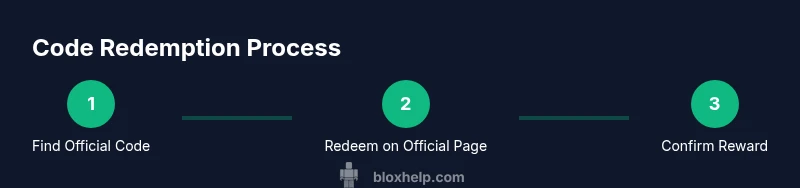
Redeeming legitimate Roblox codes should feel straightforward when done through official channels. This section outlines a high-level approach and what to verify before entering any code. Always ensure you are on the official Roblox site or app, confirm the source and expiration, and double-check the code for typographical errors. If a reward appears in your account after redemption, verify it in the appropriate inventory or currency balance screens. By following these best practices, you minimize risk and maximize your chances of receiving the promised reward from a trusted source.
Troubleshooting common issues with codes
Even legitimate codes can fail to redeem due to expiration, regional restrictions, or prior usage. If a code doesn’t work, first re-check the terms and ensure you are in the correct region. Clear your browser cache or retry in the Roblox app, sometimes latency can affect redemption. If the issue persists, verify that you entered the code exactly as shown (case sensitivity and hyphens matter for some codes) and consult the official help center. Don’t rely on random social posts offering personalized help; stick to official channels to avoid scams.
Security practices to protect your codes and account
Never share codes publicly or paste them into third-party sites. Avoid copying codes from unknown sources, and always use two-factor authentication where possible. Regularly review your account activity for unfamiliar logins and enable login alerts. If you suspect a scam, report it to Roblox Support immediately and discontinue use of the source. By prioritizing security, you reduce the risk of losing rewards or compromising your account.
Tools & Materials
- Stable internet connection(Broadband or reliable Wi-Fi)
- Active Roblox account(Ensure your email is verified)
- Trusted device(PC, laptop, or official Roblox app)
- Official access to Roblox platform(Web browser or Roblox app)
- Two-factor authentication (2FA)(Recommended for extra security)
Steps
Estimated time: 30-45 minutes
- 1
Identify legitimate code sources
Locate codes only from Roblox’s official events, announcements, or partner promotions. Cross-check the source with Roblox’s help center to verify authenticity and avoid scams. Always start from trusted domains and avoid random posts.
Tip: If a source asks for your password, it's not legitimate. - 2
Check code details and expiration
Read the terms carefully: region applicability, expiration date, and whether there’s a one-time use limit. A code that works for some users but not others may be restricted by location or status. Note any usage caps mentioned in the terms.
Tip: Mark expiry dates on your calendar when possible to avoid missing out. - 3
Open the official redemption page
Navigate to Roblox’s official promo code redemption page through the official site or app. Avoid clicking through from suspicious emails or third-party sites. Ensure the URL uses Roblox’s official domain and secure connection.
Tip: Bookmark the official page for quick, safe access. - 4
Enter the code exactly as shown
Type the code character-for-character, paying attention to uppercase, numbers, and hyphens. A single mistake will invalidate the code. If you’re unsure about a symbol, copy-paste only from the official source.
Tip: If you mispaste, backspace to correct rather than retyping the entire string. - 5
Submit and verify rewards
Submit the code and check the rewards in your inventory or currency balance. Some items show up instantly, others require reloading the app. Confirm the item or currency appears where expected.
Tip: Log out and back in if rewards don’t appear after redeeming. - 6
If problems occur, contact official support
If redemption fails persistently, contact Roblox Support through official channels and provide the exact code and error messages. Avoid sharing personal data on public forums. Keep records of your attempts.
Tip: Document dates, sources, and error messages for faster help.
Questions & Answers
What does locked codes roblox mean and can I still get rewards?
Locked codes Roblox typically means the code is not currently obtainable due to expiration, regional restrictions, or event-specific rules. Rewards may still exist from official promotions, but you’ll need to wait for a legitimate release or switch to valid codes.
Locked codes usually mean the code is not currently redeemable due to expiration or region restrictions. Look for official promotions for new rewards.
Where can I find legitimate Roblox promo codes?
Legitimate codes come from Roblox’s official events, announcements, and verified partner pages. Always verify the source on Roblox’s own site or their verified social channels.
Check Roblox’s official site and verified partners for promos.
Why do codes sometimes not work even when valid?
Possible reasons include expiration, regional restrictions, prior usage, or entry errors. Double-check the terms, re-enter carefully, and try again after confirming the code is still valid for your region.
If a code fails, check expiration, region, and accuracy, then try again.
Is it safe to use third-party sites to redeem codes?
No. Third-party sites can be scams designed to steal personal data or login details. Use only official Roblox pages for redemption and never share your password.
Avoid third-party sites; use official Roblox redemption pages.
What should I do if I suspect a scam offer?
Discontinue interaction with the offer and report it to Roblox Support through official channels. Do not share any account information and avoid clicking questionable links.
If you suspect a scam, report it to Roblox Support and stay safe.
How can I better protect my Roblox codes?
Keep codes private until redeemed, enable 2FA, and monitor account activity for unusual sign-ins. Use a trusted device and avoid saving codes in insecure locations.
Protect codes by keeping them private and enabling security features.
Watch Video
The Essentials
- Redeem codes only from official Roblox sources.
- Always verify expiration and regional eligibility.
- Protect your account with strong security practices.
- If in doubt, consult Roblox Support via official channels.