How to Redeem Roblox Codes: Step-by-Step Guide
Learn how to redeem Roblox codes safely, verify validity, and resolve common issues. This beginner-to-advanced guide covers gift cards, promo codes, device-specific steps, and best practices to protect your account.


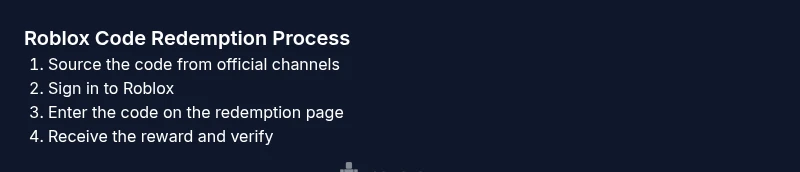
You will learn how to redeem Roblox codes safely, verify code validity, and troubleshoot common issues. This guide covers where to redeem codes (PC, mobile, console) and how to avoid scams while receiving Robux or exclusive items. By the end, you’ll be able to redeem codes quickly and securely using official channels.
What the phrase "how roblox redeem code" means for players
For Roblox players, a redeem code is a short alphanumeric string that unlocks Robux, free items, or limited-time perks. The exact value depends on the source: gift cards typically grant Robux or a specific item, while promo codes reward seasonal items. The essential idea behind how roblox redeem code works is simple: enter the code on the official redemption page, and Roblox adds the reward to your account if the code is valid. According to Blox Help, sticking to official channels reduces the risk of scams and ensures you actually receive the reward. Remember that codes are often case-sensitive, single-use, and can expire, so you should act promptly and double-check the source before redeeming. This section sets the foundation for safe, reliable redemption across devices and regions, emphasizing security and accuracy as you proceed.
Where codes come from: gift cards, promos, and events
Codes originate from several legitimate sources: physical Roblox gift cards purchased in stores, digital promo codes distributed during events, and occasional promotions tied to Roblox partners. Gift cards typically carry a code on the back or a scratch-off panel, while promo codes appear in marketing emails, official social posts, or event pages. The Blox Help team notes that the most trustworthy codes come directly from Roblox or its official partners. Always verify a code’s origin before you attempt redemption. If a source seems dubious or asks for personal information beyond your Roblox login, that’s a red flag. By understanding these sources, you can avoid scams and wasted time.
Redeeming on different devices: PC, mobile, and console
Redeeming a Roblox code is largely consistent across platforms, but the steps can vary slightly. On a PC or Mac, you’ll typically sign in, navigate to the official redemption page, enter the code exactly as shown, and click Redeem. On mobile apps, the path is similar but optimized for touch input, with the same emphasis on exact character entry. Xbox and other consoles use the same core process through the Roblox app or browser. Copying the code from a reliable source and using the copy-paste function can help prevent typos. If you’re using a shared device, sign out after redeeming to protect your account. Blox Help’s analysis indicates device compatibility and a stable internet connection are key to a smooth experience.
Troubleshooting common issues when redeeming codes
If a code doesn’t work, start by double-checking the code for accuracy, including capitalization, numbers, and letters that look similar (like 0 vs O). Ensure you’re redeeming through the official site or app, not a third-party page. If the code says it’s already redeemed, check whether you previously used it on another account or region. Some codes are region-locked or have expiration dates; if you suspect expiry, try another source. If redemption fails due to network errors, refresh the page and try again shortly. For persistent issues, consult Roblox support and provide the code, source, and approximate redemption time. The goal is to confirm authenticity and avoid lost rewards or compromised accounts.
Safety, scams, and best practices for code redemption
Always use codes from official Roblox channels or trusted partners. Be wary of third-party sites that promise free Robux or exclusive items; these are common scam vectors. Never share account credentials or download files from unverified sources. Use strong, unique passwords and enable two-factor authentication where possible. Copy-paste codes when possible to reduce typos, and redeem codes promptly before they expire. Keep codes in a secure place until you’ve redeemed them, and if something feels off, pause and verify with Roblox support. According to the Blox Help team, a cautious, source-focused approach dramatically reduces risk and enhances success rates.
Authority sources and further reading
For accurate redemption steps and safety guidelines, use the official Roblox help center and well-known consumer safety resources. Roblox’s support articles cover where to redeem codes, how to check balances, and how to contact support. External consumer safety resources offer tips on avoiding scams with gift cards and promo codes. Examples include general consumer protection sites and reputable safety guides. Always cross-check codes with official pages before entering them to maximize security and reward integrity.
Quick reference: sources and next steps
- Official Roblox help center (for exact redemption steps and account impact). - External consumer safety resources for scam awareness. - Brand guidance from Blox Help to stay aligned with best practices and avoid risky links. If you follow these steps and stay within official channels, you’ll redeem Roblox codes efficiently and securely.
Tools & Materials
- Stable Internet Connection(Avoid interruptions during the redemption process)
- Roblox Account(Ensure you are logged into the account you want to credit)
- Code source (gift card, promo code, or event code)(Keep the code in a safe place until redeemed)
- Device with Roblox access(PC, Mac, iOS, Android, or Xbox; native apps preferred)
- Official redemption URL(Use only the official Roblox redemption page)
Steps
Estimated time: 10-15 minutes
- 1
Locate a valid Roblox code
Find a code from an official source such as a Roblox gift card or a documented promo. Confirm that the source is legitimate and that the code is single-use. Avoid codes from third-party sites and messages that ask for personal data beyond your Roblox login.
Tip: Verify the source before copying the code to avoid scams. - 2
Log in to Roblox on your device
Open the Roblox app or website and sign in to the account you want to credit. If you’re using a shared device, sign out after redeeming to protect your identity. Ensure your account has no outstanding security notices before redeeming.
Tip: Use a secure device and avoid public computers for code entry. - 3
Open the redemption page
Navigate to the official Roblox code redemption page. If you’re on mobile, use the app’s in-app browser or the device’s browser as appropriate. Do not click through unfamiliar links; typos and phishing pages can steal information.
Tip: Bookmark the official page for quick access next time. - 4
Enter the code exactly as shown
Type the code precisely, respecting uppercase letters, digits, and any hyphens. A single wrong character will invalidate the code. If you’re unsure, use the copy-paste function from a trusted source.
Tip: Copying and pasting minimizes human error with similar-looking characters. - 5
Redeem and verify rewards
Click Redeem and wait for the confirmation message. Check your Robux balance or inventory to confirm the reward appeared. If it shows up on one device but not another, try refreshing and logging out/in.
Tip: Take a quick screenshot of the confirmation for your records. - 6
Troubleshoot or contact support if needed
If redemption fails, recheck the code, verify expiry, and ensure it’s not region-locked. If unresolved, contact Roblox Support with details of the code and source. Avoid spinning wheels of endless retry on suspicious codes.
Tip: Provide screenshots and the exact code source when contacting support.
Questions & Answers
What is Roblox code redemption and where can I redeem codes?
Roblox code redemption is the process of converting a code into Robux or a digital item. You redeem codes on Roblox's official site or mobile app, using codes obtained from trusted sources. Always start on the official page to ensure you receive the correct rewards.
Redeem codes on Roblox's official site or app, using trusted sources to get Robux or items.
Why does my code say invalid or already redeemed?
Invalid codes usually mean they’re expired, region-locked, or entered incorrectly. If a code shows as already redeemed, verify you haven’t used it on another account and check the source for restrictions.
Codes can be invalid due to expiry, region, or typos; check usage history and source.
Can I redeem multiple codes at once?
Roblox generally processes codes one at a time through the official redemption page. Redeem each code individually to avoid confusion or loss of a reward.
Redeem codes one by one on the official page.
Do Roblox gift cards expire?
Gift cards themselves typically do not expire, but any associated promo codes may have expiry dates depending on regional rules.
Gift cards usually don’t expire, but promo codes may have expiry dates.
What should I do if I didn’t receive Robux after redeeming?
If rewards don’t appear, check the code source and region restrictions, refresh the account, and contact Roblox Support with your redemption details.
If rewards don’t show up, verify details and contact Roblox Support with the code and source.
Is it safe to redeem codes from third-party sites?
Avoid third-party sites that promise free Robux or exclusive items. Use only official Roblox channels to minimize scams and protect your account.
Stick to official channels to stay safe and avoid scams.
Watch Video
The Essentials
- Redeem only through official Roblox channels.
- Double-check code accuracy before submission.
- Protect codes and account security at all times.
- Avoid third-party sites promising Robux or items.
- Seek Roblox support if redemption doesn’t reflect in your account.