Understanding Roblox Exploits: Defense and Secure Scripting
Understand Roblox exploits, their impact, and practical defense steps. This educational guide covers secure scripting, server-authoritative design, testing, and incident response to protect players and developers.


roblox exploit refers to techniques used to bypass protections in Roblox games or accounts. This guide focuses on understanding how exploits occur and, crucially, how developers and players can defend against them. You’ll learn defensive scripting practices, server-authoritative design, and monitoring strategies to protect games and users while staying within Roblox’s terms.
What is a Roblox exploit?
A Roblox exploit is a technique used to bypass intended protections in Roblox games or accounts. It can involve client-side manipulation, data tampering, or abusing misconfigured scripts to gain unfair advantages, access restricted content, or steal items. For safety and compliance, this article does not provide instructions to perform exploits. Instead, we explore the concept at a high level so developers and players can recognize warning signs and build stronger defenses. The term often appears in discussions about cheating, duplication glitches, and unauthorized monetization. Understanding how these exploits arise helps you design more secure experiences, because robust security starts with recognizing where risk sits.
In practice, exploit risk centers on three pillars: server authority, data validation, and careful handling of remote communication. By focusing on defense rather than attack, we support a fair, enjoyable Roblox ecosystem. The Blox Help team emphasizes education and proactive security as the best antidotes to exploit risks, guiding you toward practical, ethical steps to protect players and preserve the integrity of your games.
-? : null
1
Tools & Materials
- Roblox Studio(Primary development environment for building and testing games.)
- Test Roblox game or private server(Use Play Solo or Team Create for controlled testing.)
- Code editor (optional)(Useful for reviewing scripts outside Roblox Studio.)
- Security checklist template(Keeps security work auditable.)
- Access to Roblox Developer Hub(Official docs for best practices and security guidance.)
Steps
Estimated time: 2-6 hours
- 1
Identify risk areas and define scope
Begin with a risk assessment of your game's core mechanics, data flows, and any client-side logic that could be tampered with. Map out potential exploit vectors at a high level to inform guardrails and testing priorities.
Tip: Create a simple risk register listing features, data types, and potential abuse patterns. - 2
Set up a secure development environment
Establish a controlled workspace with version control, access controls, and a baseline of security checks. Ensure all team members understand the policy against unsafe practices and how to handle discovered issues.
Tip: Use feature branches for security fixes and require code review before deployment. - 3
Implement server-side authority for gameplay logic
Move critical decision-making from the client to the server. The server enforces game rules, validates inputs, and determines outcomes to prevent client-side manipulation from affecting core gameplay.
Tip: Audit all critical paths to verify server decisions always override client inputs. - 4
Validate all inputs and secure remote communication
Validate every data packet that reaches the server, check types, ranges, and formats. Use RemoteEvents responsibly, attach access guards, and avoid trusting data solely from the client.
Tip: Implement strict whitelists for allowed actions and data fields. - 5
Design secure data flows and DataStore usage
Limit what data is stored and transmitted. Encrypt sensitive information in transit, minimize client-accessible state, and separate session data from permanent game state.
Tip: Regularly review DataStore read/write patterns for security risks. - 6
Add robust logging and anomaly detection
Instrument logs for critical events, failed validations, and unusual player behavior. Use alerts to flag anomalies for quick investigation.
Tip: Keep logs tamper-evident and protect privacy by redacting sensitive info. - 7
Ethical testing and controlled simulations
Test defenses in a controlled, consent-based environment. Avoid releasing any exploit techniques or steps publicly, and practice responsible testing to protect players.
Tip: Coordinate with your community and stakeholders when conducting security tests. - 8
Documentation, training, and ongoing maintenance
Document security decisions, train new team members, and schedule regular security reviews. Treat security as an evolving practice, not a one-off task.
Tip: Create a living security playbook and update it after every incident. - 9
Respond to incidents and report responsibly
If you detect suspicious activity, follow a documented incident response plan. Share learnings with the community through responsible channels and update defenses accordingly.
Tip: Have an escalation path and a published contact for reporting suspected issues.
Questions & Answers
What is a Roblox exploit and why should I care?
A Roblox exploit is a technique that bypasses protections in Roblox games or accounts. It can lead to unfair advantages, data theft, or broken gameplay. Understanding exploits helps you build defenses and protect players.
A Roblox exploit is a way to bypass protections in Roblox games. It can cause cheating or data loss, so learning how to defend against it is important.
Can exploits be completely prevented in Roblox games?
No security approach is perfect, but you can greatly reduce risk by server-authoritative design, strict data validation, monitored remote communication, and proactive incident response.
They can be greatly reduced, but not guaranteed. Robust defenses are key.
What is server-authoritative design in Roblox?
Server-authoritative design means the server decides the rules and outcomes, while the client only requests actions. This prevents players from altering game state through client-side manipulation.
The server should be the final authority on game state, not the client.
How do I report a suspected exploit in my Roblox game?
Use your platform’s official reporting channels, document what you observed, and share relevant logs with your security team or Roblox support as appropriate.
Report through official channels and provide clear evidence like logs and steps to reproduce.
What are signs that a game might be exploited?
Unusual player outcomes, sudden currency changes, repeated failures in anti-cheat checks, or abnormal remote call patterns can indicate exploitation.
Watch for unusual rewards, sudden changes, or failed checks indicating possible exploitation.
Are there safe ways to test for vulnerabilities in Roblox?
Yes—use controlled environments, obtain permission, and rely on Roblox-provided security guidelines rather than attempting risky experiments in live games.
Use safe, approved testing methods in controlled setups with proper permissions.
Watch Video
The Essentials
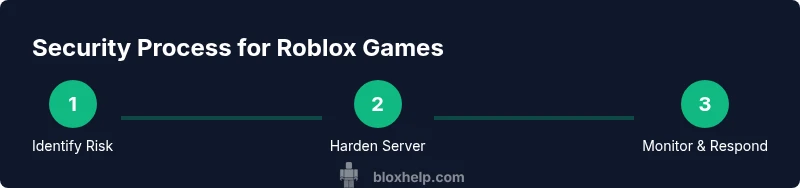
- Identify where risk sits and document it
- Enforce server authority for core logic
- Validate all client data before acting
- Monitor and respond to suspicious activity
- Educate your team with a living security playbook