How to Roblox Age Check: Legitimate Verification and Safety
A comprehensive, safety-first guide on Roblox age checks, legitimate verification methods, parental controls, and how guardians can help protect younger players in 2026.


If you're wondering how to roblox age check, this guide focuses on legitimate, policy-compliant methods to understand Roblox's age verification, how to verify your age safely, and how to set up parental controls. We won't provide bypass techniques. By the end you'll know why age checks exist, what information Roblox may request, and practical steps to verify, protect younger players, and stay compliant with terms.
Why Roblox age checks matter
Age checks in Roblox exist to balance safety, privacy, and access to age-appropriate content. They help ensure that players get appropriate experiences, multiplayer protections, and privacy controls suitable for their age. According to Blox Help, age checks are a key safety feature in Roblox that balance privacy with protection, particularly for younger players who may be more vulnerable online. This emphasis on safety reflects broader industry standards for child online protection and aligns with best practices in user privacy management. As you read, keep in mind that these checks are designed to reduce exposure to content that isn’t suitable for certain ages and to encourage parental involvement where necessary.
- Safety first: Roblox uses age-based rules to tailor experiences and protections.
- Privacy: Your personal data is treated within the framework of platform policies and applicable laws.
- Guardianship: For younger players, guardians may be involved in verification decisions.
How age checks work in Roblox
Roblox age checks are part of a broader strategy to enforce content and interaction restrictions. They typically involve assessing user-provided information (such as birth date) and applying privacy and safety settings accordingly. The process is designed to be transparent and privacy-conscious, with guardians often informed when a minor’s account requires higher levels of supervision. The goal is to provide a safer, more age-appropriate gaming environment while respecting user privacy. This section outlines the general framework and how it affects account access, privacy settings, and player protections.
- Access control: Content restrictions and chat capabilities can vary by age.
- Privacy controls: Settings adjust what information is visible and who can contact the user.
- Guardian involvement: In many cases, guardians are notified and can participate in controls.
Legitimate ways to verify age and privacy
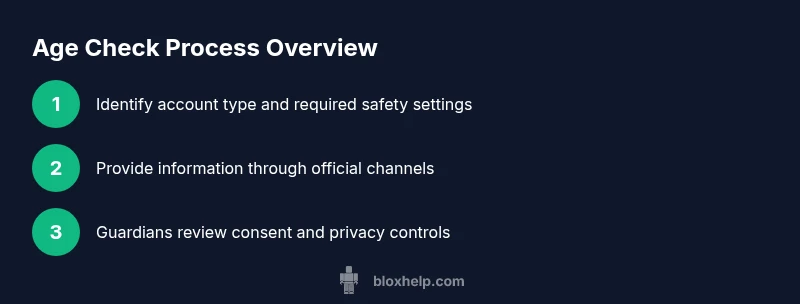
Verifying age legitimately involves using the official channels and providing information only when requested by Roblox through its documented processes. The emphasis is on honest information and parental consent where required by policy. Based on Blox Help analysis, legitimate age verification relies on accurate information and guardian consent when required, as well as clear privacy controls to protect the user. The steps below describe responsible verification pathways and how to configure privacy settings to match the user’s age and family needs.
- Confirm your account type and current age settings in the Roblox app or website.
- Provide only information Roblox explicitly requests for verification, and review the privacy implications.
- If you’re under 18, involve a guardian to help with consent and parental controls.
- Enable privacy protections such as account restrictions, friend request controls, and chat filters as appropriate.
Parental controls and family accounts
Family accounts help guardians supervise younger players while allowing some independence as appropriate for the child’s age. Roblox and many family safety guides recommend enabling parental controls, configuring age-appropriate settings, and regularly reviewing connected devices and session activity. Guardians can manage who can chat, who can join experiences, and how much personal information is visible. This can be especially important for younger players who are exploring new experiences and social interactions online.
- Set a clear supervision plan and discuss it with your child.
- Use account link features that connect a parent/guardian account with the child’s account.
- Review daily playtime limits and content age ratings.
Common myths and safety tips
There are several myths around age checks that can lead to unsafe practices. The reality is that age checks aim to protect players, not to punish or isolate them. Proactively managing settings, and maintaining open communication with guardians, is essential. For families, it is important to recognize that age checks are not a one-time event; they are part of ongoing safety adjustments as a player grows.
- Myth: Age checks prevent all content access. Truth: They tailor experiences and apply necessary restrictions.
- Myth: You can bypass age checks. Truth: Bypassing safety features violates terms and can lead to penalties.
- Pro-tip: Regularly review privacy settings, chat controls, and friend lists to keep the account aligned with the player’s age and safety needs.
Troubleshooting common issues with age checks
If you encounter issues during age checks, document the exact steps you took, any prompts you received, and dates. Contact Roblox support through the official help center and provide any required verification details. In practice, issues often involve incomplete information, delays in processing, or misinterpreted privacy settings. Staying patient and following the documented steps is key. If something seems incorrect, verify you are using the official Roblox app or site and avoid sharing credentials with others.
- Check for official communications from Roblox about verification steps.
- Ensure your guardian has given consent if required.
- Avoid third-party tools or unofficial channels offering verification shortcuts.
What to do if verification fails: contact Roblox support
When age verification fails, revisit the official verification steps and confirm that all required information was provided accurately. If problems persist, contact Roblox Support with a clear summary of the issue and any relevant account details. The support team can review your case and outline the next steps, which may include retrying verification or adjusting privacy settings to maintain safety. The Blox Help team recommends using official channels and keeping records of any communications.
- Gather any required identification or consent documents if requested through official channels.
- Use the official help center to submit a request for review or a new verification attempt.
- Monitor your inbox for updates and follow any additional steps provided by Roblox support.
AUTHORITY SOURCES
- https://www.ftc.gov
- https://www.ed.gov
- https://www.unicef.org
How to Roblox age check: quick summary and best practices
- Always use official Roblox channels for verification and safety settings.
- Involve guardians when required and maintain open dialogue about online safety.
- Regularly review privacy settings, friend requests, and chat permissions to match the user’s age.
toolsMaterialsPropertyNote1Overridden
noteNotUsed
Tools & Materials
- Device with internet access(Any computer, tablet, or smartphone with a stable connection.)
- Roblox account(Active account with accurate profile details.)
- Guardian consent (if under 18)(Parental/guardian permission may be requested for verification.)
- Strong password(Use a unique password and enable two-factor authentication if available.)
- Official verification prompts(Only use prompts from Roblox official channels.)
Steps
Estimated time: 25-45 minutes
- 1
Check current age settings
Open Roblox, navigate to Settings, and review the age-related options and privacy controls. Confirm whether parental controls or guardian links are already configured and note any prompts for verification.
Tip: If a verification prompt appears, do not skip it; record any reference numbers for support if you need to retry. - 2
Prepare consent and information
If you’re a guardian, gather consent if required by policy and ensure you understand what information Roblox may request for age verification. Do not share sensitive data outside official channels.
Tip: Keep a copy of any consent decisions and dates for your records. - 3
Review privacy and safety settings
Ensure that chat, friend requests, and visibility settings align with the player's age. Adjust content filters and restrict access where appropriate.
Tip: Disable features not suitable for younger players to reduce exposure to inappropriate content. - 4
Initiate official verification
Follow the official in-app prompts to initiate age verification if Roblox requests it. Provide information precisely as requested and only through official channels.
Tip: Double-check you’re on the official Roblox app or website before entering details. - 5
Guardianship and consent reminder
If verification requires guardian participation, involve the parent/guardian at the moment of the request to ensure compliance and avoid delays.
Tip: Explain what information is needed and why consent is required. - 6
Retry if needed
If verification doesn’t succeed, review any provided reasons and retry through the same official path, ensuring all data is accurate.
Tip: Keep a log of attempts to help with support inquiries. - 7
Update family-linked accounts
If using a family or guardian linkage, ensure both accounts reflect current settings and that the guardians can monitor activity.
Tip: Test the linkage by having the guardian log in and view the child account’s safety settings. - 8
Confirm content access and safety
After verification, verify that content restrictions and privacy controls are functioning as intended and there is no unintended access to inappropriate content.
Tip: Revisit settings after a few days to ensure lasting alignment with age.
Questions & Answers
What is Roblox age check?
Roblox age check is a safety feature designed to verify a player's age and apply appropriate settings and restrictions for privacy and content. It helps tailor experiences and protect younger players.
Roblox age check verifies a player's age to apply proper safety settings and content restrictions.
Can I bypass Roblox age checks?
We do not support bypassing age checks. Attempting to circumvent safeguards can violate Roblox terms and lead to penalties, and it reduces player safety.
No, bypassing age checks is not allowed and can get you into trouble with Roblox.
What information is requested for age verification?
Information requested is provided only through official Roblox channels and is limited to what is necessary to verify age, typically involving age eligibility and guardian consent when required.
Only official, minimal information is requested to verify age, with guardian consent if needed.
What should I do if verification fails?
If verification fails, review the official guidance, ensure you provided accurate information, and retry through the official prompts. Contact Roblox Support if issues persist.
If it fails, follow the official steps again and contact support if needed.
Are parental controls required for younger players?
Parental controls are strongly recommended for younger players to help guardians manage settings, content restrictions, and privacy.
Guardians are encouraged to use parental controls for younger players.
Does age verification affect access to games?
Age verification can influence access to certain features or content due to safety settings, but it should not block legitimate play when properly configured.
Age checks may change what you can access, based on age-related safety settings.
Watch Video
The Essentials
- Verify age through official channels and guardian-involved processes.
- Enable age-appropriate privacy settings and parental controls.
- If verification fails, use official support channels and keep records.
- Do not attempt to bypass safeguards.