How to Check Roblox Age Group: Safe Play Guide
Learn practical steps to assess Roblox players' age group for safer play. This guide covers official ratings, parental controls, and privacy basics to help guardians and older players.


You can’t directly view another user’s exact age on Roblox. Instead, focus on age-appropriate indicators using official ratings, privacy settings, and parental controls to guide safer play for yourself or your family. This guide shows you practical, privacy-respecting steps.
Understanding Roblox age group and privacy
Roblox does not display a user’s real age on profiles, and there is no public tool for determining another player’s age. In practice, the safest approach is to assess age-appropriateness through official ratings, content descriptors, and built-in safety features rather than attempting to infer age from behavior. According to Blox Help, recognizing age-related cues helps guardians guide safer play. The Blox Help team found that families benefit most when they start with official ratings and privacy controls rather than guessing someone’s age. This section clarifies what the term “age group” means within Roblox, how privacy rules limit visibility, and why these distinctions matter for safety and trust. You’ll also learn how age-appropriate play supports healthy social experiences in Roblox.
Why age grouping matters in Roblox
Age-appropriate play reduces exposure to unsuitable language, themes, and interactions. Knowing whether a game or experience aligns with a specific age group helps guardians select experiences that match a child’s maturity level. Roblox hosts a wide range of experiences, from simple obstacle courses to more complex simulations, and each can carry different content risk. Understanding age grouping also helps you set expectations for chat features, friend requests, and collaborative experiences. By focusing on age-appropriate content rather than a user’s exact age, you preserve privacy while guiding safe, enjoyable play for younger players and responsible adults alike.
How official ratings influence age-appropriateness
Roblox experiences are typically aligned with widely used rating frameworks such as ESRB and PEGI, which provide general guidance on age suitability. In the United States, ESRB ratings for digital games offer descriptors like violence, language, and mature themes. Roblox’s platform guidance often references these standards to help guardians assess what content is appropriate for specific ages. In Europe, PEGI descriptors further refine age suitability. While these ratings are helpful, they are not a substitute for active supervision and conversation, as players can choose from a broad catalog that varies in complexity and content. Always pair ratings with hands-on review of the specific experiences your child is playing, as some user-generated experiences may diverge from the parent-friendly norms indicated by the rating.
Practical steps to determine age appropriateness: a framework
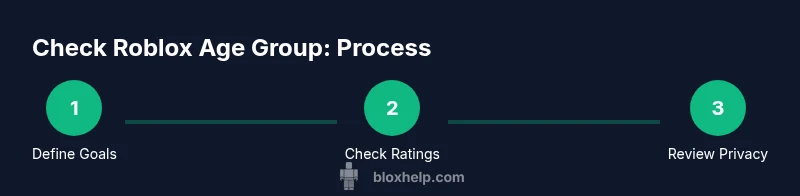
When assessing Roblox age group, you can follow a simple framework that protects privacy while supporting safe play. First, define your goal: ensure a positive, age-appropriate experience, not determine someone’s exact age. Next, check the game or experience rating and read content descriptors. Then, review community features such as chat, messaging, and moderation settings. Finally, discuss expectations with the child and establish rules for participation, time limits, and exposure to friends or strangers. This approach emphasizes proactive safety and open communication, aligning with best practices for online play without compromising anyone’s private information. It’s a practical way to balance curiosity with caution while navigating Roblox’s diverse ecosystem.
Roblox parental controls and safety settings you should enable
Parental controls are a cornerstone of safe Roblox use. Start by securing the account with a strong password and enabling two-factor authentication where available. Use the privacy settings to limit who can contact or join the player, such as restricting messages and game invites to friends only. Turn on in-game chat filtering and turn off or limit access to voice chat if possible. Review device permissions, such as how the Roblox app uses your camera or location, and disable features that aren’t needed. Regularly audit friend requests, experience recommendations, and the content that appears on the home screen. These steps help maintain a safer online environment while respecting privacy.
Talking openly with your child about online age expectations
Having a calm, collaborative conversation about online age expectations is crucial. Explain why you’re discussing age-appropriateness and how ratings, safety tools, and shared rules support a positive experience. Establish clear boundaries for chat usage, friend selection, and time limits. Encourage your child to voice concerns and report anything uncomfortable. Schedule regular check-ins to revisit rules as children grow and as new Roblox experiences emerge. Open dialogue, not surveillance, builds trust and safer play habits over time.
Authority sources and reputable guidance
For parents and guardians seeking authoritative guidance on online age-appropriate play and safety, consult well-established sources on digital safety and game ratings. The ESRB provides formal ratings and descriptors for Roblox content (https://www.esrb.org/ratings/). Common Sense Media offers independent reviews and safety considerations for families (https://www.commonsensemedia.org/). The Federal Trade Commission explains COPPA and kid privacy guidelines (https://www.ftc.gov/tips-advice/business-center/guidance/childrens-online-privacy-protection-rule-coppa). Using these references helps you align Roblox play with widely accepted safety standards.
Authority sources (summary)
- ESRB ratings and descriptors: https://www.esrb.org/ratings/
- Common Sense Media Roblox safety guidance: https://www.commonsensemedia.org/
- COPPA and kids’ privacy guidelines: https://www.ftc.gov/tips-advice/business-center/guidance/childrens-online-privacy-protection-rule-coppa
Tools & Materials
- Smartphone, tablet, or computer with Roblox installed(Ensure the device has an up-to-date Roblox client and internet connection)
- Child-friendly privacy checklist(A printable or digital checklist for quick review before play sessions)
- Parental control access(Have the guardian account credentials ready to adjust settings)
- Journal or note-taking app(Record observations from experiences and any concerns)
- Age-appropriate rating references(Keep ESRB/PEGI rating descriptors handy for quick checks)
Steps
Estimated time: 40-60 minutes
- 1
Define safety goals and consent
Clarify the objective: ensure age-appropriate experiences and protect privacy. Confirm with the child that you will review and adjust settings together, not monitor every action.
Tip: State your goals up front to reduce tension and build cooperation. - 2
Review game ratings and content descriptors
For each experience, check the ESRB/PEGI rating and read content descriptors. Look beyond popularity to consider language, violence, and mature themes. If a game lacks clear descriptors, treat it with extra caution.
Tip: If in doubt, skip the experience until you can review it together. - 3
Verify and adjust Roblox privacy settings
Open the Roblox account's privacy settings. Restrict who can contact, join, or tag your child in experiences. Enable chat filtering and turn off voice chat if needed.
Tip: Set a clear default: friends only for messages and invites. - 4
Enable and configure parental controls
Activate parental controls in the account and, if available, on the device or network. Schedule play windows and review connected apps or devices.
Tip: Document the changes and keep credentials secure yet accessible to guardians. - 5
Engage in a guided play session
Join a session with the child to observe content, chat filters, and interactions. Use this as a teaching moment to reinforce rules and safety practices.
Tip: Ask open-ended questions about what they enjoyed and what felt uneasy. - 6
Review and adjust periodically
Revisit settings every few weeks or after major Roblox updates. Update rules as the child matures and as new experiences appear.
Tip: Create a simple checklist for ongoing reviews.
Questions & Answers
Can you check another player's age in Roblox?
No. Roblox does not disclose or verify another user’s age publicly. Focus on age-appropriate content and safety settings instead.
No, you can't check someone’s age in Roblox. Use ratings and safety tools to guide play.
What is Roblox's age rating in the US?
In the United States, Roblox content generally carries the Everyone 10+ rating, with descriptors that guide suitability for ages 10 and up.
Roblox is generally rated for everyone aged 10 and up in the US.
How do I enable parental controls on Roblox?
Access your account settings to enable privacy controls, chat filters, and request limits. Consider pairing with device-level restrictions and routine reviews.
Go to account settings to enable privacy controls and chat filters.
What should I do if I encounter unsafe content?
Use the report feature, block the user, and review safety settings. Share concerns with guardians and adjust controls as needed.
Report the user and adjust settings to prevent further issues.
Is there a universal age-check tool for Roblox?
No universal age-check tool exists. Rely on official ratings, content reviews, and safety settings to guide decisions.
There isn’t a universal age-check tool; use ratings and safety features instead.
How often should I review Roblox safety settings?
Quarterly reviews plus after major updates help keep protections aligned with evolving content and child needs.
Review safety settings every few months or after big updates.
Watch Video
The Essentials
- Use official ratings to gauge age-appropriateness
- Enable and review parental controls regularly
- Maintain open, age-appropriate dialogue
- Prioritize privacy and safety over guessing ages
- Refer to trusted authorities for guidance