How to Login Roblox: Quick, Secure Access Guide 2026
Learn how to login Roblox securely across devices with this step-by-step guide. Troubleshoot common login issues, protect your account, and start playing quickly with best-practice tips from Blox Help.


Prepare your Roblox username or email and password, choose a device with internet, and decide whether to enable two-factor authentication. This guide walks you through a secure login on PC, mobile, or tablet, with tips to avoid phishing and saved credentials. By following these steps, you’ll access Roblox quickly and safely.
Why logging in Roblox securely matters
According to Blox Help, the login process is the gate to your Roblox experience. A strong, verified login protects your account from phishing, unauthorized purchases, and content restrictions. In a multi-device world, secure login practices matter across PCs, smartphones, tablets, and consoles. You’ll learn about common vulnerabilities and how to avoid them by using unique passwords, keeping your device updated, and recognizing suspicious login prompts. We’ll also outline the difference between using a saved-password feature and manual entry, and why enabling two-factor authentication (2FA) adds an essential extra layer of security. By the end, you’ll understand the core concepts behind a safe login and how to apply them to your everyday Roblox sessions.
Brand safety and personal data protection go hand in hand with a good login routine. As you read, think about where you store credentials and how you verify you are on the official Roblox site or app. The goal is to minimize risk while keeping access simple and fast for you.
What you need before you login
Before you attempt to sign in, gather the essential details and set up a safe environment. Use a trusted device with a stable internet connection, whether you’re on PC,
Understanding common login issues and fixes
Even with correct credentials, login problems can occur. Common causes include mistyped usernames or passwords, caps lock errors, outdated apps or browsers, and issues with Roblox servers. If you’re locked out, start with a password reset from the official login page, verify your email, and confirm any 2FA prompts. If servers are down, check Roblox’s status page and wait a few minutes before retrying. Avoid saving passwords on shared devices to reduce risk. This section helps you diagnose problems quickly and choose the most appropriate remedy.
Keeping your Roblox account secure after login
Security doesn’t end at logging in. After you access Roblox, practice good habits to protect your account. Use a unique, long password and enable two-factor authentication (2FA). Consider a password manager to keep credentials safe and avoid reuse. Be wary of phishing emails or scam sites that ask for login details, and always enter credentials directly on Roblox’s official site or app. Review connected devices periodically and sign out from devices you no longer use. A mindful post-login routine protects your progress, purchases, and personal data across sessions.
Tools & Materials
- A device with internet access(PC, Mac, iOS, Android, or console browser)
- Roblox account credentials (username/email and password)(Make sure you remember the correct login details)
- Two-factor authentication method (authenticator app or backup codes)(Enable if you want extra security)
- Official Roblox app or web browser(Use the official Roblox site or mobile app)
Steps
Estimated time: 5-10 minutes
- 1
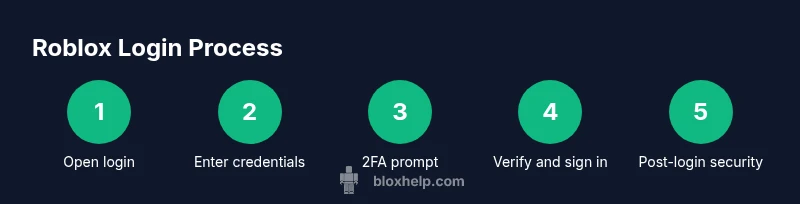
Open the Roblox login page
Launch the Roblox website or mobile app and navigate to the sign-in screen. Ensure you’re on a secure connection and avoid using public Wi‑Fi when entering credentials.
Tip: Check the URL for roblox.com to avoid phishing sites. - 2
Enter your username or email
Type your Roblox username or the email you registered with. If you can’t remember, use the password reset option from the login screen.
Tip: Use the exact username as registered; emails can be case-sensitive in some cases. - 3
Enter your password
Enter your Roblox password. If you keep getting errors, verify Caps Lock and keyboard language. Do not reuse passwords from other sites.
Tip: Consider a password manager to store and autofill securely. - 4
Provide 2FA if prompted
If you have 2FA enabled, enter the code from your authenticator app or email. This adds an extra layer of security and reduces account risk.
Tip: Keep your authenticator app accessible but secure. - 5
Complete any security prompts
Some devices may show a CAPTCHA or device verification step. Complete it accurately to continue.
Tip: Captcha may appear after several failed attempts; be patient. - 6
Check login success and manage device
Once signed in, confirm you’re on the correct account and consider signing out on shared devices. Enable 'Remember me' only on private devices if offered.
Tip: Avoid saving passwords on public devices. - 7
If sign-in fails, reset or contact support
If login still fails, use the password reset flow or Roblox support. Do not share credentials with others, and avoid scams promising instant access.
Tip: Use the official support page and document any error codes.
Questions & Answers
What should I do if I forget my Roblox password?
Use the 'Forgot Password' option on the login page and follow the email steps to reset. Check your spam/junk folder for the reset email and ensure you’re on the official Roblox site or app.
If you forget your Roblox password, click 'Forgot Password' on the login page and follow the reset instructions sent to your email.
Why am I seeing an account locked message?
An account lock can occur after suspicious activity or multiple failed attempts. Try resetting your password, verify your email, and contact Roblox support if the lock persists.
If your account is locked, run the password reset flow and contact Roblox support if needed.
Is two-factor authentication required to login?
Two-factor authentication is not required, but it’s highly recommended for stronger security. If you enable it, you’ll need the code from your authenticator app or email during login.
2FA isn’t required, but it’s strongly advised for extra protection.
Can I login on mobile and PC the same way?
Yes. The login steps are the same across devices; use the Roblox app on mobile or the official site on PC. Consoles may prompt sign-in differently but follow on-screen prompts.
The login process is similar on mobile and PC; just use the app or the official site and follow prompts.
What if Roblox is down or I encounter error codes?
Check Roblox’s status page for outages. If you see error codes, note them and search Roblox support for specific guidance. Retry after a short wait.
If Roblox is down or you see errors, check the status page and wait before trying again.
The Essentials
- Sign in only on official Roblox sites or apps.
- Enable 2FA for protection.
- Never share credentials or codes.
- If in doubt, reset your password and verify via official channels.