Is www roblox com safe? A Practical Roblox Safety Guide
Explore is www roblox com safe: learn domain checks, enable 2FA, use Safety Center tools, and spot phishing with a practical, data-driven Roblox safety guide for 2026.


Is www roblox com safe? Official Roblox domains are designed with strong security, but true safety depends on user practices. Use the correct URL, enable two-step verification, and stay alert for phishing pages that mimic Roblox. This guide details practical steps to verify safety and protect accounts.
Is the official Roblox domain safe? A practical starting point
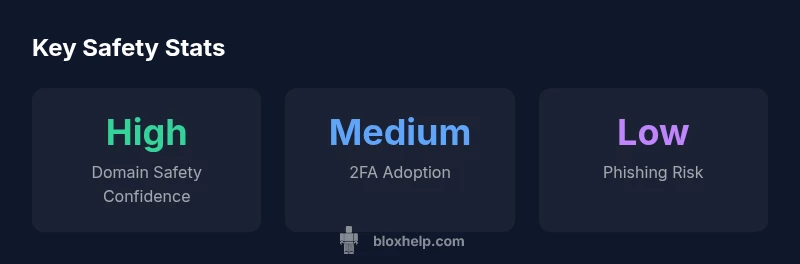
Is www roblox com safe? For many Roblox players and parents, this question sits at the forefront of safe online play. According to Blox Help, the official Roblox domain is designed with robust security measures, including TLS/HTTPS encryption and server-side protections. However, no platform is immune to risk, especially when users are tired, on shared devices, or interacting with look-alike sites. The bottom line is that safety on the official domain depends on a blend of strong technical controls and prudent user behavior. Always verify you are on the genuine domain, enable account protections such as two-step verification, and stay vigilant for phishing attempts that imitate Roblox's branding. This is particularly important when your browser autofill or you click from social media links. In 2026, the general workflow emphasizes verifying the domain, using official apps or bookmarks, and applying safety settings consistently.
The safety architecture behind roblox.com
Roblox uses industry-standard security practices to protect data in transit and at rest. The site employs HTTPS with valid certificates, secure session management, and monitoring for suspicious activity. Roblox Safety Center resources guide users on chat restrictions, privacy controls, and how to report abuse. For account security, Roblox supports two-step verification (2FA) and encourages strong, unique passwords. Parents can harness Family Settings to limit chats or content exposure for younger players. While these features reduce risk, user actions—like sharing passwords, using public Wi‑Fi, or approving suspicious prompts—remain the most common attack vectors. The existence of these controls doesn’t absolve users from staying proactive. The core takeaway is simple: rely on official domains, enable protections, and maintain good digital hygiene.
Myths vs. reality about Roblox safety on is www roblox com safe
Myth: A near-identical URL guarantees safety. Reality: Only the official domain and HTTPS-secured pages are trustworthy. Phishing pages often mimic Roblox aesthetics to steal credentials. Myth: Roblox collects all data and has no privacy controls. Reality: Roblox collects data to run and improve the service, but users can adjust many privacy settings and limit data exposure. Myth: Safety features are optional. Reality: Core protections are designed to work by default, with straightforward options to customize restrictions. Understanding the nuance between brand integrity, domain security, and user behavior helps separate fact from fiction.
Real-time verification: how to confirm you are on the official domain
Before signing in, perform a quick check:
- Look for HTTPS and a valid SSL certificate; the padlock icon should be present.
- Confirm the domain reads exactly as www.roblox.com (watch for subtle misspellings or subdomains).
- Open Roblox through a trusted bookmark or the official app rather than clicking random links.
- Enable two-step verification (2FA) to add a second layer of protection.
- Keep your device secure with up-to-date software and reliable antivirus. If in doubt, compare the page to the Safety Center’s official URLs and contact Roblox support if you notice anything suspicious.
Parental controls and best practices for younger players
Roblox provides a Safety Center with content filters, chat restrictions, and privacy settings suitable for families. Parents can enable account restrictions, adjust who can contact a player, and limit in-game interactions. A strong password paired with 2FA dramatically reduces risk. Encourage kids to log in on trusted devices, avoid sharing passwords, and use the built-in safety features rather than third-party tools. Regularly review privacy settings and keep an open dialogue about online safety so players understand how to recognize suspicious behavior or phishing cues.
What to do if you encounter phishing or suspicious pages
If you suspect a phishing page, do not enter credentials. Close the page, report it to Roblox via the Safety Center, and reset your password using official Roblox pages. If your account shows unusual activity, sign out immediately, change the password on a trusted device, and review recent login activity. Enabling 2FA can mitigate impact if credentials were compromised. Share safety tips with friends and family, and encourage reporting of suspicious links and messages.
The broader safety ecosystem: privacy, data practices, and community guidelines
Roblox’s privacy settings let users control visibility and accessibility. Community guidelines aim to reduce harmful content by promoting respectful interactions and timely reporting. As with any online platform, device security and network hygiene are essential: avoid public Wi-Fi for sensitive logins, keep software updated, and use reputable security tools. The synergy of robust platform controls and informed user practices creates a safer Roblox experience for players of all ages in 2026.
Roblox domain safety comparison
| Aspect | Official Domain Safety | Best Practices |
|---|---|---|
| Domain integrity | HTTPS with valid certificate, official URL | Bookmark roblox.com; verify before login |
| Account security | Two-step verification (2FA) available | Enable 2FA; use strong password; don’t reuse passwords |
| Phishing risk | Low on official domain but possible via clones | Always check URL; avoid clicking from unknown sources |
Questions & Answers
Is is www roblox com safe to enter my password on the official site?
On the official domain, the site uses HTTPS and Roblox supports two-factor authentication. However, never enter credentials on suspicious pages and avoid third-party login portals.
Yes, on the official Roblox site use HTTPS and enable 2FA; don’t type credentials on shady pages.
How can I tell if a Roblox site is legitimate?
Look for the official domain roblox.com with HTTPS; beware of lookalike domains and phishing pages; verify the SSL certificate and look for a legitimate safety center link.
Check the URL and certificate; if in doubt, open the Roblox safety page from a trusted bookmark.
What parental controls does Roblox offer?
Roblox provides Safety Center resources, chat filtering, and family account settings; you can set privacy and contact restrictions, and enable account restrictions for younger players.
Roblox has built-in safety settings and parental controls to limit chats and contact.
What should I do if I suspect phishing?
Do not enter credentials; use official Roblox pages to report the page; reset password from a trusted link; enable 2FA to reduce impact.
If you suspect phishing, don’t log in; report it and change your password on the official site.
Is Roblox safe for kids?
Roblox can be safe for kids with proper settings and supervision; apply Safety Center controls, enable chat restrictions, and monitor activity.
Roblox can be safe for kids when you use the built-in safety tools and supervise.
“Security is a continuous practice, not a one-time setup. Always verify the domain, enable two-step verification, and stay vigilant against phishing.”
The Essentials
- Verify the domain before login
- Enable two-step verification to protect accounts
- Use Roblox Safety Center features and parental controls
- Be cautious of phishing sites with similar URLs
- Report suspicious pages to Roblox promptly