How do you know roblox: A practical safety guide
Learn how to verify Roblox’s legitimacy and safety with a step-by-step checklist, trusted sources, and practical tips to protect your account and gameplay.


This guide shows you how to verify Roblox is legitimate and safe to use. You’ll follow a practical, step-by-step checklist covering official sources, account security, safe payment methods, and parental controls. By the end, you’ll confidently distinguish authentic Roblox channels from scams and protect your gaming experience. According to Blox Help, using official apps and trusted support reduces risk and improves performance.
How do you know roblox
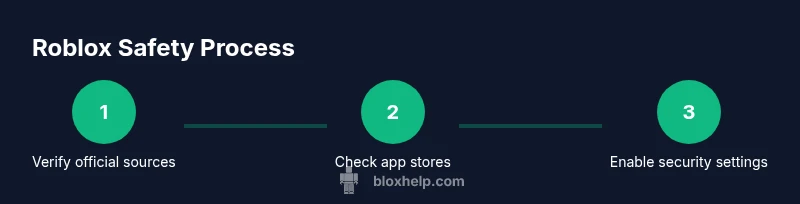
Knowing whether Roblox is the real, safe platform starts with looking for official channels and consistent branding. For new players, that means using the official roblox.com domain, downloading apps only from trusted stores, and keeping your login details private. In this section we’ll outline a practical approach to verify authenticity and safety. According to Blox Help, starting with official sources sets the foundation for a secure Roblox journey. The goal is to help you distinguish legitimate Roblox interfaces from scams, understand where to find help, and protect your personal information. Look for clear privacy policies, transparent terms of use, and links to official support on every page you visit. Cross-check with Roblox’s official social accounts or the help center to confirm you’re on the right channel. Be cautious of shortened URLs, impersonation banners, or requests to install third-party software outside the official app stores.
Official Roblox sources you can trust
Trustworthy Roblox content comes from a few core sources. The official Roblox website and its domain (roblox.com) should be the anchor of any account activity. When downloading the app, use the official store listings (Apple App Store, Google Play, Microsoft Store) rather than third-party links. The Roblox Support hub provides privacy settings, safety tips, and reporting tools. For verified information, compare any claims with notes from the official help center and user agreements. If you’re a parent or guardian, review the parental controls available on the Roblox site to tailor access appropriately. Remember, legitimate sources will never ask you for your password for login or payment outside official channels. If you’re ever unsure, contact Roblox Support directly through the official site rather than email links or social messages from unknown accounts.
Steps you can take now to verify authenticity
- Check the URL and app source: always start with roblox.com or the official store listing. 2) Compare the content against the official help center. 3) Look for privacy and terms pages that are current and clear. 4) Confirm payments and purchases occur only through official channels. 5) When in doubt, seek help from the official Roblox Support page. 6) In chat or DM messages, ignore unsolicited offers or requests for passwords. These steps reduce exposure to scams.
Protecting your account and privacy
Account protection begins with strong, unique credentials and active privacy settings. Always avoid reusing passwords across sites, enable two-factor authentication if available, and review your account’s privacy controls regularly. Use a trusted password manager to store credentials securely. Set parental controls if you’re guiding younger players, and limit who can contact you on Roblox. Regularly update your security info and phone number, and keep your device’s software up to date to minimize vulnerabilities. Good habits here protect both your account and personal information long-term.
Red flags and reporting scams
Red flags include unusual URLs, requests for passwords, pressure to make quick payments, or offers for free Robux outside the official shop. Be wary of sites that mimic Roblox branding but are hosted on non-official domains, or messages asking you to install software. If you encounter suspicious activity, report it through Roblox Support and preserve evidence (screenshots, URLs). Don’t click unfamiliar links in chats or messages, and avoid providing personal data to anyone claiming to game support outside official channels. Early reporting helps protect others in the community.
Safe gaming habits for Roblox players
Practical safety starts with mindful browsing and disciplined sharing. Always use official sources for downloads, logins, and purchases. Keep your device secure, enable privacy features, and limit data sharing. Teach younger players about online etiquette and the importance of reporting suspicious behavior. By adopting these routines, you’ll enjoy Roblox with less risk and more focus on creativity and play.
Tools & Materials
- Device with internet access(Any computer, tablet, or phone with current OS)
- Official Roblox app or verified browser(Download from Apple App Store, Google Play, Microsoft Store, or roblox.com)
- Strong, unique password(Use a password manager if possible)
- Two-factor authentication (optional)(Enable if offered by Roblox on your account)
- Parental controls plan(Define limits and privacy settings for younger players)
Steps
Estimated time: 20-40 minutes
- 1
Identify official sources
Begin by locating Roblox on official domains and stores. Verify the domain roblox.com and confirm store listings match the official app. This helps prevent phishing and ensures you’re interacting with legitimate content.
Tip: If in doubt, open the Roblox site from a bookmark rather than a link in an email or message. - 2
Check URLs and app sources
Always inspect URLs for authenticity and avoid shortened or suspicious links. When downloading, use the official store listing or the roblox.com download page.
Tip: Hover links to view the destination and avoid sites with poor security indicators. - 3
Review privacy and security settings
Open Roblox account settings to review privacy controls, who can contact you, and what data is shared. Set most controls to private or friends only if you’re unsure.
Tip: Enable two-factor authentication if your account supports it for extra protection. - 4
Enable parental controls and safety features
Set family safety levels, time limits, and content restrictions suitable for younger players. Use Family Settings where available to maintain a safe environment.
Tip: Document the agreed-upon rules with guardians and revisit them monthly. - 5
Know how to report scams
Learn how to report suspicious accounts, links, or chats through the official Roblox Help Center. Preserve evidence like screenshots when possible.
Tip: Timely reporting helps protect the community and accelerates remediation.
Questions & Answers
What counts as official Roblox sources?
Official Roblox sources include the roblox.com domain, the official app stores, and the Roblox Help Center. Always verify that information comes from these primary channels before acting on it.
Official sources are roblox.com, the app stores, and Roblox Help Center. Verify these channels before acting.
How can I tell a Roblox link is fake?
Fake links often use shortened URLs, mismatched domains, or urgent language pressuring you to act quickly. Always inspect the full URL and avoid clicking from unknown messages.
Watch for shortened links and unfamiliar domains. Always verify the destination URL before clicking.
Is Roblox safe for kids?
Roblox can be safe for kids when proper safety settings are enabled and supervision is in place. Use parental controls, limit chat features, and educate about online behavior.
With proper parental controls and supervision, Roblox can be a safe space for kids.
What should I do if I suspect a scam on Roblox?
Document evidence (screenshots, URLs) and report it through the official Roblox Help Center. Do not engage with the scammer or share personal data.
If you suspect a scam, report it to Roblox Support through the official site and save any evidence.
Where can I get official help from Roblox?
Access the Roblox Help Center from roblox.com to find safety resources, account recovery guides, and reporting tools. Always use official channels for support.
Visit the Roblox Help Center on the official site for safety resources and support.
Watch Video
The Essentials
- Verify official sources before signing in.
- Protect passwords and enable 2FA.
- Recognize red flags and report scams.
- Use parental controls to manage access.