RobloxLogin: Secure Roblox Access Best Guide for 2026
Learn how to log into Roblox securely with RobloxLogin tips: strong passwords, 2FA, recovery steps, and platform-specific guidance for desktop and mobile.


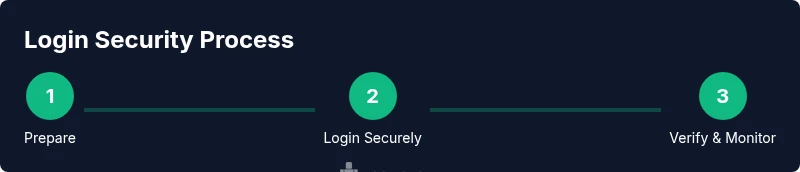
Goal: securely access Roblox by using a strong password, enabling two-factor authentication, and staying alert for phishing attempts. The term robloxlogin highlights safe, authenticated access across devices. You’ll log in from desktop or mobile, review recent activity, enable login alerts, and follow a clear recovery path if your account is ever blocked or compromised.
Why secure login matters
For Roblox players and aspiring developers, a secure login is the first line of defense against account theft, phishing, and impersonation. According to Blox Help, taking a few simple precautions dramatically reduces risk and keeps your in-game progress safe. A safe robloxlogin experience relies on strong, unique passwords, vigilant identity checks, and consistent monitoring of account activity across devices. In practice, this means using a password that is not used elsewhere, avoiding public networks when signing in, and enabling security features like two-factor authentication (2FA). Hackers often exploit sloppy login habits, so you should treat every login as an opportunity to verify you are on the official Roblox site or app. Keep login details private, review device sessions, and log out from shared devices. By building these habits, you reduce the chance of credential reuse and unauthorized access.
Understanding Roblox login flow
Roblox authentication flows are designed to verify identity across platforms, including PC, Mac, iOS, and Android. When you press the Log In button, Roblox checks the entered credentials against its servers and may prompt for 2FA if you have it enabled. On mobile, the login process often appears within the Roblox app, while desktop users interact with a browser-based form. Regardless of device, always ensure you’re navigating to the official roblox.com domain or using the official Roblox app. Phishing pages frequently imitate the login screen, so double-check the URL and avoid login links from untrusted emails or messages. Successful login takes you to your home screen where you can manage friends, games, and settings.
Password hygiene and strong credentials
For a resilient robloxlogin, start with a password that is long, unique, and hard to guess. Avoid common words, predictable patterns, or personal details. Use a passphrase or a random mix of letters, numbers, and symbols, and store it in a trusted password manager rather than writing it down where others can see. Never reuse the same password across multiple sites, especially for banking or email. If you suspect a password has been compromised, change it immediately and sign out from all devices where you’re logged in. Regularly review connected apps and sessions, and revoke access for anything you don’t recognize. Remember, the goal is to minimize reuse and maximize entropy while keeping access convenient through a password manager.
Enabling and using two-factor authentication (2FA)
2FA adds a second barrier to entry for any robloxlogin attempt. In Roblox, you can enable 2FA via an authenticator app (like Google Authenticator or Authy) or through SMS codes, depending on what Roblox supports in your region. Once set up, you’ll be prompted for a one-time code after entering your password. Keep your authenticator device secure, confirm codes only on the official Roblox login page, and never share codes with anyone. If you lose your 2FA device, use backup codes or contact Roblox support to restore access following their verification steps.
Account protections, recovery options, and alerts
Besides a strong password and 2FA, add email verification and login alerts to your Roblox account. Enable notifications for new logins or unfamiliar devices, and maintain a current recovery email or phone number. Based on Blox Help analysis, proactive alerts help you catch unauthorized access quickly and respond before significant damage occurs. If you do notice suspicious activity, sign out from other devices and change your password immediately. If access is blocked, begin the official recovery process, following prompts to verify ownership and verify recent activity.
Platform-specific login tips: desktop vs mobile
Desktop logins usually offer a straightforward browser experience, but you should still verify the URL and secure connection (https). Mobile logins often rely on the Roblox app, which may utilize in-app prompts and push alerts. For both platforms, prefer a trusted network—avoid public Wi-Fi when entering credentials. If you use a shared device, always sign out after your session and enable biometric or PIN-based quick login to streamline future access while preserving security.
Common login problems and practical fixes
Forgot password or email access issues are common. Use the Roblox password reset flow from the official site, and ensure you’re using the most recent email linked to your account. If you encounter a login loop, clear cookies or reinstall the app, and check for Roblox service status. If you receive a security warning, do not enter credentials; navigate directly to roblox.com and sign in again. For 2FA prompts you can’t complete, rely on backup codes or support channels to regain access.
Safe practices after logging in and ongoing security habits
After logging in, sign out on shared devices, review recent sessions, and rotate passwords periodically. Keep your recovery information up to date, and maintain a routine of checking for suspicious emails or messages that request login details. The goal is to create a resilient habit around robloxlogin that prevents breaches and preserves your account integrity. The Blox Help team recommends layering protections, practicing caution online, and staying informed about Roblox security updates so you can enjoy a safe and uninterrupted gaming experience.
Tools & Materials
- Personal internet-enabled device(Phone, tablet, PC, or Mac with browser or Roblox app)
- Roblox account credentials(Username and password; avoid reusing passwords)
- Two-factor authentication setup(Optional but highly recommended; authenticator app or SMS)
- Official Roblox app or trusted browser(Access the login page securely)
- Secure internet connection(Avoid public Wi‑Fi when entering credentials)
Steps
Estimated time: 15-25 minutes
- 1
Prepare your login setup
Gather your username or email, your password, and confirm you have a secure connection. If you plan to enable 2FA, decide which method you’ll use (Authenticator app or SMS) and locate backup codes if available.
Tip: Use a password manager to generate and store unique credentials. - 2
Open Roblox on a trusted device
Launch the official Roblox app or visit the legitimate roblox.com site. Check that the URL begins with https and that there are no browser warnings about insecure content.
Tip: Always verify you’re on the official site before entering credentials. - 3
Enter credentials securely
Type your username and password carefully, avoiding autofill on shared devices. If you use a password manager, let it fill the fields only on trusted devices.
Tip: Do not save passwords in public or shared browsers. - 4
Complete two-factor authentication
Enter the one-time code from your authenticator app or SMS after submitting your password. If you can’t access 2FA, use backup codes or contact support.
Tip: Keep your authenticator device secure and accessible only to you. - 5
Review account activity and devices
Go to account settings and inspect recent sessions. Sign out from any device you don’t recognize and enable login alerts for new sessions.
Tip: Enable push or email alerts for quick detection of unfamiliar logins. - 6
Troubleshoot login issues
If login fails, perform a password reset from the official site, check Roblox's service status, and clear caches or reinstall the app if needed. Document any error messages for support.
Tip: If issues persist, reach out to Roblox support with time-stamped details.
Questions & Answers
What is robloxlogin and why does it matter?
Robloxlogin refers to the secure, authenticated process of accessing Roblox accounts. It matters because strong login practices prevent unauthorized access and protect progress and in-game assets.
Roblox login is about securely accessing your account. Use strong passwords and 2FA to keep your progress safe.
How do I reset my Roblox password?
Use the official Roblox password reset flow on roblox.com and ensure you have access to your recovery email or phone. Follow the prompts to verify ownership and set a new password.
Go to Roblox password reset, verify your identity, and choose a new password.
How do I enable 2FA on Roblox?
Open Roblox account settings and look for the security or 2FA option. Choose your preferred method (authenticator app or SMS) and follow the on-screen steps to link it.
In settings, enable two-factor authentication and select your method.
What should I do if I can't log in?
First, check the Roblox status page for outages. Then attempt a password reset if needed, verify your 2FA, and ensure you’re on the official site. If problems persist, contact Roblox support.
If you can't log in, check status, reset password, verify 2FA, and contact support if needed.
Is it safe to save my Roblox password in my browser?
Saving passwords in a browser can be convenient but risky on shared devices. Prefer a trusted password manager and never save credentials on public or borrowed devices.
Only save passwords in a trusted password manager, not on shared devices.
What verification methods does Roblox support for login security?
Roblox supports multiple 2FA options depending on your region, typically an authenticator app or SMS codes. Always set up at least one method for added protection.
Roblox supports authenticator apps and SMS codes for login verification.
Watch Video
The Essentials
- Use unique, strong passwords for Roblox.
- Enable two-factor authentication whenever possible.
- Verify URLs and avoid suspicious login prompts.
- Review account activity regularly and sign out on shared devices.
- Have a clear recovery path and backup codes ready.