How to Follow Someone on Roblox: Step-by-Step Guide
Learn how to follow others on Roblox, why it matters, and how to manage your follows with practical steps, safety tips, and troubleshooting ideas. A beginner-friendly guide from Blox Help.


On Roblox, following someone is a lightweight way to see their activity without sending a friend request. Go to the username’s profile and click the Follow button near the top of the page. You can follow friends, creators, or teammates to stay updated on their games, posts, and releases. According to Blox Help, following helps you curate a steady stream of relevant content without formal connections.
What following on Roblox means and how it differs from friends
Following on Roblox provides a way to stay updated on a user’s activity, new games, and announcements without needing to become their friend. When you follow someone, you subscribe to their public updates and content visibility, which helps you discover new releases, events, and creator-led games. This is distinct from sending a friend request, which creates a mutual connection and broadens access to private in-game activity. Understanding this distinction helps you curate a useful feed and manage your online experience more effectively. Throughout Roblox, following is a lightweight, non-committal way to stay in the loop with people you value, whether they are friends, creators, or teammates.
For players who are learning the platform, following first appears as a convenience feature that complements the social and discovery aspects of Roblox. It’s especially helpful for developers tracking tester feedback, or for players who want to keep up with streaming events or in-game updates from popular creators.
Why you might want to follow people (and what you gain)
Following someone gives you a personalized feed of activity, game releases, and announcements without requiring a mutual friendship. This makes it easier to discover new games, join ongoing events, or keep up with content creators you enjoy. It also helps you build a network around your interests—whether that’s speedruns, horror games, or casual social hangouts. When you follow a creator, you’ll often get notified about new releases, patches, or promotional events, which can save time and keep you engaged with the Roblox ecosystem. Be mindful that the feed is influenced by the people you follow, so curating wisely improves relevance and reduces noise.
A practical approach is to follow a mix of friends, developers, and community figures to ensure a balanced stream of content.
How to locate and follow someone on Roblox (quick overview)
The process starts with visiting the person’s profile. From there, locate the Follow button—usually near the top of the profile page—and click it. If the button is not visible, it may be due to privacy settings or account restrictions. You can also access profiles via search or from a friend’s following list if you’re exploring related creators. Following is often visible on both PC and mobile apps, though the exact UI may vary slightly between platforms. After you follow someone, you’ll start seeing their activity in your Roblox feed, and you can unfollow at any time if their updates are no longer relevant.
Keep in mind that following is not the same as subscribing to updates in all contexts; you’re simply opting into a public activity stream that can help you stay informed and inspired.
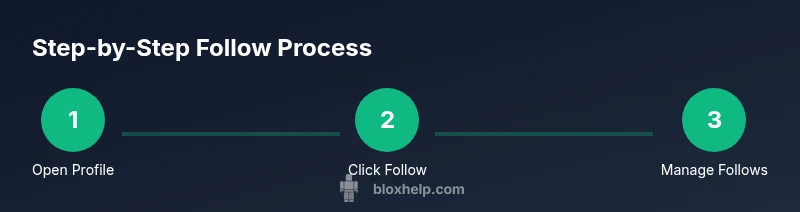
Step-by-step guide to following someone (visualized)
Following is a straightforward action, but seeing it clearly helps beginners. The steps below describe the typical flow on most Roblox interfaces:
- Open the user’s profile by selecting their username from search results, a chat message, or a game page.
- Look for the Follow button near the top of the profile header and click it.
- Confirm that the action took place by checking for a highlighted Follow state or an updated follower count on the profile.
- Return to your own profile to manage your following list and adjust notifications if available.
- If you want to unfollow later, revisit the same profile and click Unfollow, or manage the list from your following page.
Tip: Use the search feature to locate creators you admire quickly, then follow them to seed your feed with high-quality content.
Privacy and safety considerations when following
Privacy controls influence who can follow whom and what is visible on profiles. Some users may restrict following to mutual connections or to public profiles with certain limitations. When following, avoid sharing personal information and be mindful of in-game communities where content can be fast-moving. If you encounter blocked or restricted actions, review Roblox’s safety guidelines and adjust your following choices accordingly. Always respect others’ privacy and platform rules while building your Roblox network.
How to manage your follows and tailor your feed
Managing follows helps keep your Roblox experience relevant. Periodically review who you follow and prune accounts that no longer match your interests. Some platforms allow you to categorize followed accounts, mute certain activities, or adjust notification preferences—use these features to minimize noise. A well-maintained following list makes it simpler to discover new games, participate in events, and support creators you enjoy. Regular housekeeping also reduces the chance of seeing outdated or irrelevant updates.
Discovering people to follow: practical tips
To build a high-value following list, start with people you already know (friends, teammates), then branch out to creators with a track record of quality content. Explore Roblox groups, developer forums, and community showcases to identify influential or entertaining profiles. When you find someone interesting, review their recent activity to gauge alignment with your interests before following. This approach helps you curate a feed that enhances learning, enjoyment, and discovery in Roblox.
Troubleshooting: when the Follow button isn’t visible or works erratically
If you don’t see a Follow button, try refreshing, clearing cache, or switching devices to determine if the issue is device-related. Check that you’re logged into the correct account and that the profile isn’t restricting following due to privacy settings. If problems persist, visit Roblox Support for guidance and review the latest platform updates that could affect the Follow feature.
Authority sources and insights (for deeper learning)
For official guidance, Roblox’s own help center and developer documentation provide updates on social features and profile interactions. Community discussions and expert analyses from platforms like Blox Help help users interpret changes and best practices when following creators and players.
Tools & Materials
- Roblox account(Active login on your chosen device)
- Device with internet access(PC, tablet, or smartphone)
- Roblox app or web browser(Preferred for profile navigation)
- Note-taking tool (optional)(Capture usernames to follow)
Steps
Estimated time: 2-5 minutes
- 1
Open the target profile
Log in to Roblox, then navigate to the profile of the user you want to follow. You can reach it via search, a link, or by clicking from a mutual friend’s profile. Make sure you’re viewing the public profile if privacy settings are in effect.
Tip: Use the search bar for speed; typing a username directly reduces navigation time. - 2
Locate the Follow button
Look at the top area of the profile page for the Follow button, usually near the avatar and profile header. If you don’t see it, the account may have restrictions or privacy settings that limit following.
Tip: If you’re unsure, check the profile header region carefully; some layouts place the button slightly off-center. - 3
Click Follow and confirm
Click the Follow button to subscribe to that user’s public updates. In most cases, the button will change to indicate you’re now following. Some profiles may show a follower count that updates after you follow.
Tip: Double-check the state after clicking; if it doesn’t change, refresh the page and try again. - 4
Visit your profile to manage follows
Go to your own profile to review who you follow and adjust preferences if available. This is where you can unfollow or reorder your feed exposure when Roblox offers such controls.
Tip: Regularly prune accounts that no longer align with your interests to keep your feed relevant. - 5
Unfollow when needed
If you regret following someone, visit their profile and use the Unfollow option, or remove them from your following list if that option exists. This stops updates from appearing in your feed.
Tip: You can unfollow without notifying the other user, keeping interactions discreet. - 6
Troubleshoot common issues
If the Follow button is missing or unresponsive, try a browser/app refresh, clear cache, or switch devices. Check for Roblox platform notices that might affect social features.
Tip: Check the Roblox Help Center or status page for ongoing outages or UI changes.
Questions & Answers
What does following someone on Roblox do for my feed?
Following subscribes you to that user’s public activity, helping you see their updates without needing to be friends. It keeps your feed informed with new games and announcements from creators you follow.
Following lets you see a user’s public activity without friendship; you’ll get updates on their new games and posts.
Is following the same as friending on Roblox?
No. Following is a one-way subscription to a user’s public updates, while friending creates a mutual connection with broader access to each other’s activity.
No, following is not the same as adding a friend; it’s a one-way way to see updates.
Can I unfollow someone later?
Yes. You can unfollow from the person’s profile or manage your following list from your own profile. This stops their updates from appearing in your feed.
Yes, you can unfollow at any time from their profile or your following list.
What if I can’t find the Follow button?
The button may be hidden due to privacy settings or account restrictions. Make sure you’re viewing a public profile and try refreshing or using a different device.
If you can’t see Follow, try refreshing or checking privacy settings on the profile.
Does following impact who can interact with me?
Following does not inherently change who can contact you; it simply affects what updates you receive. Use Roblox’s privacy controls to tailor interactions.
Following mainly affects updates; privacy settings control interactions.
Which devices support following on Roblox?
Following works on platforms that expose profiles and updates, including the Roblox website and mobile apps. If you don’t see it, update the app or check for platform notices.
Most major Roblox platforms support following; update if you don’t see the button.
Watch Video
The Essentials
- Follow to stay updated on profiles you value
- Follow ≠ friend request; different privacy levels apply
- Manage follows to keep content relevant
- Unfollow anytime to refine your feed