Does Roblox Use CPU or GPU? A Practical Hardware Guide
Learn whether Roblox uses CPU or GPU, how each component contributes to performance, and practical tips to optimize settings across Windows, macOS, and mobile devices for smoother Roblox gameplay.


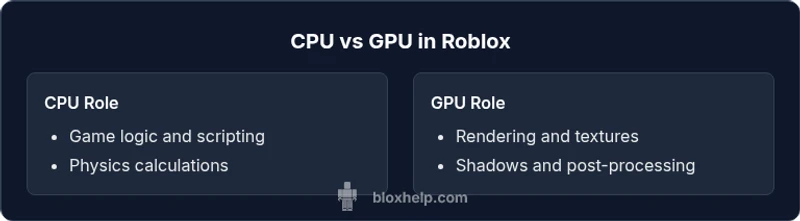
Does Roblox use CPU or GPU? Both play a role, but which resource is the bottleneck depends on what you’re doing. Core game logic, physics, and scripting rely heavily on the CPU, while rendering, lighting, and post-processing lean on the GPU. In practice, Roblox performance improves when both CPU and GPU are balanced, especially on modern hardware and well-tuned graphics settings.
Does Roblox Use CPU or GPU?
Does Roblox use CPU or GPU? This question sits at the heart of performance tuning for Roblox players and developers. The short answer is that Roblox uses both CPU and GPU, but the exact balance changes with what you’re doing in-game. According to Blox Help, the performance you experience depends on how demanding your current scene is for game logic, physics, and rendering. For most players, your experience improves when you achieve a balanced hardware setup and sensible graphics defaults that match your device. Across platforms, the key is understanding where the bottleneck tends to appear and adjusting settings accordingly. This guidance is especially important for aspiring Roblox developers who are testing leaner scripts or more complex scenes, as the same principles apply to both debugging and everyday play.
The CPU’s Role in Roblox: Core Logic, Physics, and Scripting
On the CPU side, Roblox performs the bulk of game logic, AI decision making, physics calculations, and scripting execution. The scripting engine runs Lua code, events trigger logic updates, and physics simulations require continuous core computation. This work is highly parallelizable to a degree, but it often benefits from higher single-core performance in practice because many Roblox scripts run sequentially within frames. A multi-core CPU helps, especially when there are several concurrent scripts or complex physics objects. CPU bottlenecks manifest as stuttering, uneven frame pacing, and longer load times because the engine has to wait for logic to complete before rendering the next frame. In real-world terms, faster CPUs with more cores reduce these stalls and keep frame pacing smoother during busy scenes. It’s also worth noting that texture streaming and some post-processing tasks can still bind to CPU resources, particularly when there are many assets loading in the background. In short, a strong CPU is essential for smooth gameplay during scripted events and physics-heavy moments.
The GPU’s Role in Roblox: Rendering, Textures, and Shaders
Roblox relies heavily on the GPU for rendering the on-screen image. The GPU handles vertex and fragment shading, lighting calculations, texture filtering, and post-processing effects. When a scene becomes visually complex—lots of particles, dynamic lighting, reflections, or render-distance changes—the GPU’s duty increases. A fast GPU with ample VRAM helps maintain higher frame rates and reduces frame-time variance, especially in graphically intense scenes or when running at higher resolutions. While the GPU handles what you see, the CPU feeds it with geometry, materials, and shader instructions. If your GPU is underpowered for the current scene, you’ll notice lower frame rates and stutter during visually rich moments, even if the CPU isn’t maxed out. In practice, modern GPUs paired with capable CPUs deliver the smoothest Roblox experience, particularly on devices with high refresh-rate monitors or VRAM-heavy textures.
Signs You Might Be CPU-Bottlenecked in Roblox
A CPU bottleneck shows up as inconsistent frame pacing, stuttering during scripted events, and longer-than-expected loading when scenes are logic-heavy. If you’re seeing high CPU usage while the GPU usage remains relatively low, there’s a good chance you’re CPU-bound. Monitoring tools built into your OS (or third-party apps) can reveal whether the CPU consistently sits near 100% during gameplay, while the GPU sits at a lower level. When this happens, you’ll often notice that reducing script complexity, minimizing complex physics interactions, or lowering the number of active NPCs and particles can yield a smoother experience. Optimization here usually means trimming unnecessary scripts, optimizing loop timing, and batching or simplifying physics objects so the CPU has fewer tasks to juggle per frame.
Signs You Might Be GPU-Bottlenecked in Roblox
Conversely, a GPU bottleneck occurs when the GPU is fully utilized while the CPU sits idle or at moderate usage. This is common when you enable high-resolution textures, long-range lighting, or complex post-processing effects. In GPU-bound scenarios, increasing GPU strength or memory bandwidth can raise frame rates, especially at higher resolutions or on displays with fast refresh rates. If your frame rate is capped by your GPU, lowering texture detail, turning off or reducing post-processing, and decreasing resolution can often restore smoothness. Upgrading drivers and ensuring proper cooling also helps the GPU maintain peak performance during long play sessions.
Balancing Your System: CPU, GPU, RAM, and Storage
Performance in Roblox is not about one component alone; it’s about balancing the stack. Sufficient RAM prevents frequent paging and reduces load times, while fast storage reduces long load screens. Thermal throttling can also reduce both CPU and GPU performance when temperatures spike, so keep your system cool with good airflow and, if needed, a better cooling solution. When planning upgrades, consider your target resolution and refresh rate. A mid-range CPU with a capable GPU typically provides better results than a high-end GPU paired with a weak CPU for Roblox at 1080p. For players who create user-generated content or test more elaborate scenes, prioritizing CPU improvements can pay dividends for script-heavy experiences, while GPU upgrades benefit visually intense builds.
Graphics Settings that Matter: How to Tune for Performance
Graphics settings drive the balance between image quality and performance. Start with a baseline that matches your monitor’s resolution and refresh rate. Lower settings such as shadows, texture quality, and anti-aliasing can lift frame rates on CPU-bound rigs by reducing the load per frame. Enabling V-Sync can stabilize frame times but may cap FPS to your monitor’s refresh rate. Consider running Roblox in windowed or borderless mode to reduce GPU overhead on some systems. For developers, profiling tools reveal which settings have the biggest impact on FPS, enabling you to optimize visuals without sacrificing gameplay quality. A measured, iterative approach—adjusting one parameter at a time—yields the best results.
Platform Differences: Windows, macOS, and Mobile
Roblox runs across Windows, macOS, iOS, Android, and consoles, with platform-specific optimizations. Windows PCs often provide the broadest hardware options, but macOS devices can differ in how they utilize GPU acceleration due to metal-based rendering. Mobile devices constrain both CPU and GPU, so graphics settings should be tuned aggressively on phones and tablets compared to desktop gaming. Developers should design experiences with scalable assets that adapt to the device’s capabilities, ensuring core gameplay remains natively responsive across platforms. A balanced approach across platforms reduces support demands and keeps performance consistent for players.
Troubleshooting Common Roblox Performance Issues (Step-by-Step)
If you’re experiencing persistent performance issues, follow this pragmatic checklist:
- Verify CPU and GPU usage with monitoring software; identify the bottleneck.
- Update drivers for GPU and ensure the OS is current.
- Check thermal performance and ensure adequate cooling.
- Reduce load from scripts and physics-heavy scenes; optimize assets.
- Adjust Roblox graphics settings gradually to a stable FPS target.
- Confirm you’re not CPU- or memory-bound due to background processes.
- Test on different devices to determine if the issue is device-specific.
- Consider a clean reinstall if issues persist across all games and scenes.
Summary: Practical Takeaways for Roblox Performance
Balancing CPU and GPU is key to robust Roblox performance. Prioritize CPU for logic-heavy scenes and ensure the GPU isn’t memory-bound in graphically intense moments. Platform-aware tuning and proactive driver/thermals management consistently offer the best results for all players and aspiring Roblox developers.
Comparison
| Feature | CPU-focused path | GPU-focused path |
|---|---|---|
| Primary workload | Logic, physics, scripting | Rendering, textures, shaders |
| Typical bottleneck | CPU-bound scenes | GPU-bound scenes |
| Best upgrade focus | CPU performance, cores, single-thread speed | GPU VRAM and bandwidth |
| Resolution impact | Marginal FPS gain at higher resolutions | Significant FPS gain at 4K/144Hz |
| Most effective settings | Script optimization, fewer active NPCs | Lower textures, shadows, post-processing |
Benefits
- Encourages balanced hardware for broader compatibility
- Promotes targeted optimizations for developers
- Supports cross-platform performance improvements
- Helps users diagnose bottlenecks quickly
What's Bad
- Requires monitoring tools and some technical know-how
- Upgrades can be costly if both CPU and GPU need improvement
- Platform differences may complicate optimization
- Performance gains depend on specific Roblox scenes
Balanced hardware is best for Roblox performance
Roblox performance hinges on both CPU and GPU. Prioritize CPU for logic-heavy scenes and ensure your GPU isn’t a bottleneck. A balanced upgrade plan and sensible graphics settings yield the most consistent improvements.
Questions & Answers
Does Roblox primarily use CPU or GPU for performance?
Roblox uses both CPU and GPU. The CPU handles game logic, physics, and scripting, while the GPU renders visuals. The dominant factor depends on the scene and settings. A balanced system generally delivers the smoothest experience.
Roblox uses both CPU and GPU. CPU handles logic and physics, GPU renders visuals; the bigger factor depends on the scene.
How can I tell if Roblox is CPU-bound?
If CPU usage spikes to near 100% while GPU usage is lower, the game is likely CPU-bound. You can confirm with system monitors and by reducing script complexity to see if FPS improves.
Look for near-100% CPU usage with lower GPU use, then test by simplifying scripts.
Will lowering graphics improve FPS if I’m CPU-bound?
Yes. Reducing textures, shadows, and post-processing often reduces CPU load, especially during scripted events. It can also indirectly lower GPU load and stabilize frame times.
Lowering graphics often helps when the CPU is the bottleneck by reducing workload per frame.
Do platform differences affect Roblox hardware usage?
Yes. Windows, macOS, iOS, Android, and consoles handle graphics pipelines differently. Expect some variance in how CPU and GPU are utilized and tailor settings for each platform.
Different platforms use hardware differently; tune settings per platform.
Should I upgrade CPU or GPU first for Roblox?
Start with the component most likely to be the bottleneck in your typical Roblox use case. If you face scripted-heavy scenes, upgrade the CPU; for graphically intense scenes, upgrade the GPU.
Upgrade the bottleneck component first, CPU for scripts, GPU for visuals.
Is Roblox sensitive to integrated vs discrete GPUs?
Roblox runs on both, but discrete GPUs offer better headroom for textures and shaders. Integrated GPUs can still perform well at 1080p with balanced settings, especially on modern laptops.
Discrete GPUs usually perform better, but integrated GPUs can suffice with balanced settings.
The Essentials
- Assess CPU and GPU usage to identify bottlenecks
- Prioritize calm, principled graphics settings changes
- Balance hardware across CPU, GPU, RAM, and storage
- Test across platforms to ensure consistent performance
- Keep drivers updated and thermals under control