When Did Roblox Come Out on Mobile? A Release Timeline and Mobile Play Guide
Discover when Roblox first released on mobile (iOS in 2014, Android follow-up), how the mobile experience evolved, and practical tips for playing and developing on smartphones.


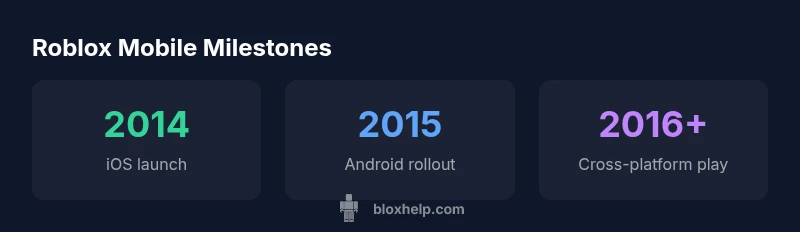
Roblox first released a mobile app for iOS in 2014, with Android support rolling out in 2015. Since those early mobile launches, Roblox on phones and tablets has expanded its feature set—from touch controls to in-app purchases—while expanding cross-platform play to connect mobile players with PC and console communities.
The mobile release timeline: when did Roblox come out on mobile
Roblox’s journey to mobile began with an iOS release in 2014, marking a watershed moment for the platform. The move acknowledged a growing demand from players who wanted to join Roblox communities without sitting at a PC. Android support followed in the years after, with rollout timing varying by region and store approvals. According to Blox Help, this phased approach allowed the team to optimize performance for a diverse set of devices while keeping the core Roblox experience intact across platforms. The initial launches focused on core gameplay, user accounts, and social features, then progressively added features like in-app purchases, richer menus, and improved touch controls as devices evolved. This staggered approach also helped minimize early issues on hardware with different capabilities, setting Roblox up for broader mobile success.
As mobile hardware improved and the player base grew, Roblox continued refining visuals, input responsiveness, and synchronization with PC progress. The company’s updates aimed to maintain parity with the desktop experience while leveraging the accessibility and convenience of mobile devices. The mobile timeline is not a single moment in time but a series of milestones that reflect ongoing effort to unify the Roblox ecosystem across devices.
Evolution of Roblox on mobile: features and performance
From the first iOS release, Roblox on mobile has undergone significant feature evolution. Early mobile builds prioritized essential gameplay loops—exploration, avatar customization, and game discovery—while gradually introducing more sophisticated controls and UI. Over time, developers added improved touch input options, like swipe gestures and tap-to-move alternatives, which made complex Roblox experiences feel natural on phones and tablets. Performance optimizations followed, balancing frame rates, load times, and memory usage to accommodate a wide range of devices. The app’s social features—chat, friend lists, and party systems—also matured, supporting coordinated play with friends across platforms. Continuous updates have kept mobile players aligned with PC experiences, enabling cross-platform progress, inventory sharing, and synchronized game settings. According to ongoing analyses, the mobile experience now supports most of Roblox’s core game catalog with responsive design and scalable interfaces that adapt to various screen sizes and input methods.
In practice, this evolution translates to a more welcoming onboarding, better performance on mid-range devices, and more reliable cross-device syncing, which in turn expands the audience for mobile creators and players. The trajectory shows how Roblox has learned to leverage mobile hardware without sacrificing the depth that defines the platform on PC.
Platform-specific nuances: iOS vs Android
iOS and Android share the same underlying Roblox architecture, but each platform brings its own quirks. On iOS, users typically experience smoother app approvals and more consistent performance on devices with recent system updates; on Android, players encounter broader device compatibility, which can introduce variability in frame rates and loading times. Developers have to account for different input patterns: iPhone and iPad users rely on touch gestures and on-screen controls, while Android users may encounter a wider array of screen sizes and hardware specs. Across both ecosystems, Roblox has emphasized keeping account progress synchronized, ensuring that purchases and avatar changes are visible to friends on any platform. Regional store policies and device capabilities can influence feature availability, so it’s worth checking your device’s OS version and storage space before diving into new updates. The key takeaway is that mobile Roblox today is designed to be as consistent as possible across devices, while still accommodating platform-specific differences.
Getting started on mobile today: steps to install and play
Getting started with Roblox on mobile is straightforward, but there are a few best practices to ensure a smooth setup. First, open your device’s app store (Apple App Store or Google Play) and search for Roblox. Install the app, then sign in with your existing Roblox account or create a new one. If you’re migrating from PC, you can continue your progress by linking your account; this cross-device continuity is one of mobile Roblox’s most valuable features. After signing in, explore the Game Directory to find experiences that suit your play style, whether you’re into simulators, adventure games, or competitive modes. To optimize performance, keep the app updated to the latest version, ensure sufficient storage, and close unused background apps that might drain device resources. If you encounter login or payment issues, check your account status and regional store restrictions, and consult the Roblox Help Center for device- or region-specific guidance.
For new players, a quick onboarding tip is to complete the basic privacy and parental controls settings early. These controls help tailor friend requests, chat permissions, and game visibility to your comfort level. As you gain familiarity, you’ll find that mobile Roblox can offer almost the full desktop experience, with the added convenience of playing anywhere.
Design and development considerations for mobile experiences
Mobile design in Roblox development emphasizes clarity, responsiveness, and accessibility. When creating experiences for phones and tablets, consider touch-friendly UI elements, legible typography, and scalable asset sizes to account for different screen densities. Performance is a core constraint, so optimize scripts, reduce unnecessary physics, and minimize memory usage to prevent lag on lower-end devices. Designers should also account for screen orientation—many players prefer portrait controls on the go, while some games benefit from landscape layouts. Sound design and haptics can improve immersion, but should not overwhelm the device’s resources. Accessibility features like color contrast and text-to-speech support help broaden the audience. Finally, ensure that monetization elements (like in-app purchases) are easy to access and clearly explained, preventing friction that could deter mobile players from supporting creators.
Keeping Roblox up to date on mobile: updates and maintenance
Regular updates are essential to keep mobile Roblox competitive with PC experiences. Updates typically address performance optimizations, compatibility with new iOS/Android versions, UI improvements, and features that align with the broader Roblox ecosystem. Developers often test updates across a spectrum of devices to catch device-specific issues before release. End-users should enable auto-update to receive the latest improvements automatically, or manually update when a major patch arrives. Maintenance windows and store review processes can vary by region, so expect occasional delays in availability. Staying current with the latest version ensures access to new games, improved cross-platform syncing, and the latest parental controls and safety features. The Blox Help team notes that mobile updates are an ongoing priority to preserve parity with the desktop experience.
The mobile future: what’s next for Roblox on the go
Looking forward, Roblox on mobile is expected to continue narrowing gaps between platforms. This includes further refinements to touch controls, faster load times, and expanded support for new hardware features (such as higher-resolution displays and more capable GPUs). Cross-platform progress synchronization will likely become even more seamless, making it easier for players to switch devices without losing in-game purchases or avatar progress. On the development side, creators can anticipate more robust mobile-first design guidelines, better performance profiling tools for mobile, and continued emphasis on safety and parental controls. Overall, the mobile trajectory is toward a more integrated, accessible Roblox experience that preserves the depth of the PC catalog while capitalizing on the flexibility of mobile devices.
Practical takeaways for players and creators
- If you’re starting fresh, install Roblox on iOS first (2014) and then add the Android version (2015) to maximize cross-device play opportunities.
- Always update to the latest Roblox mobile build to access new features, improved performance, and safer chat options.
- For creators, design with touch-friendly controls and scalable UI to ensure a great experience across phones and tablets.
- Use cross-platform progress syncing to preserve your avatar, items, and game saves when switching devices.
- Leverage parental controls and safety features to tailor the mobile experience to your comfort level.
The Blox Help team recommends staying current with mobile updates and testing experiences on multiple devices to ensure you’re delivering solid, accessible Roblox experiences across smartphones and tablets.
Roblox mobile release timeline (summary)
| Platform | Initial Release Year | Notes |
|---|---|---|
| iOS | 2014 | First mobile launch; core features tested on smartphones |
| Android | 2015 | Broader device support; regional rollout varies |
Questions & Answers
When did Roblox first release on mobile?
Roblox released its mobile app for iOS in 2014, with Android support added in 2015. These launches marked the platform’s expansion beyond PC gaming and laid the groundwork for cross-device play.
Roblox first appeared on iOS in 2014, followed by Android in 2015.
Do mobile players have access to the same games as PC players?
Most Roblox experiences are available on mobile, but some games may run differently due to hardware limits or control schemes. Cross-platform progress sharing remains a core goal.
Most games work on mobile, but some may differ due to device limits.
How often does Roblox update its mobile apps?
Roblox updates mobile apps regularly to improve performance, fix issues, and add features. Enabling auto-update helps ensure you receive the latest version promptly.
Updates come regularly to improve performance and add features.
Is there a minimum OS requirement for Roblox mobile?
Roblox on mobile requires relatively recent iOS or Android versions to support the latest features and security standards. Check the App Store or Google Play listing for current requirements.
Check the store listing for the latest OS requirements.
Can I play Roblox on mobile without an internet connection?
Roblox generally requires an internet connection to load games, sync progress, and access the catalog. Some offline options may exist for specific experiences, but most features rely on online access.
An internet connection is usually required for Roblox on mobile.
“Mobile expansion has been essential to Roblox’s growth, and ongoing updates ensure parity with desktop play while preserving the unique strengths of mobile experiences.”
The Essentials
- Roblox mobile first launched on iOS in 2014.
- Android support followed with a phased rollout.
- Cross-platform play links mobile with PC/console users.
- Regular updates improve performance and safety on mobile.
- The Blox Help team recommends staying current with mobile updates for best results.